Week 4.1 - Solving second order ODEs
Function for solving the seond order ode
The theta_1 and theta_2 values are assigned as theta(1) and theta(2).
dtheta1_dt is assigned to be equal to theta_2.
dtheta2_dt is equal to -(b/m)*theta2-(g/l)*sin(theta1).
function [dtheta_dt] = ode_func(~,theta,b,g,l,m)
theta1= theta(1);
theta2=theta(2);
dtheta1_dt=theta2;
dtheta2_dt= -(b/m)*theta2 - (g/l)*sin(theta1);
dtheta_dt= [dtheta1_dt ; dtheta2_dt];
end
main program
Line 1 ,2 & 3 - clear the variable in the workspace, close all plots and figures and clear the command window.
Line 5, 6, 7 & 8 - The given input values of b, g, l and m are entered.
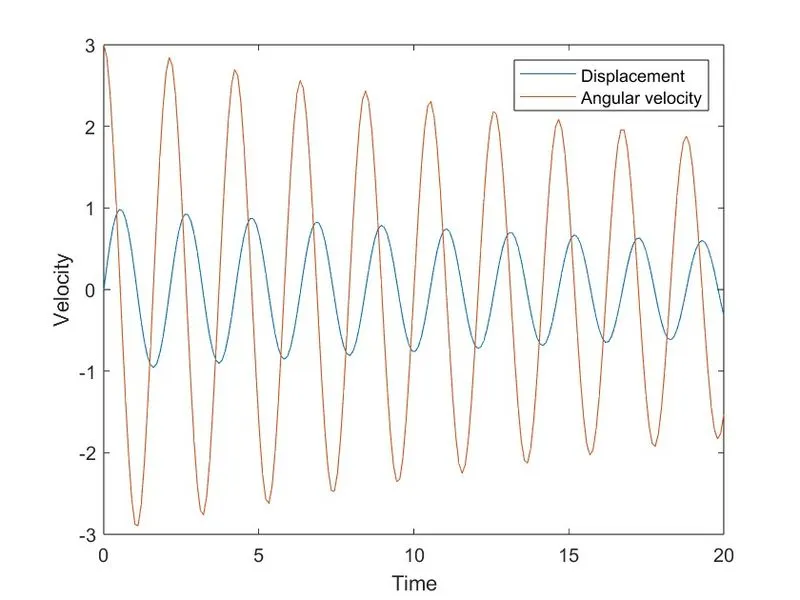
Line 10 - The time span of the motion of simple pendulum ‘t’ is taken to be 20 seconds with 200 equal intervals.
Line 12 - assigning angular displacement=0,angular velocity=3 rad/sec at time t=0
Line 14 - To solve ODE, the inbuilt solver ODE45 to solve for Angular Displacement & Angular Velocity as results. The function is used to solve ode45(@(t,theta) ode_func(t,theta,b,g,l,m),t,theta_0).
Line 16 to 25 - The integration time and results of the second order ODE function's computation are provided.
Due to the fact that we are solving for two ODEs, the output will be a column vector with two columns: the first column will be angular displacement, and the second column will be angular velocity. Plotting the result as velocity and time to get the angular displacement and angular velocity.
Line 28 to 36 - To simulate the pendulum motion on Graph by giving the Coordinate points for ball, using ‘for loop’ command
x0 = 0;
y0 = 0;
x1=l*sin(D(i));
y1=-l*cos(D(i));
Line 40 to 50 - this lines indicates graphic representation to plot all the points on x and y coordinates, adding the pause command to halt the graph for a specific amount of time, and using M(ct) to record the current frame each time for the "for loops." Finish the "for loop" and then add the code "ct=ct+1" to increase the frame each time it runs.
Line 52 to 56 - the "movie" command is used to create a video, with the "writeVideo" command being used to write the plots in video format and the "AVI" format being used in VideoWriter to save files in AVI format. & close' is used to end playback of the video and save it to the computer.
clear
close all
clc
% assigning the input variables
l=1;
m=1;
b=0.05;
g=9.81;
% time span from 0 to 20 sec
t=linspace(0,20,200);
% assigning angular displacement=0,angular velocity=3 rad/sec at time t=0
theta_0=[0,3];
% solver second order ODE
[t,results]=ode45(@(t,theta) ode_func(t,theta,b,g,l,m),t,theta_0);
% plotting Displacement and angular velocity
figure(1)
plot(t,results(:,1))
hold on
plot(t,results(:,2))
xlabel('Time')
ylabel('Velocity')
legend('Displacement','Angular velocity')
hold off
D = results(:,1);
V=results(:,2);

%fixed coordinates
x0=0;
y0=0;
ct=1;

for i = 1:length(D)

    % end position
    x1=l*sin(D(i));
    y1=-l*cos(D(i));
    % plotting the pendulum motion
    figure(2)
     % fixed co-ordinate axis of the pendulum
     plot([-2 2],[0 0],'linewidth',3)
     hold on
     plot([x0 x1],[y0 y1],'-O','linewidth',4)
     plot(x1,y1,'-O',"markersize",20)
     title('simple pendulum damping effect')
     axis([-2 2 -2 2])

     M(ct)= getframe(gcf);
     ct=ct+1;
     hold off
end
% video creating process
movie(M)
videofile=VideoWriter('simple pendulum.avi','uncompressed AVI');
open(videofile)
writeVideo(videofile,M)
close(videofile)
output:
video file link: https://drive.google.com/file/d/1dJTEsSuwAr5ucS1yHRHGsIqPod6velvu/view?usp=sharing
Youtube link : https://youtu.be/E-gUJ93Hemk
Error faced during programming
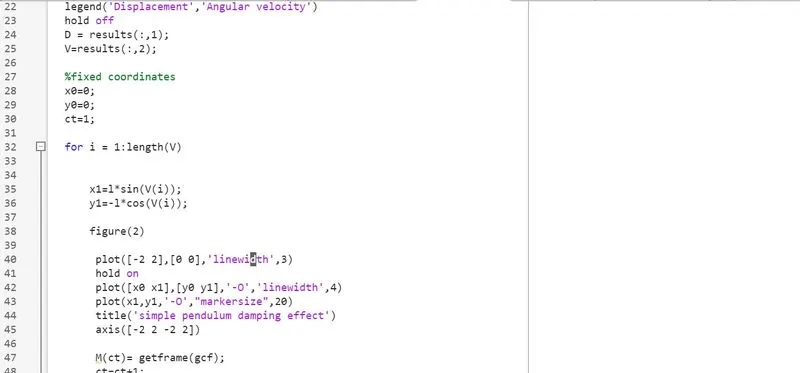
instead of taking the displacement matice i have taken the angular velocity matrice column due to that the following output i have got it
https://drive.google.com/file/d/1TcKPW4ozRqnWsBt5TQrVjUoxy-PhFkem/view?usp=sharing
attached the video in the above drive link.
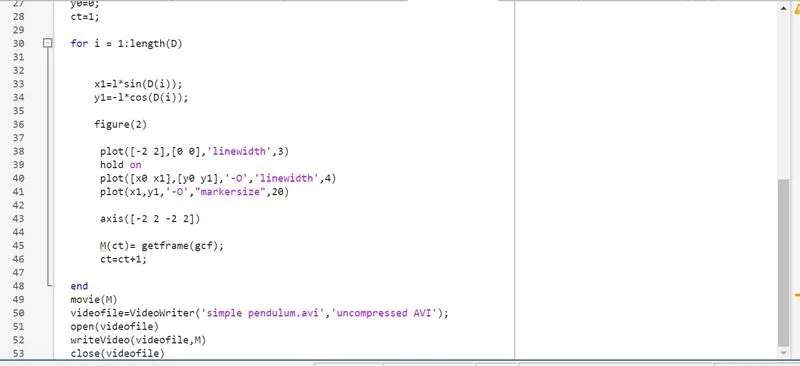
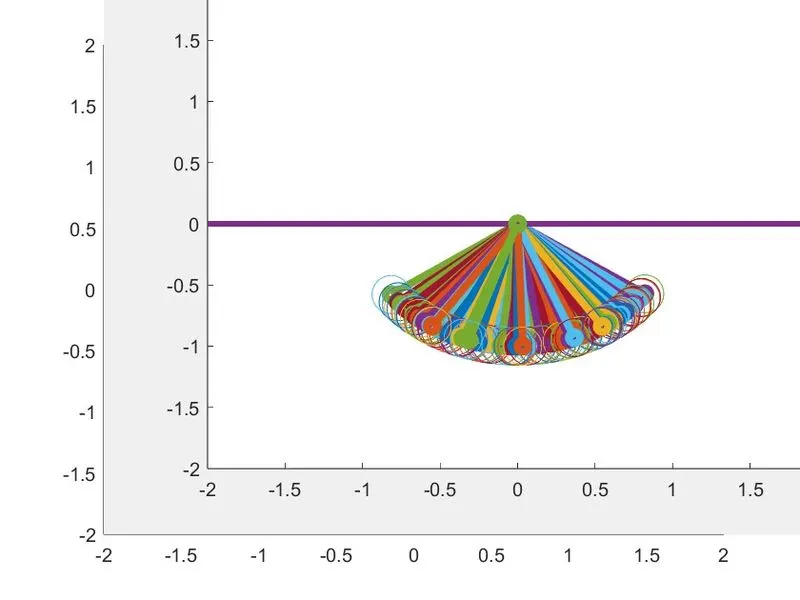
Forget to put the hold off command. After the desired output the hold off commannd has been inserted to overcome the issue.