Week 4.1 - Genetic Algorithm
AIM:
- write a code in MATLAB to optimize the stalagmite function and find the global maxima of the function.
- Clearly explain the concept of genetic algorithm in your own words and also explain the syntax for ga
PROCEDURE:
INTRODUCTION:
In computer science and operations research, a genetic algorithm (GA) is a metaheuristic inspired by the process of natural selection that belongs to the larger class of evolutionary algorithms (EA). Genetic algorithms are commonly used to generate high-quality solutions to optimization and search problems by relying on biologically inspired operators such as mutation, crossover, and selection.
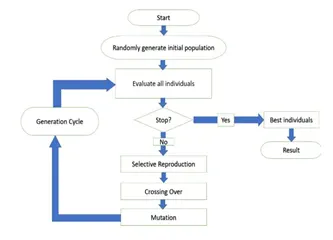
The genetic algorithm is a technique for solving both constrained and unconstrained optimization problems that are based on natural selection, the process that drives biological evolution. The genetic algorithm constantly modifies the population size of individual solutions.
STALAGMITE FUNCTIONS:
1) As opposed to hanging from the ceiling, Stalagmite structures are formed from the cave floor that point upward. ... Stalagmite and Stalactite functions are mathematical functions that represent shapes similar to that of the stalagmite and stalactite functions.
2) A genetic algorithm (GA) is a method for solving both constrained and unconstrained optimization problems based on a natural selection process that mimics biological evolution. The algorithm repeatedly modifies a population of individual solutions. ... Generates a population of points at each iteration.
PHASES IN GENETIC ALGORITHM-
- INITIALIZATION OF POPULATION(CODING) :
The code generates its random population of defined size and from that population, the code evaluates the fitness of the members of the population according to which it forms a new population-based on the. of iterations performed.
1. Fitness Function
It is that function which we have to optimize and its optimization is done with the help of a number of generations that have been formed by the code in accordance with the fitness value of each member-generated, these fitness values are used for the reproduction of the children.
SELECTION:
The idea of the selection phase is to select the fittest individuals and let them pass their genes to the next generation. The main goal of this phase is to find the region where the chances of getting the best solution are more.
Inspiration for this is from the survival of the fittest.
It should be a balance between exploration and exploitation of search space.
GA tries to move the genotype to higher fitness in the search space.
Too strong fitness selection bias can lead to sub-optimal solutions.
Too little fitness bias selection results in unfocused search.
REPRODUCTION:
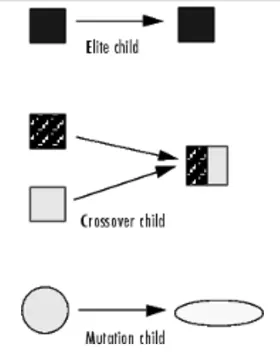
Generation of offspring happen in 2 way:
Crossover
Mutation
1. A) Crossover
Crossover is the most significant stage in the genetic algorithm. During crossover, a random point is selected while mating a pair of parents to generate offspring.
There are 3 major types of crossover.
Single Point Crossover:
A point on both parents’ chromosomes is picked randomly, and designated a ‘crossover point’.
Two-Point Crossover: Two crossover points are picked randomly from the parent chromosomes.
Uniform Crossover: In a uniform crossover, typically, each bit is chosen from either parent with equal probability,
MUTATION:
In a few new offspring formed, some of their genes can be subjected to a mutation with a low random probability. This indicates that some of the bits in the bit chromosome can be flipped. Mutation happens to take care of diversity among the population and stop premature convergence.
Syntax
x = ga(fun,nvars,A,b,Aeq,beq,lb,ub)
x = ga(fun,nvars,A,b,Aeq,beq,lb,ub,nonlcon)
x = ga(fun,nvars,A,b,Aeq,beq,lb,ub,nonlcon,options)
x = ga(fun,nvars,A,b,[],[],lb,ub,nonlcon,IntCon)
x = ga(fun,nvars,A,b,[],[],lb,ub,nonlcon,IntCon,options)
[x,fval,exitflag,output] = ga(___)
[x,fval,exitflag,output,population,scores] = ga(___)
GA FUNCTION IN MATLAB:
A genetic algorithm (GA) is a method for solving both constrained and unconstrained optimization problems based on a natural selection process that mimics biological evolution. The algorithm repeatedly modifies a population of individual solutions. ... Generates a population of points at each iteration.
DESCRIPTION:
x = ga(fun,nvars) finds a local unconstrained minimum, x, to the objective function, fun. nvars is the dimension (number of design variables) of fun.
x = ga(fun,nvars,A,b) finds a local minimum x to fun, subject to the linear inequalities A*x ≤ b. ga evaluates the matrix product A*x as if x is transposed (A*x').
x = ga(fun,nvars,A,b,Aeq,beq) finds a local minimum x to fun, subject to the linear equalities Aeq*x = beq and A*x ≤ b. (Set A=[] and b=[] if no linear inequalities exist.) ga evaluates the matrix product Aeq*x as if x is transposed (Aeq*x').
x = ga(fun,nvars,A,b,Aeq,beq,lb,ub) defines a set of lower and upper bounds on the design variables, x, so that a solution is found in the range lb ≤ x ≤ ub. (Set Aeq=[] and beq=[] if no linear equalities exist.)
x = ga(fun,nvars,A,b,Aeq,beq,lb,ub,nonlcon) subjects the minimization to the constraints defined in nonlcon. The function nonlcon accepts x and returns vectors C and Ceq, representing the nonlinear inequalities and equalities respectively. ga minimizes the fun such that C(x) ≤ 0 and Ceq(x) = 0. (Set lb=[] and ub=[] if no bounds exist.)
x = ga(fun,nvars,A,b,Aeq,beq,lb,ub,nonlcon,options) minimizes with the default optimization parameters replaced by values in options. (Set nonlcon=[] if no nonlinear constraints exist.) Create options using optimoptions.
x = ga(fun,nvars,A,b,[],[],lb,ub,nonlcon,IntCon) or x = ga(fun,nvars,A,b,[],[],lb,ub,nonlcon,IntCon,options) requires that the variables listed in IntCon take integer values.
x = ga(problem) finds the minimum for problem, a structure described in problem.
[x,fval] = ga(___), for any previous input arguments, also returns fval, the value of the fitness function at x.
[x,fval,exitflag,output] = ga(___) also returns exitflag, an integer identifying the reason the algorithm terminated, and output, a structure that contains output from each generation and other information about the performance of the algorithm.
[x,fval,exitflag,output,population,scores] = ga(___) also returns a matrix population, whose rows are the final population, and a vector scores, the scores of the final population.
FORMULA USED:
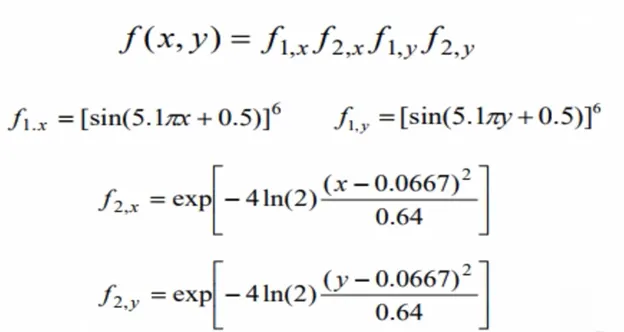
The above equations are used in the stalagmite function to plot the graph in the main functions.
function A = stagalmite(input_vector)
x=input_vector(1);
y=input_vector(2);
f1=(sin(5.1*pi*x+0.5)).^6;
f2=exp((-4*log(2)*((x-0.0667).^2))/0.64);
f3=(sin(5.1*pi*y+0.5)).^6;
f4=exp((-4*log(2))*((y-0.0667).^2)/0.64);
A =-(f1*f2*f3*f4);
end
While using the function at the end as we are using the -ve sign so that the plot will be reversed as we have to find the maxima of the given function using ga.
MAIN CONTENT:
- First, cresting the mesh from the two vectors will be acting as a search space to find the maxima of the function.
- creating the mesh from the two vectors using the 'mesh' command and defining the no. of iterations as num_cases to iterate the values of the optimum values of the function
- Now calculate the values of fitness function at each point of the mesh grid formed
- Now creating its surface through the 'surf' command will also provide the contour of the generated surface.
- While using surface applying the -ve sign to the function will generate the surface upside down which will be quite good to get the maxima of the function, as it will provide positive value for the maxima using the -ve sign
HERE'S THE FUNCTION CODE:
function A = stagalmite(input_vector)
x=input_vector(1);
y=input_vector(2);
f1=(sin(5.1*pi*x+0.5)).^6;
f2=exp((-4*log(2)*((x-0.0667).^2))/0.64);
f3=(sin(5.1*pi*y+0.5)).^6;
f4=exp((-4*log(2))*((y-0.0667).^2)/0.64);
A =-(f1*f2*f3*f4);
end
GENETIC ALGORITHM PROGRAM 1:
% Step 1
% clearing workspace, command window & closing all plots
close all
clear all
clc
% Step 2
% Define our search space
x = linspace(0,0.6,150);
y = linspace(0,0.6,150);
% Step 3
% Calculating a 2Dimentionl mesh
[xx, yy] = meshgrid(x,y);
% Step 4
%Evaluating the stalagmite function
for i = 1:length(xx)
 for j = 1:length(yy)
 input_vector(1) = xx(i,j);
 input_vector(2) = yy(i,j);
 f(i,j) = stalagmite(input_vector);
 end
end
tic
% Step 5
% Study1- Statical behaviar
num_cases = 50;
for i=1:num_cases
 [inputs, fopt(i)] = ga(@stalagmite,30);
 xopt(i) = inputs(1);
 yopt(i) = inputs(2);
end
study1_time = toc
F=-f;
figure(1)
subplot(2,1,1)
hold on
surfc(x, y, F)
shading interp
plot3(xopt,yopt,-fopt,'marker','o','markersize',5,'markerfacecolor','r')
title('Unbounded inputs')

subplot(2,1,2)
plot(-fopt)
Xlabel('iteration')
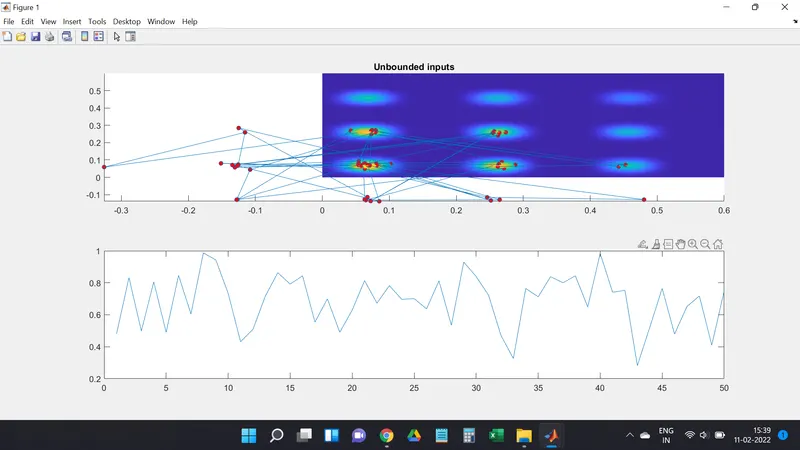
RESULT OF THE CASE 1 PROGRAM:
GENETIC ALGORITHM CASE 2:
% Step 1
% clearing workspace, command window & closing all plots
close all
clear all
clc
% Step 2
% Define our search space
x = linspace(0,0.6,150);
y = linspace(0,0.6,150);
% Step 3
% Calculating a 2Dimentionl mesh
[xx, yy] = meshgrid(x,y);
% Step 4
%Evaluating the stalagmite function
for i = 1:length(xx)
 for j = 1:length(yy)
 input_vector(1) = xx(i,j);
 input_vector(2) = yy(i,j);
 f(i,j) = stalagmite(input_vector);
 end
end
% Step 6
% Study2- Statical buhaviour with upper and lover bounds
options = optimoptions('ga','populationSize',50);
tic
num_cases = 50;
for i = 1:num_cases
 [inputs,fopt(i)] = ga(@stalagmite,2,[],[],[],[],[0;0],[0.6;0.6]);
 xopt(i) = inputs(1);
 yopt(i) = inputs(2);
end
Study2_time = toc
figure(2)
F=-f;
subplot(2,1,1)
hold on
surfc(x, y, F)
shading interp
plot3(xopt,yopt,-fopt,'marker','o','markersize',5,'markerfacecolor','r')
title('Bounded inputs')

subplot(2,1,2)
plot(-fopt)
xlabel('Iterations')
ylabel('Function Maximum')
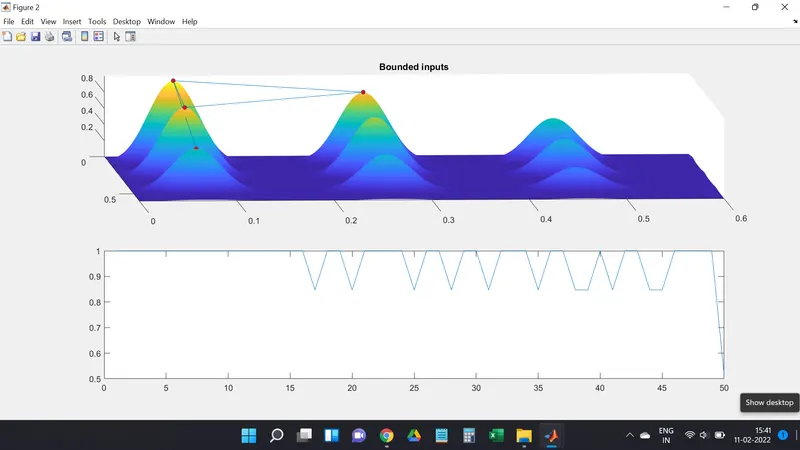
RESULT OF THE CASE 2 PROGRAM:
GENETIC ALGORITHM CASE 3:
% Step 1
% clearing workspace, command window & closing all plots
close all
clear all
clc
% Step 2
% Define our search space
x = linspace(0,0.6,150);
y = linspace(0,0.6,150);
% Step 3
% Calculating a 2Dimentionl mesh
[xx, yy] = meshgrid(x,y);
% Step 4
%Evaluating the stalagmite function
for i = 1:length(xx)
 for j = 1:length(yy)
 input_vector(1) = xx(i,j);
 input_vector(2) = yy(i,j);
 f(i,j) = stalagmite(input_vector);
 end
end
% Step 6
% Study2- Statical buhaviour with upper and lover bounds
options = optimoptions('ga','populationSize',50);
tic
num_cases = 50;
for i = 1:num_cases
 [inputs,fopt(i)] = ga(@stalagmite,2,[],[],[],[],[0;0],[0.6;0.6]);
 xopt(i) = inputs(1);
 yopt(i) = inputs(2);
end
Study2_time = toc
figure(2)
F=-f;
subplot(2,1,1)
hold on
surfc(x, y, F)
shading interp
plot3(xopt,yopt,-fopt,'marker','o','markersize',5,'markerfacecolor','r')
title('Bounded inputs')

subplot(2,1,2)
plot(-fopt)
xlabel('Iterations')
ylabel('Function Maximum')
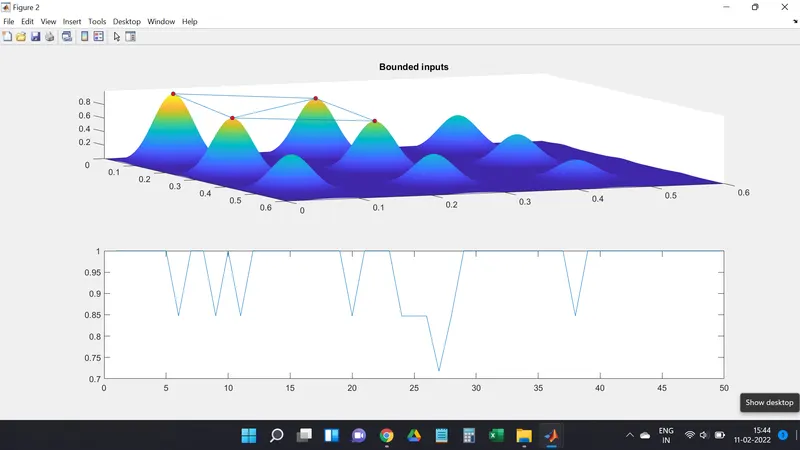
RESULT OF THE CASE 3 PROGRAM:
STEPWISE EXPLANATION:
1) Clearing workspace, command window & closing all plots
2) our search space by using linspace command
3) Calculating a 2D mesh using mesh grid command
4) Give the stalagmite function for each value of x & y
5) By using the GA command with unbounded inputs means optimum value may be come from outside of search space.
6) using GA command with bounded inputs means the optimum value will be come from inside of search space, However, there will be
huge variation in optimum value
7) By using of GA command with bounded inputs means the optimum value will become from inside of search space. However this time to
avoid huge variation in optimum value, we have increased the initial population size to 200. MATLAB takes 50 as the initial population
ERROR:
The main error was I can't make the labels of X & Y. because of some technical issues.
REFERENCES:
1) https://stackoverflow.com/questions/8956533/find-the-minimum-of-y-xx-using-genetic-algorithm-in-matlab - STAKE OVERFLOW.
2) https://in.mathworks.com/discovery/genetic-algorithm.html - MATHWORKS.
RESULT :
THEREFORE WE WILL FIND THE STALAGMITE FUNCTION AND THE GLOBAL MAXIMA OF THE FUNCTION USING MATLAB: