Week 2- 2R Robotic Arm Challenge
AIM: To write a program in MATLAB to simulate the forward kinematics of a 2R Robotic Arm.
PROCEDURE:
KINEMATICS: Kinematics is the science of describing the motion of objects using words, diagrams, numbers, graphs, and equations. Kinematics is the branch of mechanics. The goal of any study of kinematics is to develop sophisticated mental models that serve to describe (and ultimately, explain) the motion of real-world objects.
Forward kinematics refers to the use of kinematic equations of a robot to compute the position of the end-effector from specified values for the joint parameters. The kinematics equations of the robot are used in robotics, computer games, and animation.
ROBOTIC ARM: A robotic arm, sometimes referred to as an industrial robot, is often described as a 'mechanical' arm. It is a device that operates in a similar way to a human arm, with a number of joints that either move along an axis or can rotate in certain directions.
Robotic arms are machines that are programmed to execute a specific task or job quickly, efficiently, and extremely accurately.
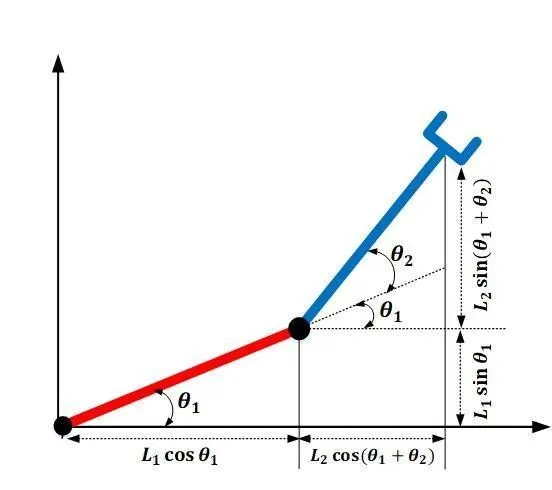
ORIENTATION(FORMULA):
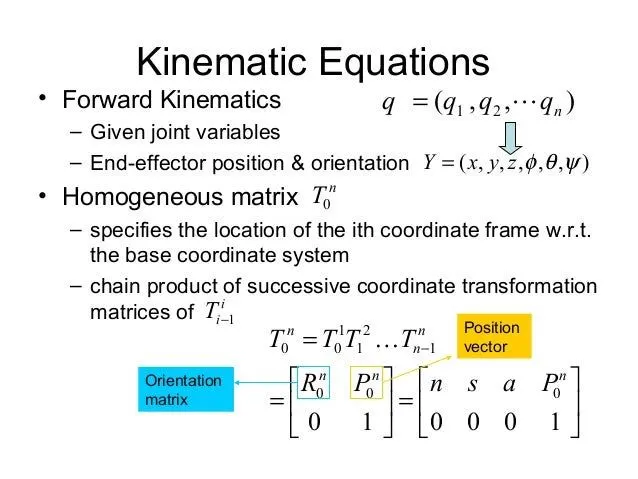
HERE IS THE CODE OF THE KINEMATICS OF THE 2R ROBOTIC ARM:
clear all
close all
clc

%inputs
l1 = 1;
l2 = 0.5;
theta1 = linspace(0,90,10);
theta2 = linspace(0,90,10);

ct = 1
for i =1:length(theta1)
    THETA1 = theta1(i);
    for j = 1:length(theta2)
    THETA2 = theta2(j);

    x0 = 0;
    y0 = 0;

x1 = l1*cosd(THETA1);
y1 = l1*sind(THETA1);

x2 = x1+l2*cosd(THETA2);
y2 = y1+l2*sind(THETA2);

%plotting

plot([x0 x1],[y0 y1], [x1 x2],[y1 y2],'linewidth', 3)
axis([-0.1 1.5 0 1.5])
pause(0.3)
M(ct) = getframe(gcf);
ct = ct+1;


end

end

movie(M)
videofile= VideoWriter('forward_kimeatics.avi','uncompressed AVI');
open(videofile)
writeVideo(videofile,M)
close(videofile)
STEP-WISE EXPLANATION OF THE CODE:
Enter all the inputs that should be provided
The l represents the length between the ARM,
l1 = 1;
l2 = 0.5;
theta1 = linspace(0,90,10);
theta2 = linspace(0,90,10);the plot can be generated for different values of theta by manually changing the values but it is complicated work, By avoiding these problems instead of these commands we can use a for-loop function, by using these functions the values will run again, and again.
THE POINTS SHOULD BE REMEMBERED WHILE TYPING THE PROGRAM.
i =1:length(theta1)
    THETA1 = theta1(i);
    for j = 1:length(theta2)
    THETA2 = theta2(j);
Both the values in "theta" are the same, we have to change the values of "theta" using the for loop command. i.e lower case "theta" values contain 10 values, but we can use the instaed uppercase "THETA" because it's a variabe, not an array.
WE CAN ADD ALL THE VALUES BY GENERATING THE ANGLE AND LENGTH BETWEEN THE ROBOTIC ARM:
x1 = l1*cosd(THETA1);
y1 = l1*sind(THETA1);

x2 = x1+l2*cosd(THETA2);
y2 = y1+l2*sind(THETA2);
NEXT STEP WILL BE PLOTTING BY ENTERING AS %PLOTTING:
plot([x0 x1],[y0 y1], [x1 x2],[y1 y2],'linewidth', 3)The above program is to represent the length between the origin (O) and the length of the arm(L).
'linewidth', 3 makes the line more smother to see while 'RUN' is a program.
THE VALUES WHICH ARE GIVEN TO THE X & Y AXIS:
axis([-0.1 1.5 0 1.5])THESE VALUES MENTION THE OPERATING RANGE AND VIDEO LEVELS:
pause(0.3)
m(ct) = getframe(gcf);
INCREMENT FOR LOOP EXECUTION:
ct = ct+1;ERRORS FACED WHILE CREATING THIS PROGRAM:
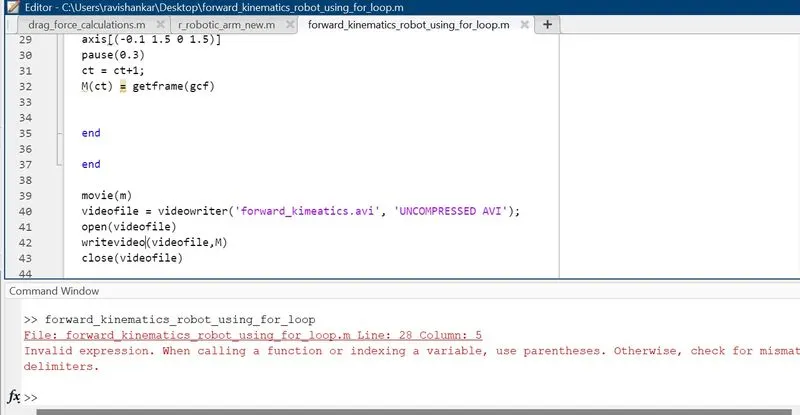
THE ABOVE PICTURE SHOWS THE ERROR WHICH I WAS MISSING THE PARENTHESES LIKE THE COMMAND INSTEAD OF USING THE "VideoWriter" I WILL TYPE THE COMMAND AS "videowriter".
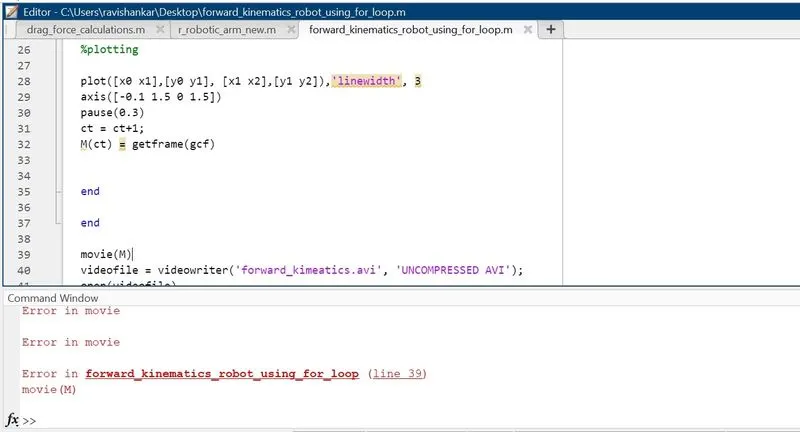
THE ABOVE PICTURE SHOWS THE ERROR WHICH WAS TYPO ERROR OF UPPERCASE "M".
THESE ARE THE PARAMETERS TO CHECK WHETHER ENTERING THE COMMAND.
HERES THE YOUTUBE VIDEO:
CLICK THE LINK TO CHECK THE VIDEO OF KINEMATICS OF 2-R ROBOTIC ARM USING (MATLAB):
RESULT:
- using this commands we can change the lengths and angles whateveer the working conditions was given and analyze all of the parameters to build.
- Hence the simulation of Forward Kinematics of 2-R Robotic arm design was achieved using the MATLAB
THANK YOU