Week 4.1 - Genetic Algorithm
Week 4.1 - Genetic Algorithm
Aim
- To write a code in MATLAB to optimise the stalagmite function and find the global maxima of the function.
- To plot graphs for all 3 studies and for F maximum vs no. of iterations.
Governing equations:
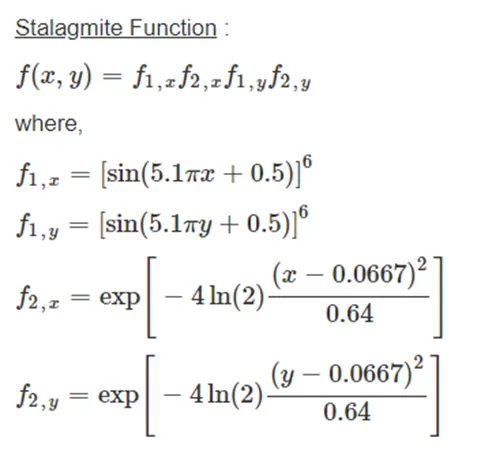
Genetic algorithm:
Genetic algorithm is a natural selection process that has governed the process of evolution for ages. This theory was discovered by Charles Darwin and has since been studied upon to understand the patterns and parameters nature chooses to optimise the survival of species. The same method is incorporated in optimisation process of real-world problems.
In real-world problems we have a lot of variables that can be controlled by multiple parameters. Now to optimise the output is a very tedious process for human and will lead to lot of scope for error. Hence algorithms are made to do this with the help of computers.
There are many different algorithms of which GA is one:
- It first picks up data points randomly from the population.
- Then it calculates the objective function with fitness approach.
- It then moves to next iteration for which the population is formed using the selected datapoints from the previous iteration.
- The new datapoints are also formed using mutation and crossover.
- After a certain no. of iteration an optimal solution is found.
The code for all the 3 studies done is as follows:
clear
close
clc
%%
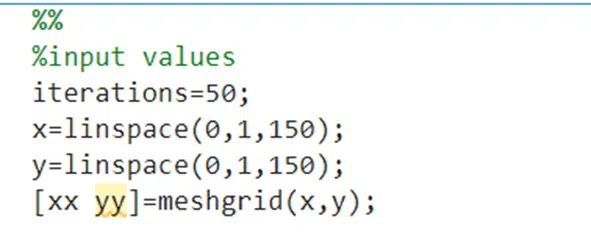
%input values
iterations=50;
x=linspace(0,1,150);
y=linspace(0,1,150);
[xx yy]=meshgrid(x,y);

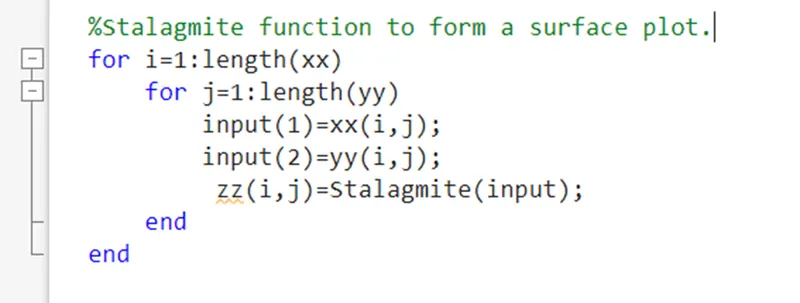
%Stalagmite function to form a surface plot.
for i=1:length(xx)
    for j=1:length(yy)
        input(1)=xx(i,j);
        input(2)=yy(i,j);
         zz(i,j)=Stalagmite(input);
    end
end


%%
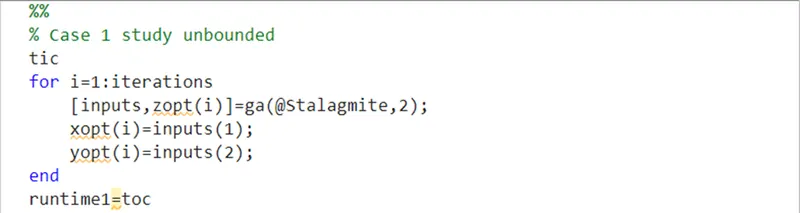
% Case 1 study unbounded
tic
for i=1:iterations
    [inputs,zopt(i)]=ga(@Stalagmite,2);
    xopt(i)=inputs(1);
    yopt(i)=inputs(2);
end
runtime1=toc

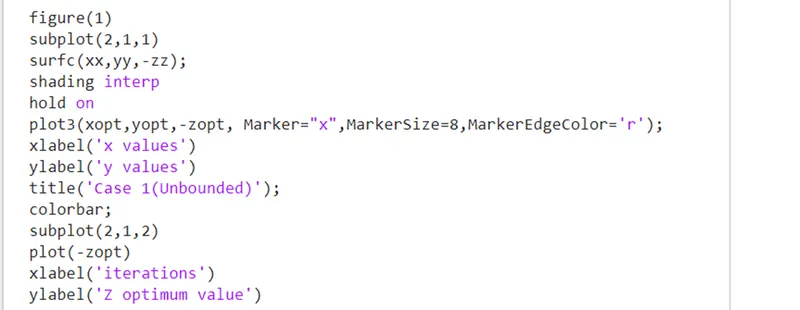
figure(1)
subplot(2,1,1)
surfc(xx,yy,-zz);
shading interp
hold on
plot3(xopt,yopt,-zopt, Marker="x",MarkerSize=8,MarkerEdgeColor='r');
xlabel('x values')
ylabel('y values')
title('Case 1(Unbounded)');
colorbar;
subplot(2,1,2)
plot(-zopt)
xlabel('iterations')
ylabel('Z optimum value')

%%
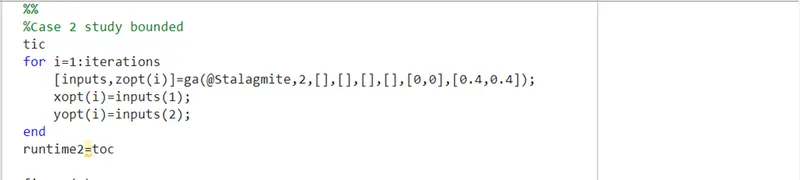
%Case 2 study bounded
tic
for i=1:iterations
    [inputs,zopt(i)]=ga(@Stalagmite,2,[],[],[],[],[0,0],[0.4,0.4]);
    xopt(i)=inputs(1);
    yopt(i)=inputs(2);
end
runtime2=toc

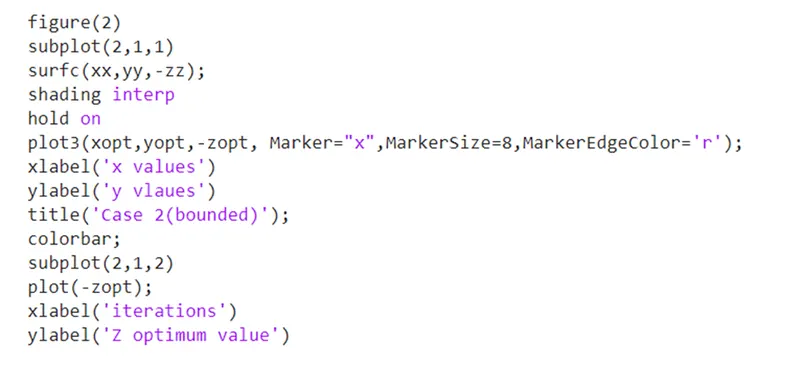
figure(2)
subplot(2,1,1)
surfc(xx,yy,-zz);
shading interp
hold on
plot3(xopt,yopt,-zopt, Marker="x",MarkerSize=8,MarkerEdgeColor='r');
xlabel('x values')
ylabel('y vlaues')
title('Case 2(bounded)');
colorbar;
subplot(2,1,2)
plot(-zopt);
xlabel('iterations')
ylabel('Z optimum value')

%%
%Case 3 study bounded with population size defined

options= optimoptions('ga');
options= optimoptions(options,'PopulationSize',270);
tic
for i=1:iterations
    [inputs,zopt(i)]=ga(@Stalagmite,2,[],[],[],[],[0,0],[0.4,0.4],[],[],options);
    xopt(i)=inputs(1);
    yopt(i)=inputs(2);
end
runtime3=toc
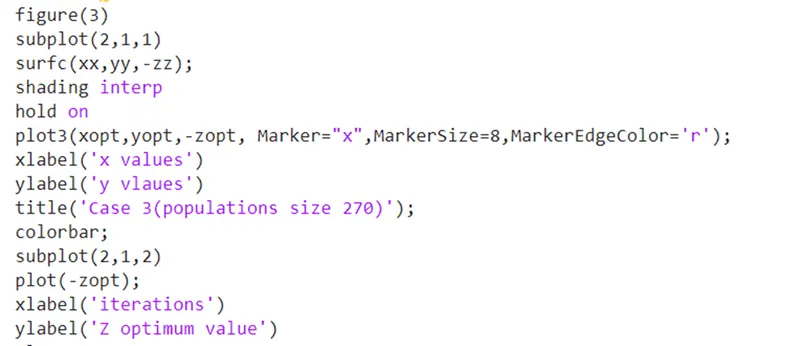
figure(3)
subplot(2,1,1)
surfc(xx,yy,-zz);
shading interp
hold on
plot3(xopt,yopt,-zopt, Marker="x",MarkerSize=8,MarkerEdgeColor='r');
xlabel('x values')
ylabel('y vlaues')
title('Case 3(populations size 270)');
colorbar;
subplot(2,1,2)
plot(-zopt);
xlabel('iterations')
ylabel('Z optimum value')

runtime1
runtime2
runtime3
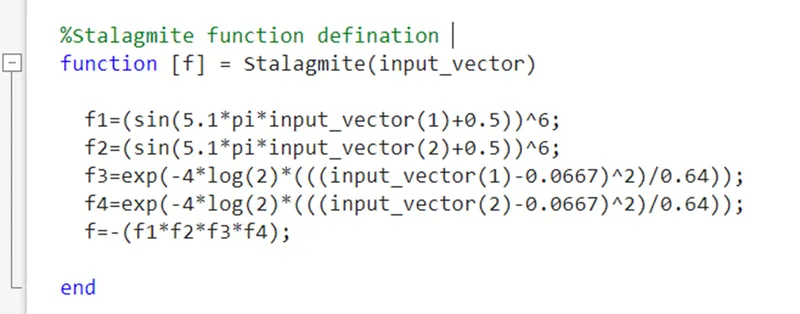
The code of the stalagmite function is as follows:
function [f] = Stalagmite(input_vector)

  f1=(sin(5.1*pi*input_vector(1)+0.5))^6;
  f2=(sin(5.1*pi*input_vector(2)+0.5))^6;
  f3=exp(-4*log(2)*(((input_vector(1)-0.0667)^2)/0.64));
  f4=exp(-4*log(2)*(((input_vector(2)-0.0667)^2)/0.64));
  f=-(f1*f2*f3*f4);

end
Step by step execution of code:
1.First, we define the stalagmite function that can be called in our main program to execute it and perform optimisation study in it.
2.In the main program first, the input variables are defined and a mesh grid is formed of the x, y values to execute the stalagmite function and get values for a 2D grid of X and Y values.
3.Nested for loop is used to implement stalagmite function on the 2-d grid of X and Y values.
4.Case1: Unbounded study-
Here a for loop is used to run multiple iterations of the ‘ga’ solver to let the ‘ga’ solver evolve its answer with every iteration.
Inside the we call the ‘ga’ solver using its syntax. We give only 2 parameters i.e. the objective function and the no of variables to the functions. These are the mandatory parameters for the solver to work. In return we get an array of the input x and y value at which solver finds an optimum value and also return the optimum value. We store the values in different variables.
Tic toc is used to get the running time for all the iterations of this particular study combined.
After this we plot the values into a representable form. We make 2 plots in the same figure using subplot command. The first plot is a surface plot with the optimum values marked with a ‘x’ using plot3() command. we define the marker type and size using parameters of the plot command. In the second plot we make a 2d graph of all the z optimum values that are calculated in every iteration of ga solver.
Then we use xlabel(), ylabel(), colorbar, title() to format the figure into presentable one.
5.Case 2: bounded study
Here a for loop is used to run multiple iterations of the ‘ga’ solver to let the ‘ga’ solver evolve its answer with every iteration.
Inside the we call the ‘ga’ solver using its syntax. We give the 2 mandatory parameters i.e. the objective function and the no of variables to the functions and then we also give the upper and lower boundaries for the solver to keep its domain restricted. In return we get an array of the input x and y value at which solver finds an optimum value and also return the optimum value. We store the values in different variables.
Tic toc is used to get the running time for all the iterations of this particular study combined.
After this we plot the values into a representable form. We make 2 plots in the same figure using subplot command. The first plot is a surface plot with the optimum values marked with a ‘x’ using plot3() command. we define the marker type and size using parameters of the plot command. In the second plot we make a 2d graph of all the z optimum values that are calculated in every iteration of ga solver.
Then we use xlabel(), ylabel(), colorbar, title() to format the figure into presentable one.
- Case 3: bounded study with increases population size
In this study we change a predefined part of the solver that is population of the solver for each iteration. By default, solver takes 50 ‘PopulationSize’. But we increase it to 270 to increase the probability of getting the right value.

Here a for loop is used to run multiple iterations of the ‘ga’ solver to let the ‘ga’ solver evolve its answer with every iteration.
Inside the we call the ‘ga’ solver using its syntax. We give the 2 mandatory parameters i.e. the objective function and the no of variables to the functions and then we also give the upper and lower boundaries for the solver to keep its domain restricted. And we also write ‘options’ in the parameters to tell it the changed value of Population size. In return we get an array of the input x and y value at which solver finds an optimum value and also return the optimum value. We store the values in different variables.
Tic toc is used to get the running time for all the iterations of this particular study combined.

After this we plot the values into a representable form. We make 2 plots in the same figure using subplot command. The first plot is a surface plot with the optimum values marked with a ‘x’ using plot3() command. we define the marker type and size using parameters of the plot command. In the second plot we make a 2d graph of all the z optimum values that are calculated in every iteration of ga solver.
Then we use xlabel(), ylabel(), colorbar, title() to format the figure into presentable one.
Errors:
The function definition of the objective function has to be done carefully. I defined the parameters to be passed separately from the main program. but this was not permitted by the gas solver and hence gave an error. The inputs are to be send via a single array containing the input variables as its elements.
Results and Plots:
The plot of case study 1 is as follows:
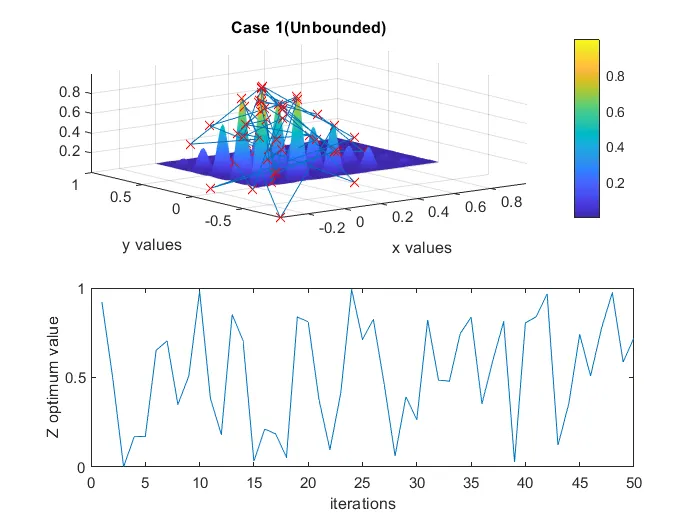
Here we can see that there are a lot of z optimum values, because of the unbounded condition the solver took the population from a very vast span and hence it can also be seen in the second plot that the variation in the values of 50 iterations is a lot.
The plot for case study 2 is as follows:
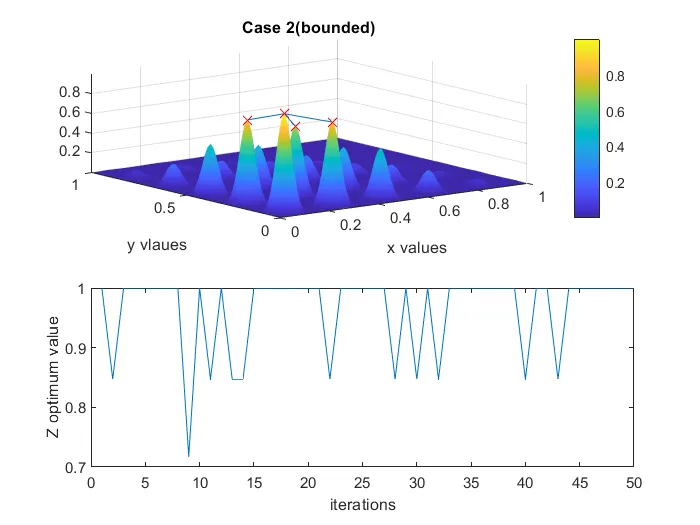
Here we can see that as we have confined the boundaries for the solver to choose its population from we get a more precise result with very less variations in the z optimum values over 50 iterations.
The plot for case study 3 is as follows:
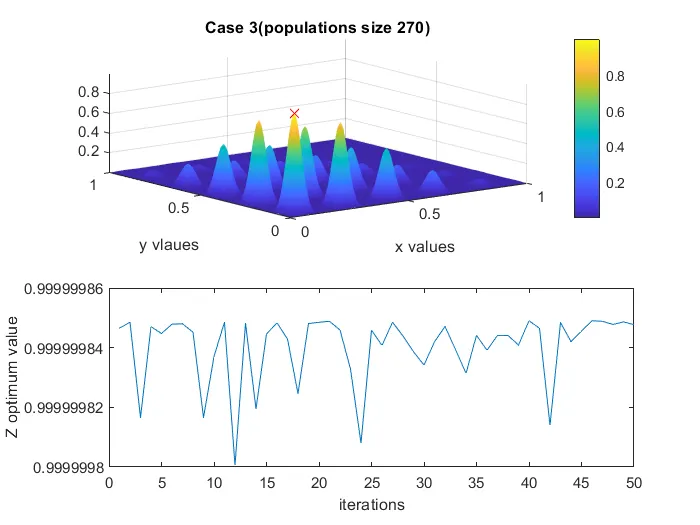
Here we can see that as we increase the population size with in the confined boundary we get almost a constant value of the Z optimum for every iteration.
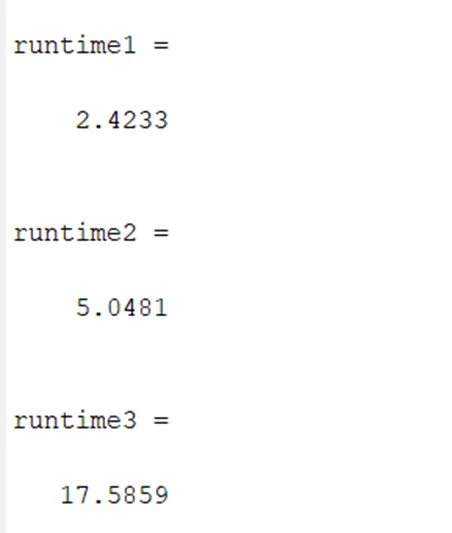
We also get the runtime for each case study:
Conclusion:
The genetic algorithm has a vast scope of usage in mechanical domain. It can be used to optimise an IC engine where a lot of parameters play role. It can be used to calculate the optimum thrust for a rocket so that its structures can withstand various forces it undergoes. A robot can calculate the optimum way of doing a task. This solver although is limited to the parameters that humans realise and define. So the experimental data is also necessary to realise the variables that nature has for us.