Week 3 - Solving second order ODEs
Week 3 - Solving second order ODEs
AIM:
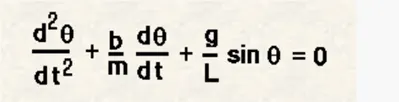
To write a program that solves the following ODE. This ODE represents the equation of motion of a simple pendulum with damping.
Governing equation:
Following is a 2nd order differential equation that governs the motion of a pendulum.
BODY:
The code for this program has been written on MATLAB.
%program to solve an ODE function
clear
close
clc

%%
%Input Varibales
b=0.05;    %damping coefficient
g=9.81;    %acceleration due to gravity(m/s^2)
l=1;       %length of pendulum(m)
m=1;       %mass of bob(kg)
%Initially the bob is having zero angular diplacement and angular velocity of 5m/s
theta_initial=[0;3];
%Time span
tspan=linspace(0,20,400);


%%
%using the ODE45 solver to solve the 2nd order differential equation.
[t,r]=ode45(@(t,theta) ode_equation_return(b,g,l,m,t,theta),tspan,theta_initial);


displacement_values=r(:,1);

%%
%Animation of Pendulum
ct=1;
for i=1:length(displacement_values)

x1= l*sin(displacement_values(i));
y1= -l*cos(displacement_values(i));
 plot([-1.5 1.5], [0 0], 'LineWidth',3, 'Color', [0 0 0]);
 hold on
 plot(x1,y1,'Marker','.','Markersize',50, 'color', 'k')
 plot([0 x1],[0 y1],'Color','r');
 axis([-2 2 -2 2]);
 hold off
 M_array(ct)=getframe(gcf);
 ct=ct+1;
end

videofile= VideoWriter('pendulum_swing.avi','Uncompressed AVI');
open(videofile);
writeVideo(videofile,M_array);
close(videofile);
%function to return 2 lst order equations to ODE45 solver
function [d_theta_dt]= ode_equation_return(damping_coeff,acc_gravity,length,mass,t,theta)

            Theta1=theta(1);
            Theta2=theta(2);

        d_theta1_dt= Theta2;
        d_theta2_dt=-((damping_coeff/mass)*Theta2)-((acc_gravity/length)*Theta1);

        d_theta_dt=[d_theta1_dt ; d_theta2_dt];
end
First, we input the physical properties of the pendulum like damping coefficient, length, mass. Then we will initialise a column vector that gives the initial conditions to the ODE45 solver. And finally, we define the timespan in which we want to analyse the motion.
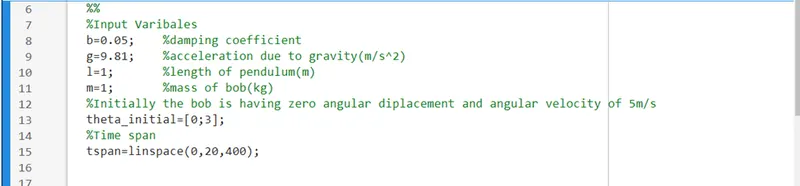
After defining the required inputs, we call ODE45 solver and provide it with the required parameters. One of the parameters require a UDF.

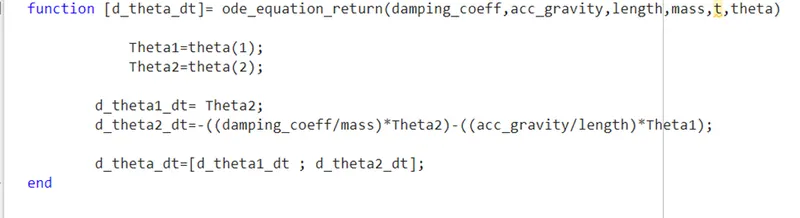
This UDF takes in the physical parameters of the system and the variables ‘t’ and ‘theta’. We define the UDF in which we divide the 2nd order DE into two 1st order DE and return a column matrix of these equations.
Before starting plotting we will first take the values of angular displacement(radians) from the results 2-d matrix (includes values of angular displacement and angular velocity).

We first open a for loop that runs till the size of the displacement_values. We use the values of angular displacement in radians to calculate the x and y projection of the pendulum at that instant.
We then use 3 plot() commands to plot the:
- Fixed wall- We do it by simply plotting a horizontal line from -1.5 to 1.5 on x axis.
- Pendulum bob- we do it by putting the points and defining the marker and marker size in the plot() parameters.
- Pendulum string- we do it by plotting a line from a fixed point (0,0) to (x1, y1) that is computed every time the loop runs its iteration.
We also define the axis limits so that we can observe the movement of the pendulum.
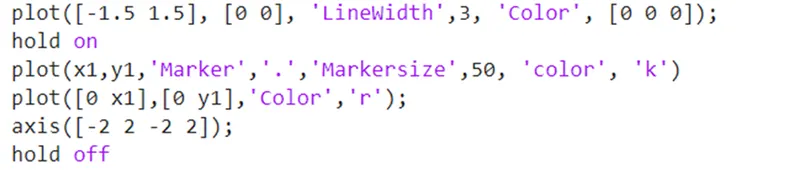
We use hold on to hold the plots in the same figure otherwise only the latest plot is visible. After that we capture the frame using get frame() and gcf, and use hold off to clear the plot for the next iteration.

After capturing all the frames in the M_array we implement the counter variable used for M_array and end the loop.
As the loop completes all its iterations we are left with M_array which has captured all the frames of pendulum positions. We now use the set of commands/statements to write these frames on to a video file using VideoWriter(), open(), writeVideo(), close() as shown below.

Results and Clips:
https://drive.google.com/file/d/1gpJwCEMv8kBlRJPDi4_HNE6VGCGZfpYV/view?usp=sharing
Conclusion:
The ODE45 solver is a convenient tool used to solve ODEs of 2nd order. In real world ODEs are everywhere in cars using suspension to the vibrations in the structural elements, buildings, blast attenuation etc.
Simulating a model using plot commands is really a helpful tool to visualise the model. Further if it can be used to get results and optimise the system then we can reap the real benefits of the solver, because in optimising we would need to runs the solver again and again.