Week 3 - Solving second order ODEs
Objective: To solve the ODE governing the motion of a simple pendulum and obtain the animation for the same, save it as a video, and upload the video to youtube.
Problem Statement: The governing differential equation of the motion of a simple pendulum is an ordinary differential equation of second order. We need to obtain its solution for a pendulum of length = 1m, mass = 1kg, damping coefficient = 0.05 for the first 20 seconds. The initial conditions are theta = 0 rad and angular velocity = 3 rad/s at time t = 0.
Solution Procedure:
The present ODE could be solved using the scipy module in python. The animation could be obtained by using the animation module. The following code was developed for the same and is self-explanatory with relevant comments as and when required.
"""
SIMULATION OF MOTION OF A SIMPLE PENDULUM
"""

import numpy as np
from scipy.integrate import odeint
import matplotlib.pyplot as plt
import math
import matplotlib.animation as animation
from collections import deque


def model(theta,t,b,g,l,m):
    theta1 = theta[0]
    theta2 = theta[1]

    dtheta1_dt = theta2
    dtheta2_dt = -(b/m)*theta2 - (g/l)*math.sin(theta1)
    dtheta_dt = [dtheta1_dt, dtheta2_dt]
    return dtheta_dt

b = 0.02    #Damping Coefficient
g = 9.81    #Acceleration due to gravity
l = 1.0     #Length of the pendulum in m
m = 1.0     #Mass of the ball in kg

#INITIAL CONDITION
theta_0 = [0,3]

#TIME POINTS
t = np.linspace(0,20,500)
dt = 500/20 #To set the time interval between frames

#SOLVE ODE
theta = odeint(model,theta_0,t,args = (b,g,l,m))

# The following loop finds the position of the ball for different theta
x1 = []
y1 = []
for i in range(len(t)):

    x1.append(l*math.sin(theta[i,0]))
    y1.append(-l*math.cos(theta[i,0]))


#CREATING THE ANIMATION:

fig = plt.figure(figsize=(5, 5))
a = fig.add_subplot(autoscale_on=False, xlim=(-2*l, 2*l), ylim=(-2*l, 1.))
a.set_aspect('equal') #So that the figure is not distorted due to different scales along the axes
a.grid()

line, = a.plot([], [], '-', lw=2)  #Comma after variable is required as a.plot returns
                                   #a tuple
ball, = a.plot([],[],color = 'blue',marker = 'o',markersize = 15)
trace, = a.plot([], [], ',-', lw=1)
time_template = 'time = %.1fs'
time = a.text(0.05, 0.9, '', transform=a.transAxes)
hist_x, hist_y = deque(maxlen=len(theta)), deque(maxlen=len(theta))

#The following function creates each frame taking i as input
def pendulum(i):

    # The following arrays give the position of pendulum bob for frame i
    thisx = [0, x1[i]]
    thisy = [0, y1[i]]

    #While repeating the animation(after 20 sec) the trace-line vectors hist_x and
    #hist_y must be cleared
    if i == 0:
        hist_x.clear()
        hist_y.clear()

    #Append each successive position of the bob to the position vector of trace line
    hist_x.appendleft(thisx[1])
    hist_y.appendleft(thisy[1])

    line.set_data(thisx, thisy)
    ball.set_data(thisx[1], thisy[1])
    trace.set_data(hist_x, hist_y)
    time.set_text(time_template % (t[i]))
    return line, trace, ball, time

'''Assignment to variable ani ensures that the object is not garbage collected by Python memory management'''

ani = animation.FuncAnimation(fig, pendulum, len(theta), interval = dt , blit=True)
fig.suptitle('Simple Pendulum', fontsize=14)
plt.show()
To save the resulting animation as a .mp4 video, the following code snippet was appended at the end of the above code. As soon as the figure window showing the animation was closed manually through the close button in the figure window, the animation was saved as a video in .mp4 format at the given location.
f = r"c://Users/.../.../simple_pendulum.mp4"
writervideo = animation.FFMpegWriter(fps=25)
ani.save(f, writer=writervideo)
The link to the video uploaded to youtube is: https://youtu.be/EInnkrYmv1k
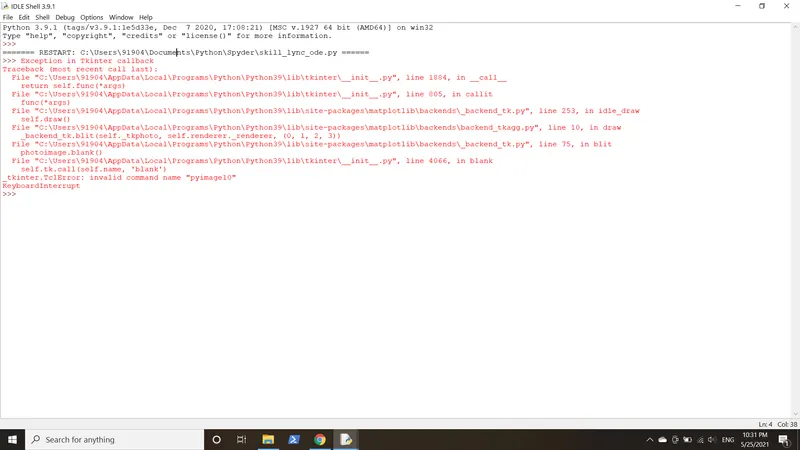
Although the animation was saved in .mp4 format successfully at the specified location, an error message was displayed at the end, the reason for which could not be ascertained in the time period assigned to submit the solution. The above error did not interrupt the normal functioning of the rest of the code. The screenshot of the error message has been attached below:
Results and Discussion: The code provided above successfully generated the animation using the animation module of Matplotlib and was also saved as a video using a suitable code. It could be further improved so that the error message at the end is not flagged and the code runs smoothly. Manual intervention could be further minimized by finding a way to close the figure window automatically as soon as one cycle of the animation is over.