Week 3 - Solving second order ODEs
AIM:- (i) To create plot for angular velocity and displacement verses time of simple pendulum by using a numerical ode45 solver.
(ii) To create an animation of simple pendulum by using 2nd order differential equation by using ode solver function.
SIMPLE PENDULUM:- A point mass attached to a light inextensible string and suspended from fixed support is called a simple pendulum. The vertical line passing through the fixed support is the mean position of a simple pendulum.
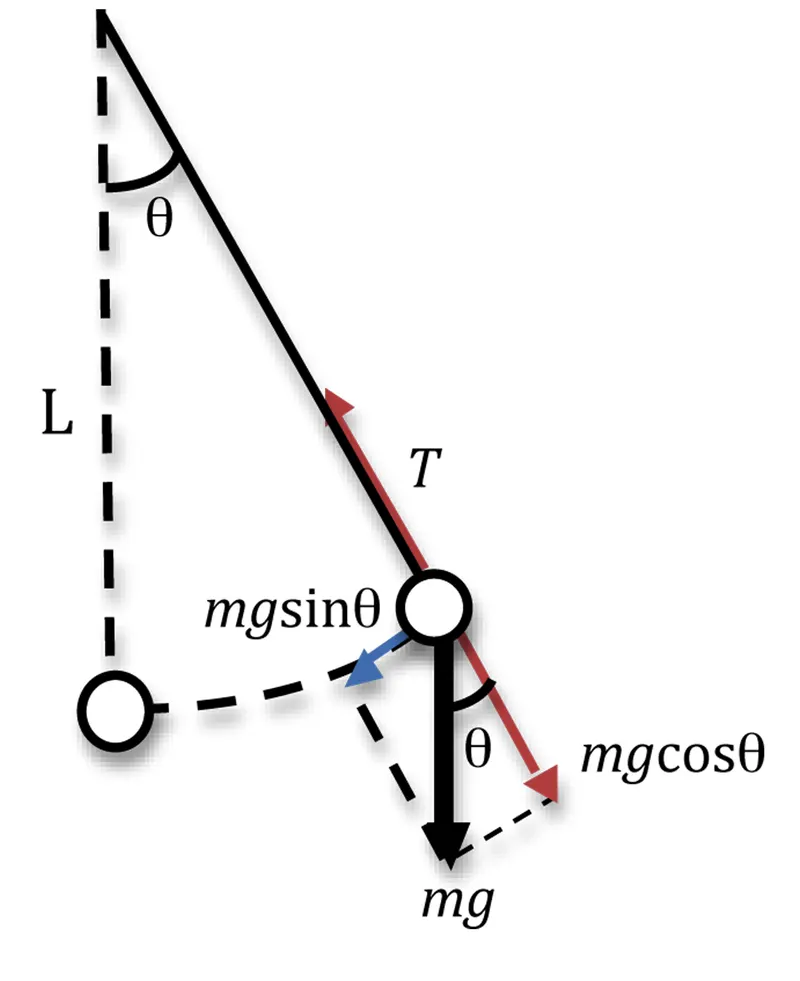
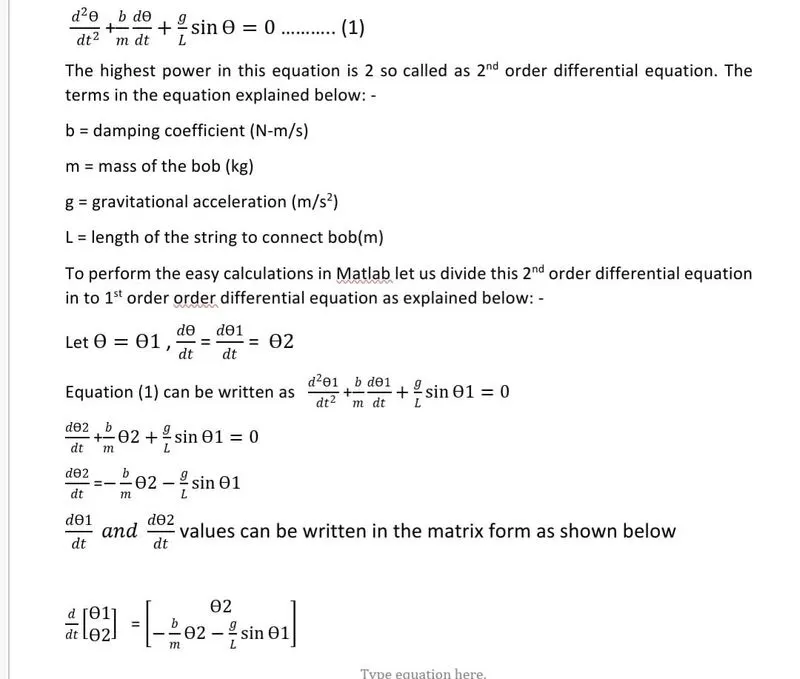
CONCEPT:- For a simple pendulum with a damping factor ,the equation of simple pendulum is
MAIN PROGRAM:-
clear all
close all
clc
% inputs
b = 0.05;
g = 9.81;
l = 1;
m = 1;
% initial condition
theta_0 = [0;3];
% time points
t_span = linspace(0,20,300);
% solve ODE
[t,results] = ode45(@(t,theta)ode_func(t,theta,b,g,l,m),t_span,theta_0);
figure(1)
plot (t,results(:,1))
hold on
plot(t,results(:,2))
xlabel('time')
ylabel('angular velocity and displacement')
grid on
% animation the transient motion of the simple pendulum
figure(2)
ct=1;
for i=1:length(results(:,1))
    x0=0;
    y0=0;
    x1=l*sin(results(i,1));
    y1=-1*cos(results(i,1));

    plot([0 0],[-1.5 0.5])
    hold on;
    plot ([x0 x1],[y0 y1],'linewidth',1,'color','b')
    hold on
   axis([-1.5 1.5 -1.5 0.5])
   plot(x1,y1,'o','Markersize',20,'color','r')
    pause(0.0001)
    M(ct) = getframe(gcf)
    hold off
    ct = ct+1;
end
% animation file
movie (M)
videofile = VideoWriter('simple_pendulum.avi');
open(videofile)
writeVideo(videofile,M)
close(videofile)
PROGRAM EXPLANATION :-
- The code starts with clear all,close all and clc where,
- 'clear all' command is used to clear the data stored in the workspace.
- 'close all' command is used to close all plots and figures.
- 'clc' command is used to clear the command window.
- Input values for b, g, l, m, theta values for displacement (initial displacement zero) and angular velocity (initial 3rad/sec) are specified.
- t_span is a command used in the ode45 solver which specifies the time span of the iterations that are going to solve the ordinary differential equation.
- A numerical ODE solver is used as the main tool to solve the ODE's. The matlab function ode45 will be used. The important thing to remember is that ode45 can only solve a first order ODE. So in this program we have divided the 2nd order ODE to 1st order ODE.
- Syntax of a ode45 solve: [t,results]=ode45[@(t,y)ode(t,y,args),t_span,y0);
- The angular velocity and displacement will be calculated and those values will be plotted against time using plot command .
- The label command is used to label the x and y axis .
- x0 &y0 be the fixed positions at one end of the string and x1 and y1 be the different position of the bob.
- At each and every point of the bob the ‘ct’ command is used to count each and every position and stores the data.
- At the end of the for loop there will be set of positions for each and every point
- axis ([-1.5 1.5 -1.5 0.5]) used to sets axis limits taken range (-1.5 to 1.5) for X-axis & (-1.5 to 0.5) for yaxis.
- pause (0.02) for smooth plot and animation.
- M(ct)=getframe(gcf) (Gets a frame from the figure or plot)
- End – used to terminate the plot.
- Movie(M) -plays the movie in matrix M once
- Videofile = VideoWriter('simple_pendulum.avi')- additionally applies uncompressed avi properties to this video write data on avi file
- open(videofile)-used to open video for writing a video data
- writeVideo(videofile,M) - to write video data to file
- close(videofile) - used to close file for writing video data
OUTPUT :- A plot for angular velocity and displacement verses time drawn
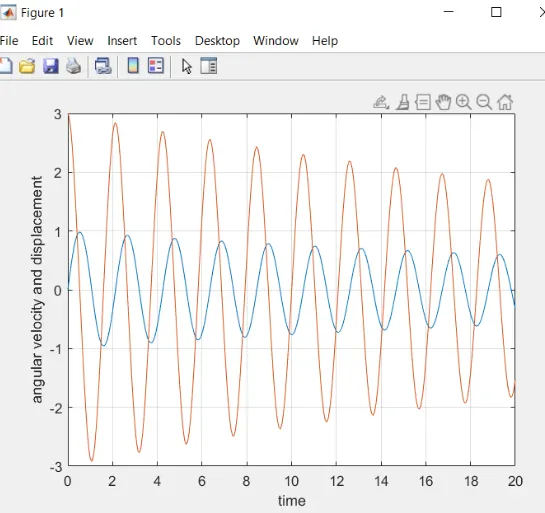
- The blue line is the displacement where it starts from zero and angular velocity is starting at 3 rad/sec
- Youtube link provided for the animated file
- https://www.youtube.com/watch?v=TmaxM1qt8Mc
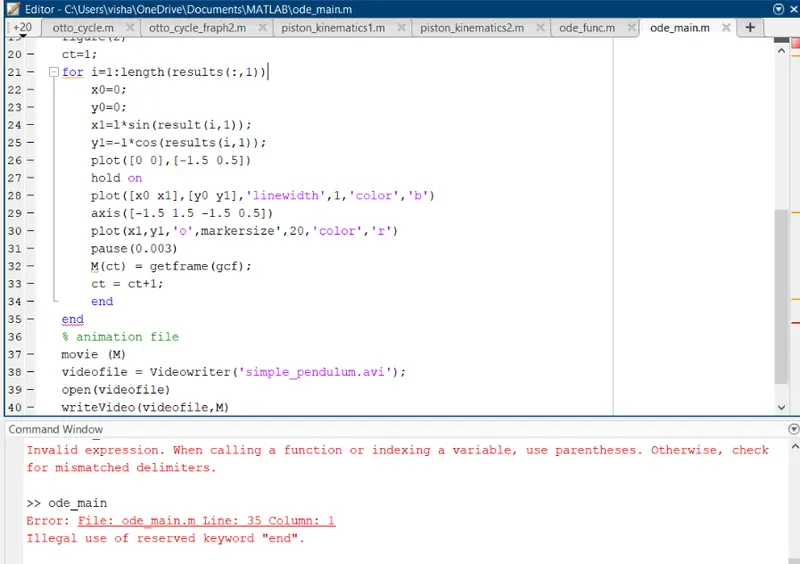
ERROR DURING THE PROGRAM:- (i)Initially hold off command is not used the bob displaying the position at every location
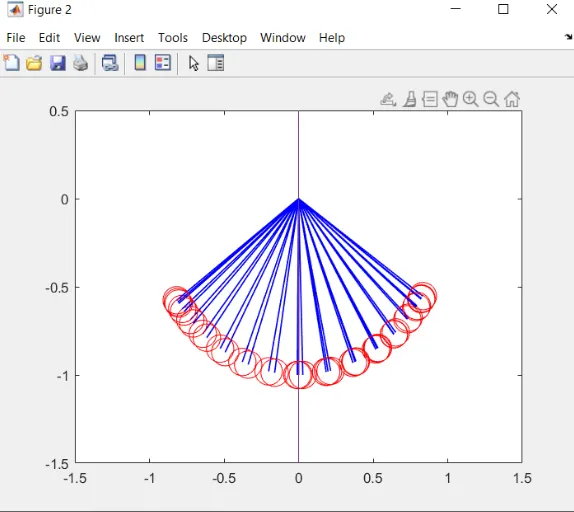
(ii) Twice end operator is used