Week 3 - Solving second order ODEs
AIM :- To write a program in MATLAB to simulate the motion of the simple pendulum.
OBJECTIVE :-
- Create the image that represents the position of the pendulum.
- Use marker command to create sphere.
- To create angular displacement and angular velocity Plot diagram.
THEORY :-
The simple pendulum consists of a mass m hanging from string of the length L and fixed at a pivot point p. when displaced to an a initial angle and released, the pendulum will swing back and fourth with periodic motion. with being the natural frequency of the motion.
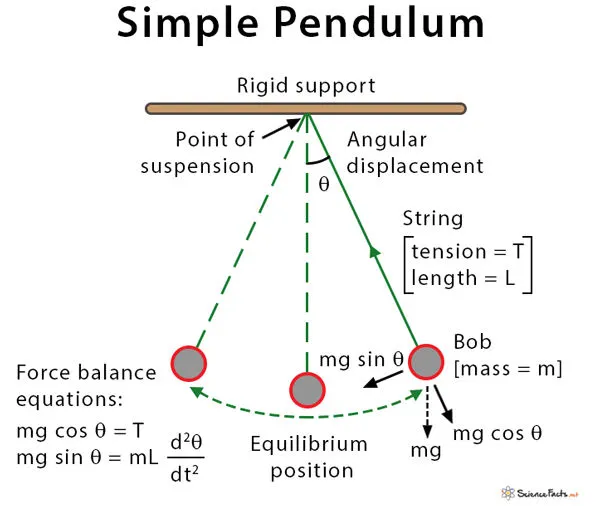
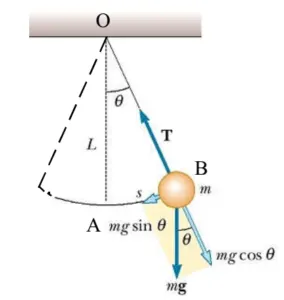
A simple pendulum consists of a mass m hanging from string of the length l and fixed pivot point p. when displaced to an initial angle and realesed, the pendulum swing back and fourth with periodic motion. By applying Newton's second law of rotational systems. the equvation for the motion of pendulum may be obtained.
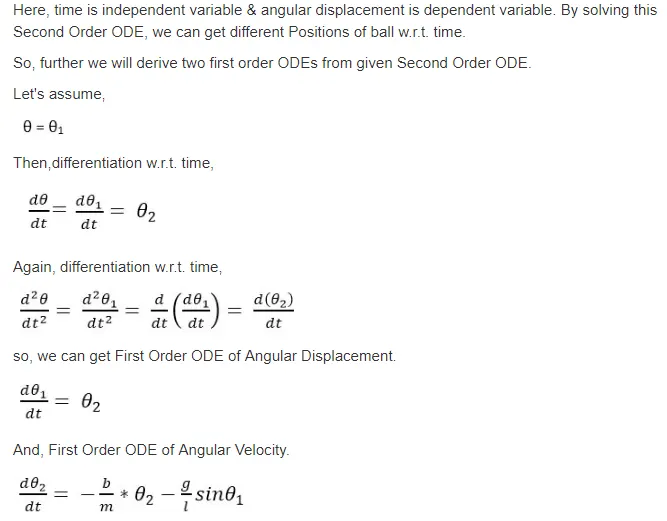
The second order ODE breakdown the firsr order ODE equvation in angular displacement and angular velocity. in this values used to write a program for simulate the motion of the simple pendulum.
MATLAB CODE :-
To solve this diffrential function equvation in MATLAB a function needs to be created which will be called in later in main program.
Function code :-
% % of inputs need simple pedulum equvation
% b = 0.1; % dambing coefficient
% g = 9.81; % accleration due to gravity
% l = 0.8;    % length of the string
% m = 0.9;  % mass of the bob
% % Initial condition
% dis_v = [0;5];
% % of Time points
% t_span = linspace(0,20,500);

function [dtheta_dt] = ode_spendulam(t,theta,b,g,l,m)
theta1 = theta(1)
theta2 = theta(2)
dtheta1_dt = theta2;
dtheta2_dt = -(b/m)*theta2 - (g/l)*sin(theta1);
dtheta_dt = [dtheta1_dt ; dtheta2_dt];
end
Main code :-
% A program to understand the motion of simple pendulum using Matlab
clear all
close all
clc
% of inputs need simple pedulum equvation
b = 0.1; % dambing coefficient
g = 9.81; % accleration due to gravity
l = 0.8;    % length of the string
m = 0.9;  % mass of the bob
% Initial condition
theta_0 = [0;6];
% of Time points
t_span = linspace(0,20,500);
% solve ODE
[t,results] = ode45(@(t,theta) ode_spendulam(t,theta,b,g,l,m),t_span,theta_0);
% Outputs
figure(1)
plot(t,results(:,1))
hold on
plot(t,results(:,2))
xlabel('time')
ylabel('Angular displacement and angular velocity')
grid on
hold off
% Creating an animation of a simple pendulum

ct = 1;
for i = 1:length(t_span)
    x0 = 0;
    y0 = 0;
    x1 = 1*sind(results(i,1));
    y1 = -1*cosd(results(i,1));
    figure(2)
    plot([x0 x1],[y0 y1],[-0.5 0.5],[0 0],'linewidth',3)
    hold on
    plot(x1,y1,'marker','o','markerSize',30,'markerFacecolor','r')
    axis ([-1 1 -1.5 0.5])
    grid on
    pause(0.001)
    M(ct)= getframe(gcf);
    ct = ct+1;
    hold off
end
movie(M)
videofile = VideoWriter('ode_spendulum.avi','uncompressed AVI')
open(videofile)
writeVideo(videofile,M)
close(videofile)
Explanation of Program :-
- To derive the second order ODE into first order equvations, it consider angular displacement and angular velocity two values.
- To write a function code for addressing the terms of equvations it,s mentioned for theta1,theta2and dtheta1_dt,dtheta2_dt for ODE functions.
- Main program code consider inputs of damping coefficient, mass,gravity, length and also give initial condition of initial displacement and time.
- ODE function default solver used to give the condition of use function code addressing, then we run the program to get angular displacement and angular velocity.
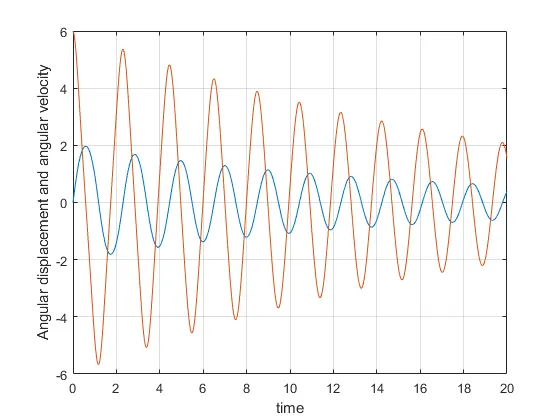
- ploting function started to enter conditions and animation of simple pendulum using marker command and also created movie clip of simple pendulum. the plot graphs and animated video attached in below.
Outputs :-
The command window pdf and workspace window pdf attached in file below. also attached animationmovie link below.
Plot diagram :-
Simulation link :- https://drive.google.com/file/d/1LfTVbG3-Bc5XxnAj3TpL2tVkAnirjsRq/view?usp=sharing
RESULT and CONCLUSION:-
- The matlab code create a image and represents position of pendulum. Simulation of simple pendulum animation movie making is done.
- The damping coefficient,mass,gravity,length this factors are affecting simple angular accleration and angulur velocity of simple pendulum.