Week 3 - Solving second order ODEs
Ans:
econd order differenceal equation to solve the simple pendulum simulation.
d^2theta/dt^2+b/m.dtheta/dt+g/lsin(theta) = 0
create two ODE
dtheta1/dt = theta2 and dtheta2/dtheta = -(b/m(theta2)+g/lsin(theta1))
codes for calling a function :-the function which we have define with some parameter are going to use in the other programe the function is going to solve the second order equation or we can say that it going to integrate the value
function[dtheta_dt] = ode_func(t,theta,b,g,l,m);
theta1 = theta(1);
theta2 = theta(2);
dtheta_dt = theta2;
dtheta_dt = -(b/m)*theta2-(g/l)*sin(theta1);
dtheta_dt = [dtheta1_dt;dtheta2_dt);end
code simple pendulum
ODE system are two firest order velocity and other displacement and initial condition for displacement and velocity
ode 45 inbuilt solver in matlab and octave
Code:
close all clear all clc


b=0.05; l=1;

m=1;

g=9.81;

theta_0=[0;4];

t_span=linspace(0,20,300);

[t,result]=ode45(@(t,theta) ode_function(b,g,l,m,t,theta),t_span,theta_0); figure(1)

hold on

plot(t,result(:,1),'color','r');

plot(t,result(:,2),'color','b');

xlabel('Time')

ylabel('Displacemt/Velocity')

legend('Displacement','Velocity') grid on

close all clear all clc

b=0.05; l=1;

m=1;

g=9.81;


theta_0=[0;4];


t_span=linspace(0,20,300);

[t,result]=ode45(@(t,theta) ode_function(b,g,l,m,t,theta),t_span,theta_0); figure(1)

hold on

plot(t,result(:,1),'color','r');

plot(t,result(:,2),'color','b');


xlabel('Time')

ylabel('Displacemt/Velocity')

legend('Displacement','Velocity') grid on


close all clear all clc


b=0.05; l=1;

m=1;

g=9.81;


theta_0=[0;4];


t_span=linspace(0,20,300);

[t,result]=ode45(@(t,theta) ode_function(b,g,l,m,t,theta),t_span,theta_0); figure(1)

hold on

plot(t,result(:,1),'color','r');

plot(t,result(:,2),'color','b');


xlabel('Time')

ylabel('Displacemt/Velocity')

legend('Displacement','Velocity') grid on
Video Link:
https://www.youtube.com/watch?v=zdIb5upGppw
In ode45 synatx we defining value of b,g,l,m are assumed and then we define time span
d initial conditions by theta_0
t_span an The result of above progrm as belows:
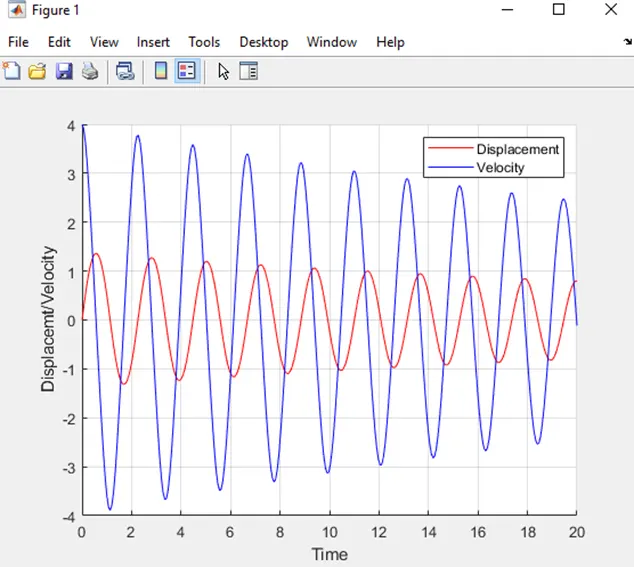
I used hold on command to show the result into one graph or frame and legend command to differentiate displacement and velocity.
I got error when not use hold command;
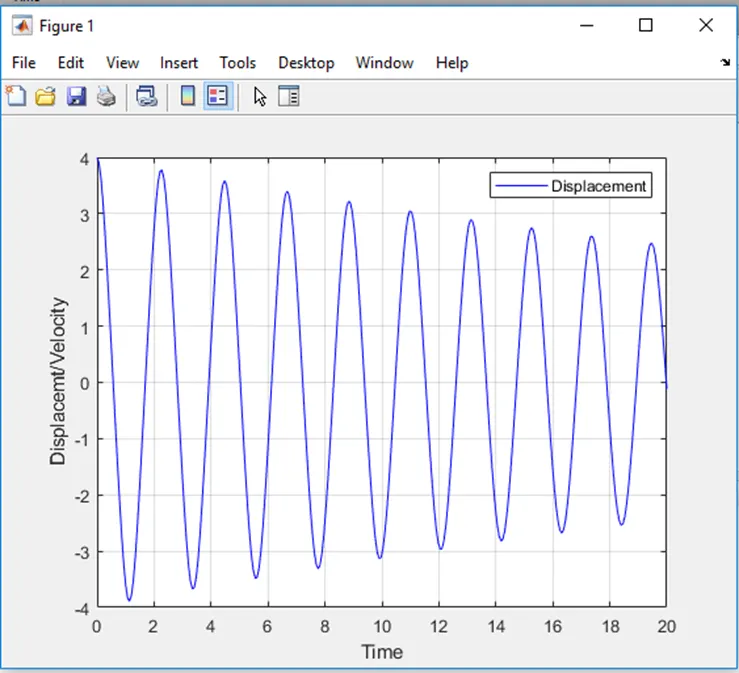
In order to create animation vbideo i used counter (ct) command and movie command.
M is the variable to store all the output result figures and use for loop to complete time span length(t) i.e. 300 intervals.
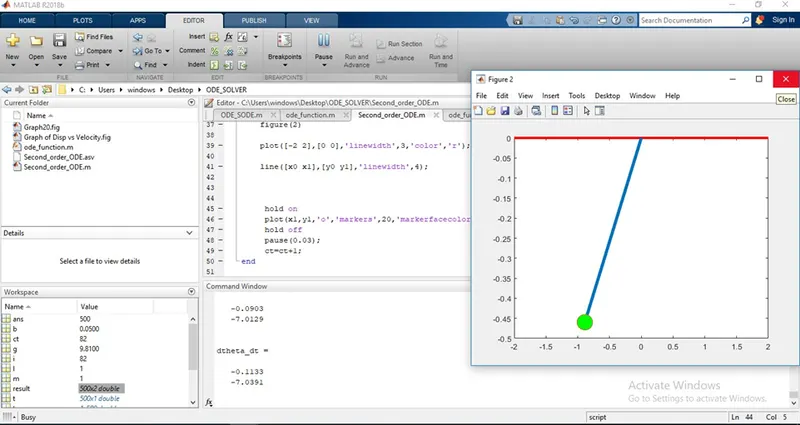
in order to fix this i use axis([-2 2 -2 2])
I got another typographic error for wrongly used Videowriter command instead of used VideoWriter which.
Please find below link for Animation video of Simple Pendulum Single ODE