Week 3 - Solving second order ODEs
'' SECOND ORDER ODE PENDULUM ''
The ode is very important in engineering, which describes many important phenomena.Solving these odes helps in understanding the system.
It is also very useful in vehicle dynamics Jha suspension model can be modeled as a set of mass, damper and spring.
Solve the ode and find out what will be the vehicle dynamics.
Example of second order ode is like a simple pendulum
second order ode-
d^2theta/dt^2+b/m*(dtheta/dt)+g/l*sintheta=0
b=damping
m=mass
g=gravity
l=length
theta=theta1
dtheta/dt=dtheta1/dt=theta2 -------(1)
d^2theta/dt^2=d^2theta1/dt^2=d/dt*(dtheta1/dt)=d/dt(theta2)------(2)
d^2theta/dt^2+b/m*(dtheta/dt)+g/l*sin(theta)=0
dtheta^2+b/m^dtheta1/dt+g/l*sintheta1
dtheta2/dt+b/m*theta2+g/lsintheta1=0
dtheta1/dt=theta2 dtheta2/dt= -b/mtheta2-g/lsintheta1
d/dt[theta1;theta2]=[theta2 ;-b/mtheta2-g/lsintheta]
([theta1;theta2]=theta1)
WRITE PROGRAME IN THREE STEPS:-
1STEP:-
%SECOND ORDER ODE
clear all
close all
clc

%inputs
%damping
b=0.05;
%gravity
g=9.81;
%length
l=1;
%mass
m=0.1;

%initial condition
theta_0=[0,3];


%time points
t_span=linspace (0,10,500);

%solve ODE

[t,results]=ode45(@(t,theta) ode_function(t,theta,b,g,l,m),t_span,theta_0);
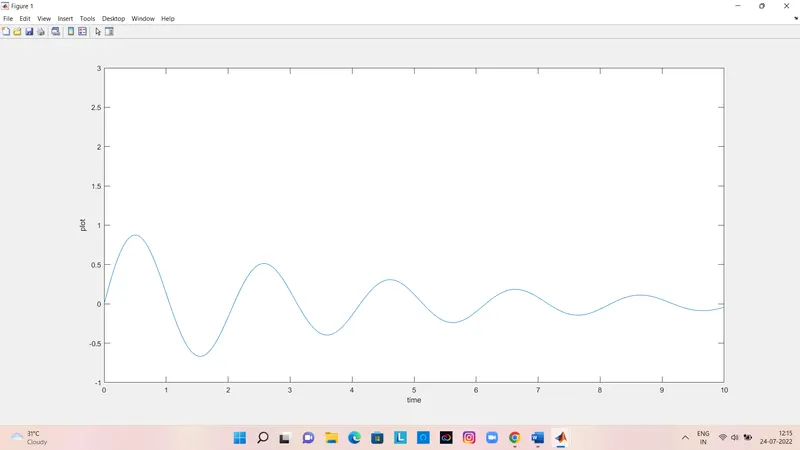
figure(1)
plot(t,results(:,1))
hold on
plot(t,results(1,2))
xlabel('time')
ylabel('plot')
start the program with comment % second order ode and then clear all, close all and clc because before any plot and workspace is open so closed and restart the program .
inputs defind
b(damping)=0.05
m(mass)=0.1
g(gravity)=9.81
l(length)=1
initial condition will defind
There are two types of first order ODE, one is for velocity, the other is for displacement, when first order ode is solved, then initial value has to be given for displacement.
theta0=[0;5]
initial displacment 0
initial velocity 5
value defind of time
t_span=linspace(0,10,500)
500 value in 0 to 10sec.
%solve ode
[t,results]=ode45(@(t,theta)ode_func(t,theta,b,g,l,m),t_span,theta0)
then call ode function,ode 45 is a inbild solver in matlab , ode is main inputs is t and theta ,t and theta is dependent & indipendent varibls are ode
ode_function(t,theta,b,g,l,m) function defind
t_span time arry which tells where to integrate
finally this function give [time &result]
use plot command to create a plot
xlabel & ylable is shown time and plot
PLOT
2STEP:-
function [dtheta_dt]= ode_function(t,theta,b,g,l,m)
theta1=theta(1)
theta2=theta(2)
dtheta1_dt=theta2;
dtheta2_dt=-(b/m)*theta2-(g/l)*sin(theta1);
dtheta_dt=[dtheta1_dt;dtheta2_dt];
end
creat a function ,use function command ,function name is ode_function
t (time)
theta is a solution array
b (damping)
g(gravity)
l(length)
m(mass)
dtheta1_dt=theta2 is first ODE
dtheta2_dt=-(b/m)*theta2-(g/l)*sin(theta1) is second order ODE
then first ODE & second order ODE combine in arry
dtheta_dt=[dtheta1_dt;dtheta2_dt];
3STEP:-
3stap is crate a movie of second order ODE
%SECOND ORDER ODE PENDULUM
clear all
close all
clc

%inputs
%damping
b=0.05;
%gravity
g=9.81;
%length
l=1;
%mass
m=0.1;

%initial condition
theta_0=[0;3];


%time points
t_span=linspace (0,20,500);

%solve ODE

[t,results]=ode45(@(t,theta) ode_function(t,theta,b,g,l,m),t_span,theta_0);
figure(1)
plot(t,results(:,1))
hold on
plot(t,results(1,2))
xlabel('time')
ylabel('plot')
ct=1;
figure(2)
for  k=1:length(results(:,1))
    x0=0;
    y0=0;
    x1=1*sin(results(k,1));
    y1=-1*cos(results(k,1));
plot([-1.5 1.5],[0 0])
hold on
plot([x0 x1],[y0 y1],'linewidth',2,'color','r')
axis([-1.5 1.5 -1.5 1.5])
plot(x1,y1,'o','markersize',20,'color','g')
pause(0.001)
M(ct)=getframe(gcf);
hold off
ct=ct+1;
end

%making movie
movie(M)
videofile=VideoWriter('pendulum.avi');
open(videofile)
writeVideo(videofile,M)
close(videofile)
- ;(semicolon is used because no value is shown into command window
- The for loop is used because we have to change the value with the help of programming, not to change it manually.
- The loop counter is different for each for loop.
- plot command use to create a plot
- ct is figure of counter ct=1,when for loop is execute then ct=ct+1
- axis is xlimits and y limits ([-1.5 1.5 -1.5 1.5])
- The pause command is simply pausing the code
- current figure window will be found getframe command
- end command is close the for loop
- movie (M) create a movie
- VideoWriter(videofile,M) specified fileformate
- VideoWriter is wirte a video
- uncompressed AVI is file format ,many formats are avliable other formats are choice Avi,Mp4
- and last close (videofile)
- why use hold off command because this command not use in programe our animation every step show in movie
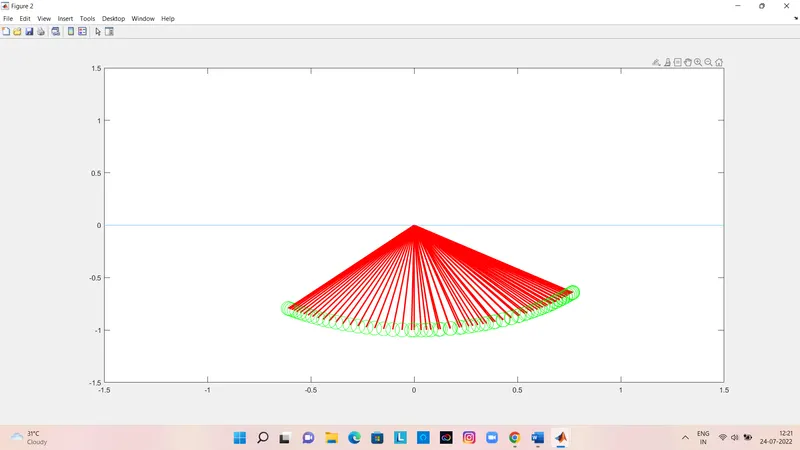
share second order ode pandulum animation movie link by google drive :-
https://drive.google.com/file/d/14OPcrjzYqbc-alfqs0ujdz075nRxigcT/view?usp=sharing