Week 2- 2R Robotic Arm Challenge
'' Forward Kinematics Of A 2R Robotics Arm''
- Why Use ROBOT in Industry ?
- Robotics are emerging field,there are used in the manufacturing and welding field in indusrty.
- its use in a certain work space, works space dependent on structure of robot and his arms .
- its less time to work,like welding (spot welding).
- engineer are designing robot for complex application and complex fram` .
In this case write a program to solve the Forward Kinematics of 2R Robotics Arm
- When write a program before know about robots -
first think to learnt is the kinematics of links, if able to understand the kinematics then write a program simulate how the move robotics arm, and figure out how to robot are moves in his workspace is prefer the possible location that robot it reached at objects.
- First We Will Understand 2R ROBOTICS ARM structure -
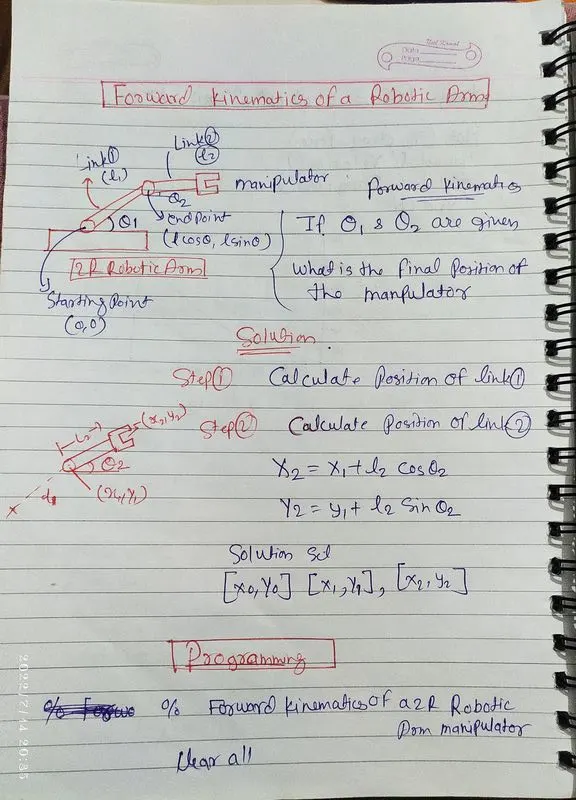
- robotics arm joint by links ,1st link's starting point are joint with base
- 1st link's cordinate of starting point is (0,0) it represent (x0,y0)
- 1st link's ending point is (l*cos*theta ,l*sin*theta) it represent (x1,y1) and this is also starting point of link 2
- 2nd link's starting point is (x1,y1)and ending point is (x2,y2)
- l1and l2 is length of link1 and link2
- theta1 and theta2 is angle of link1 and link2
2 step of set of action -
- calculate position of link1
- calculate position of link 2
asume that link 2 end atteched with a weld gun(manipulator) to know what is the final position of weld gun(manipulator) x2=x1+l2costheta2
y2=y1+l2sintheta2
end this three cordinate [x0,y0] [x1,y1] [x2,y2] able to plot and create a animation in program.
- The First General Program code forward kinematics of 2R robotics arm is Shown-
%forward kinematics of a 2R robotic arm
clear all
close all
clc

%inputs
l1=1.5;
l2=0.8;


theta1=55;
theta2=35;


%coardinates
x0=0;
y0=0;

x1=l1*cosd(theta1);
y1=l1*sind(theta1);

x2=x1+l2*cosd(theta2);
y2=y1+l2*sind(theta2);

%plotting
line([x0 x1],[y0 y1],'linewidth',3,'color','b')
line([x1 x2],[y1 y2],'linewidth',3,'color','r')
start the program with comment % forward kinematics of 2R robotics arm and then clear all, close all and clc because before any plot and workspace is open so closed and restart the program .
%inputs values of l1 length of link 1's value =1.5
length of link2 =0.8
(theta1)angle of l1 =55
(theta2) angle of l2=35
x1=l1*cosd(theta1)
y1=l1*sind (theta1)
x2=x1+l2*cosd(theta2)
y2=y1+l2*sind(theta2)
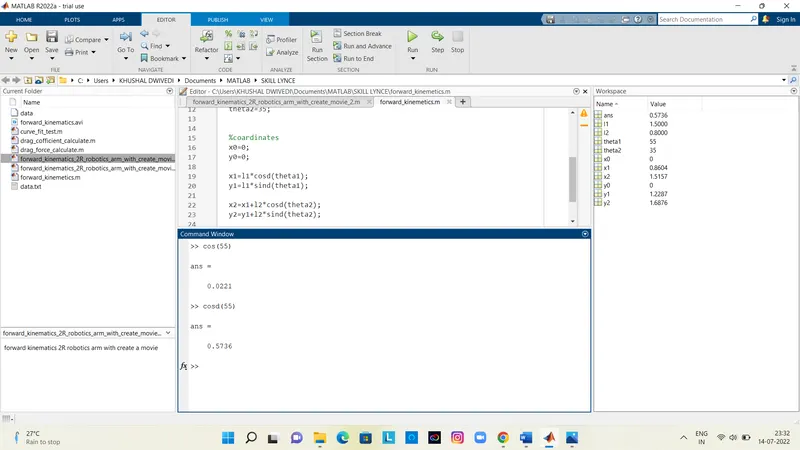
Why is cosd and sind taken here because if you take cos and sin , then the value of cos and sin will come in redial and the value of cosd and sind is in degrees.
like values are diffrent
%plotting
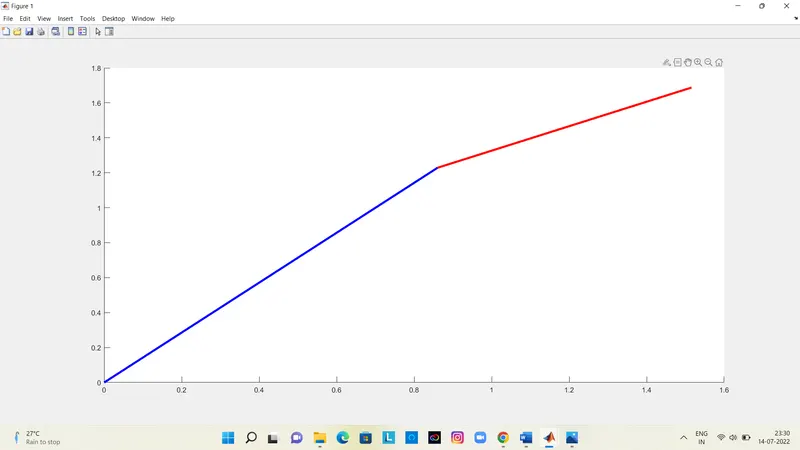
plotting means create a plot/figure it shown the figure of robotics arm
'linewidth'is width of l1 and l2 links, 3 is show the link's width/thickness, 'b' and 'r' show the color of links .
and then run click and run the program and open plot window .
- The second program for create a animation of Forward Kinematics 2R Robotic ARM
%forward kinematics 2R robotics arm with create a movie
close all
clear all
clc


%inputs
l1=1.5;
l2=0.8;
theta1= linspace(0,90,10);
theta2= linspace(0,90,10);

ct=1;
for i=1:length(theta1)
    THETA1=theta1(i);
    for j=i:length(theta2)
         THETA2=theta2(j);

           x0 = 0;
           y0 = 0;

           x1 = l1*cosd(THETA1);
           y1 = l1*sind(THETA1);

           x2 = x1+l2*cosd(THETA2);
           y2 = y1+l2*sind(THETA2);

           %plotting

           plot([x0 x1],[y0 y1],[x1 x2],[y1 y2],'linewidth',3)
           axis([-0.4 2.5 0 2.5])
           M(ct)=getframe(gcf);
           ct=ct+1;
           pause(0.3)

    end
end

movie(M)
videofile=VideoWriter('forward_kinematics1.avi','uncompressed AVI');
open(videofile)
writeVideo(videofile,M)
close(videofile) - in this case - inputs are samed but theta 1 and 2 is a array whom represent with linspace command
- theta1=linspace(0,90,10);
- theta2=linspace(0,90,10);
- theta1 and theta 2 will have 10 values between 0 to 90
- 10 multipal value of theta 1 and theta2
- ;(semicolon is used because no value is shown into command window
- The for loop is used because we have to change the value of theta 1 and theta 2 with the help of programming, not to change it manually.
- The loop counter is different for each for loop.
- plot command use to create a plot
- ct is figure of counter ct=1,when for loop is execute then ct=ct+1
- axis is xlimits and y limits ([-0.4 2.5 0 2.5])
- The pause command is simply pausing the code
- current figure window will be found getframe command
- end command is close the for loop
- movie (M) create a movie
VideoWriter(videofile,M)specified fileformate- VideoWriter is wirte a video
- uncompressed AVI is file format ,many formats are avliable other formats are choice Avi,Mp4
- and last close (videofile)
- share the animation link by google drive-
https://drive.google.com/file/d/1rhhCHmFBlDJHDfa-zrFp-fZKOuGjMF4d/view?usp=sharing