Week 3 - Solving second order ODEs
OBJECTIVE = SECOND ORDER ODE
ODE is to describe the transient behavior of a system. A simple example is a pendulum.the pendulum moves depends on the Newtons second law. ODE represents the equation of motion of a simple pendulum with damping.
the equation :- (d^2(theta)/dt^2)+b/m(d(theta)/dt)+g/l(sin(theta))=0
CODE:-
clear all
close all
clc

b = 0.05;
g = 9.81;
l = 1;
m = 1;

%initial condition
theta_0 = [0;5];

%time points
t_span = linspace(0,10,500);

%solve ODE
[t,r] = ode45(@(t,theta)odefunc(t,theta,b,g,l,m),t_span,theta_0);

plot(t,r(:,1))
hold on
plot(t,r(:,2))
xlabel('time')
ylabel('plot')

%animation pendulum
x0 = 0;
y0 = 0;

displacement_values = r(:,1);
ct = 1;
for i = 1:length(displacement_values)

    x1 = 1*sin(displacement_values(i));
    y1 = -1*cos(displacement_values(i));

    figure(2)
    plot([-3 3],[0 0])
    hold on
    plot([x0 x1],[y0 y1])
    plot(x1,y1,'.','MarkerSize',40)
    axis([-3 3 -3 3])
    M(ct) = getframe(gcf);
    ct = ct+1;
    hold off
end

movie(M)
videofile=VideoWriter('ode_main','Uncompressed AVI');
open(videofile)
writeVideo(videofile,M)
close(videofile)
EXPLINATION:-
start the code for clear all, close all & clc command. Then it will define the input variable (b,g,l,m)
b=damping, m= mass, g=gravity, l=length. Define the input variable the value is given
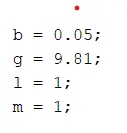
we start the code with the clear all , close all , and clc to clear out the workspace ,previous graphs,and command window
we have the some inputs damping coefficient (b),length(l),mass(m),and gravity force(g) is constant.
we take time interval from 0 to 10 sec and we need 500 intervals so for this we use linspace command .
theta is taken as 0 to 5.
solving ode is a comment and [t,r] is the output and t represents time and r represents displacement and in matlab we in built function called ode45 and we used @(t,theta) it was totally inbuilt function and ode_function (b,g,l,m)is the function which is written in other editor window as a function which is shown in below.Then the apply for the initial condition for solving the ode system two 1st order ode veloctiy and displacement for theta_0=[0;5];
Explain the function code:-
function [dtheta_dt] = odefunc(t,theta,b,g,l,m)

theta1=theta(1);
theta2=theta(2);
dtheta1_dt = theta2;
dtheta2_dt = (-(b/m)*theta2 - (g/l)*sin(theta1));
dtheta_dt = [dtheta1_dt;dtheta2_dt];
end
[dtheta_dt]=odefunc(t,theta,b,g,l,m) this we have ode_function as function name and the input varables.
in second line we define the theta which is written in above line (function_code).
and in 4th line dtheta1_dt=theta2 this devired from the equation of ,
( d^2theta/dt^2+b/m(dtheta/dt)+g/l(sintheta)=0).
according to first order ,
theta2=dtheta1/dt.
and by second order,
dtheta2/dt= -(b/m)theta2-(g/l)*sin(theta1).
dtheta_dt is equal to (dtheta1_dt ;dtheta2_dt), put the end to function code.
Generate the function then it apply foe ode main then solving 2 ode colom vector specific is 2colom ,t for the integration time and reuslts show.
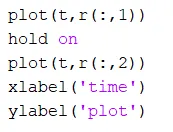
command for the plot t,resluts . hold on command agian plot command ,then show the label for the xaxis and yaxis
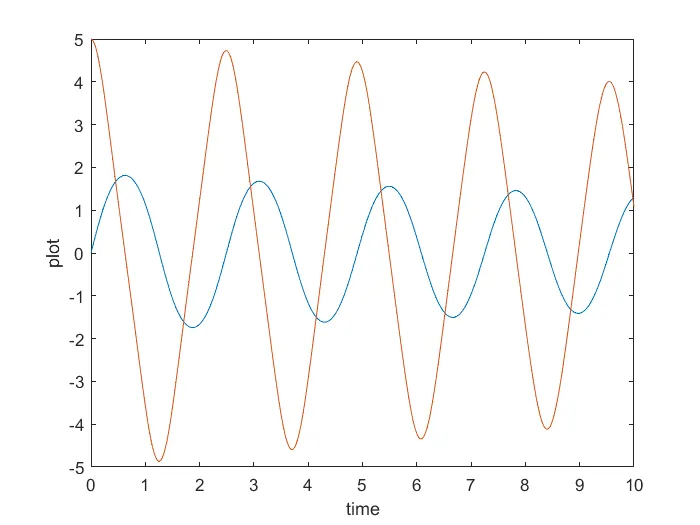
Then show the result figure(1)
to create the animation of pendulum using the for loop
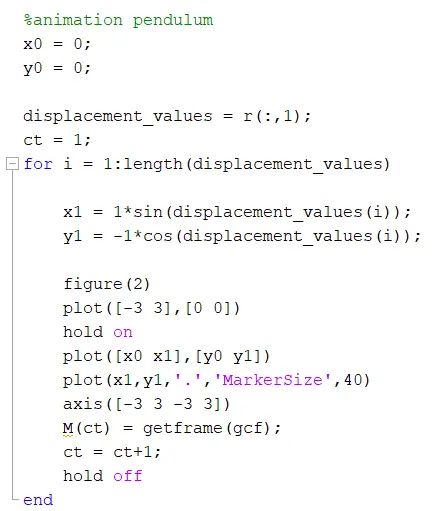
for the animation of pendulum we define the co-ordinate of pendulum x0=0 and y0=0 .the displacement value r represent the r all colomn infirst row. then apply the for loop for i=1:length (displacemnt_value).and it will be x1 and y1 with sin and cos theta,(-) sign show the direction of pendulum is down using the formula.plot([x0 x1],[y0 y1]) this point represent the line for hanging point for pendulum.at the end of the x1 and y1 we need to the pendulum ball and it is mark as'.' and the is 40 using makersize command.the axis for -3 3 -3 3 is direction of x and y axis.m(ct)=getframe(gcf) is current figure everything.
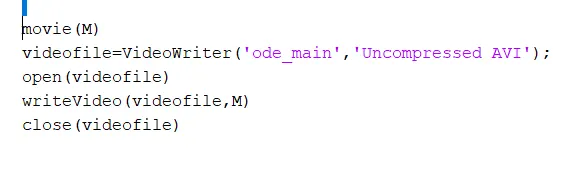
video file is to save the animation.videowriteris the name and animation type,open is the command for open video write the video file for close command is to colse the video file.
this is the link for oscillation pendulum output.figure(2)
RESULT:
https://drive.google.com/file/d/1gCZVdG6WKtz0q1MLRD_o_Zv5esSS5EJx/view?usp=sharing
ERROR:-
i have one error for the function create.
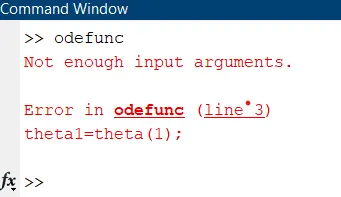
create the function, then the function name is different so the error is given.
CONCLUSION:-
hence with this we have completed animation the simple pendulum using ode45.