Week 3 - Solving second order ODEs
CODE EXPLANATION:
- The code starts with the input which are provided in the problems. Then make time domain for which the whole code is going to run. It was done by 'linspace' command from 0 to 20 seconds with 300 value in between them.
- After that we provide the initial condition for the angular displacement and velocity from, because we need to calculate the both value from the equation of the motion for plotting purpose.
- The code comprises of function which solves the second order differential equation which is taken inside the main code. The main code has another function which calculates the array of data for time and displacement.
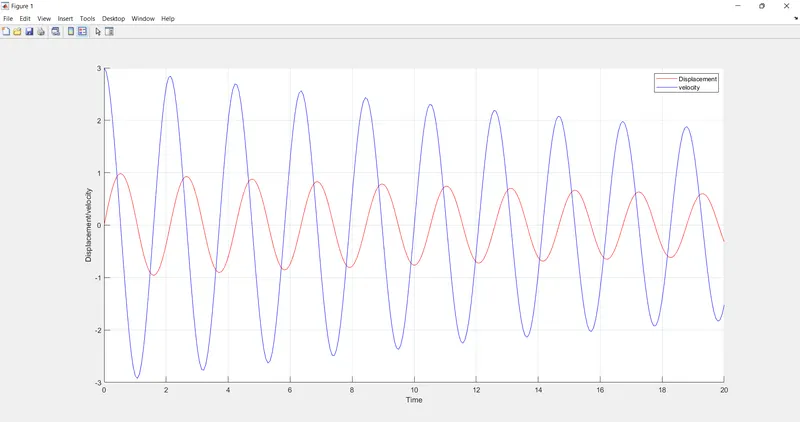
- After calculation plotting is done in which subplot command is used, in the first plot first column is plotted and in second subplot second column is plotted wuth respect to time.
- Then we are changing the polar co-ordinateb to cartesian co-ordinate because we have used 'sin' command instead of 'sind' command in function.
- Then we have created a for loop for which we are creating the frame motion for the simple pendulum and saved in the movie.
MATLAB CODE FOR SOLVING AND PLOTTING CURVE:
clear all
close all
 clc


% Given data

 b = 0.05;
 l = 1;
 m = 1;
 g = 9.81;

 %initial condtion
 theta_0 = [0;3];

 %time duration for simulation
 t_span = linspace(0,20,300);

 %solve
 [t,result] = ode45(@(t,theta) ode_function(b,g,l,m,t,theta),t_span, theta_0);

 figure (1)
 hold on
 plot(t,result(:,1),'color','r');
 plot(t,result(:,2),'color','b');

 xlabel('Time')
 ylabel('Displacement/velocity')

 legend('Displacement','velocity')
 grid on

 ct=1;
  for i=1:length(t)

      x0 = 0
      y0 = 0

      x1 = l*sin(result(i,1));
      y1 = -l*cos(result(i,1));

      figure(2)

      plot([-2 2],[0 0],'linewidth',3,'Color','r');
      line([x0 x1],[y0 y1],'linewidth',3);

      axis ([-2 2 -2 2])

      hold on
      plot(x1,y1,'o','markers',20,'markerfacecolor','g');
      hold off

      grid on
      pause(0.03);

      M(ct)=getframe(gcf)

      ct=ct+1;

  end

 movie(M)
 videofile = VideoWriter('Second_order_ODE.avi','uncompressed AVI');
 open(videofile)
 writeVideo(videofile,M)
 close(videofile)
MATLAB CODE FOR CREATING FUNCTION USED IN MAIN PROGRAM:
function [dtheta_dt] = ode_function(b,g,l,m,t,theta)

theta1 = theta(1);
theta2 = theta(2);
dtheta1_dt = theta2;
dtheta2_dt = -(b/m)*theta2-(g/1)*sin(theta1);
dtheta_dt = [dtheta1_dt; dtheta2_dt];

end
OUTPUT:
YOUTUBE LINK FOR AN ANIMATION:
ERROR & COMMAND WINDOW EXECUTION:
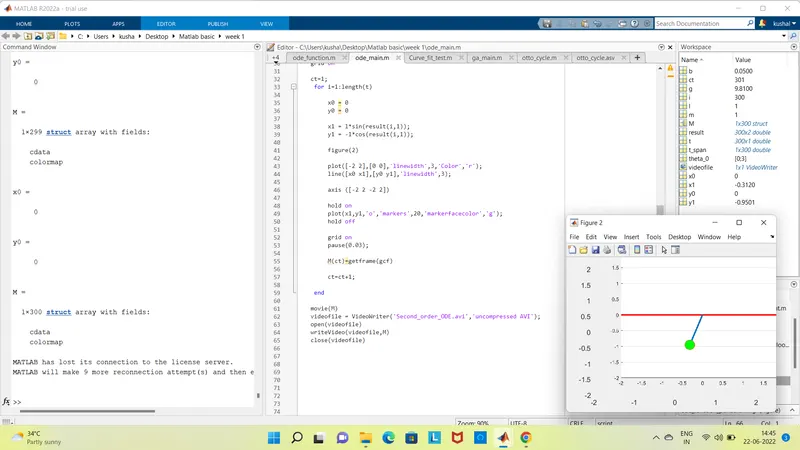
- No error found during the execution