Week 2- 2R Robotic Arm Challenge
Code Explanation :-
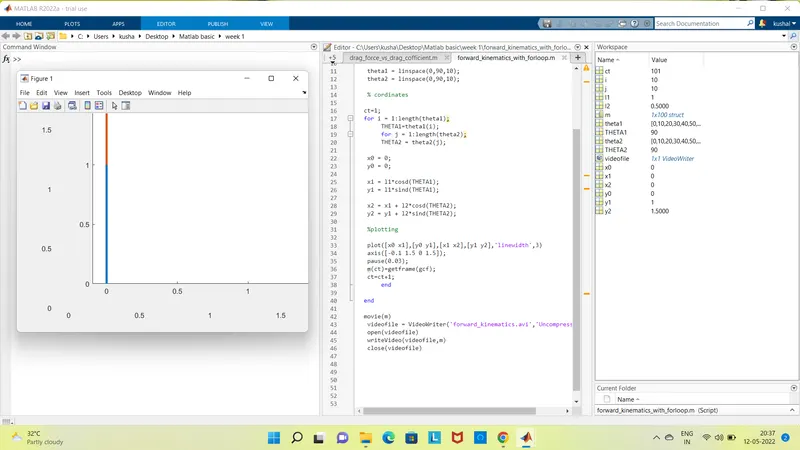
- Programing Language used Matlab Online
- Starting the program by using comments
- Providing the input variables like
- Predifining the length/values of the robotic arms,i.e. l1 and l2
- Providing the values for theta-1 & theta-2 using the linspace command for theta=0 to 90 degrees for 10 values.
- Providing the cr (compression ratio) value as a specific digit.
- Now using 'for' command for iterating the values of the desired variable.
- Again using 'for' commond for providing movement to the second robotic arm.
- Providing the eqn for the x1,y1,x2,y2 or say defining the coordinates of both the robotic arms.
- Plotting all the coordinates values and providing the axis no.
- Using the pause command to make the plot realistic.
- Incrementing the cr or compression ratio value by +1 each time it executes for loop.
- All figures are assigned to a variable M, one at a time using cr.
- Ending the 'for' loop twice.
- Using movie commands to combine all the figures saved in the Mfiles to make an animation/movie.
- At end saving the movie in .avi format.
Animation for 2R Robotic arm
https://drive.google.com/file/d/1wmepo67goI4P_GO3ZcmyBmhu67CIt12B/view?usp=sharing
Error & command window Execution :-
- No errors were found during execution
- use of semi-colon (;) in coding results in no output in command window