Week 3 - Solving second order ODEs
AIM : Write a program to solve the ode in mathlab
Objectives : To make an animation of an simple pendulum and create a video output
Theory : A simple pendulum is a mass suspended from a fixed point of a fixed length of the string. The pendulum is pulled over a distance and released to make some oscialltions as the bob of mass m kg and length l makes an angle thetha with the y axis and it is
substitued as two angle cos and sin.
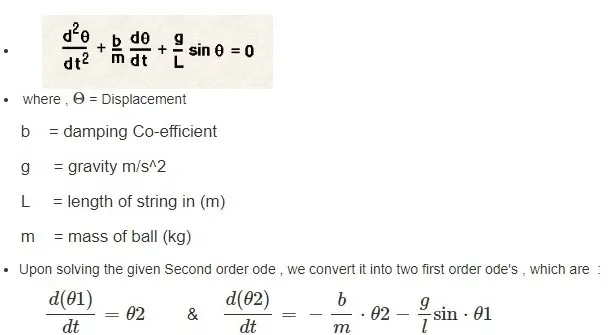
after the trigonometric calcualtions we arrive at the final steps of thetha1 and thetha2
Code :

clear all
close all
clc

%input parameters

b=0.05; %damping coeff
g=9.81;
l=1; %length
m=1; %mass

%inital conditions
theta_0 = [0;3]; %function of dispalcement and velocity

%time intervals
t_span = linspace(0,20,1000);

%solve ode
[t , results] = ode45(@(t,theta)ode_fun(t,theta,b,g,l,m),t_span,theta_0);

plot(t,results (:,1))
hold on
plot(t,results(:,2))
hold on
axis([0 22 -4 4]);
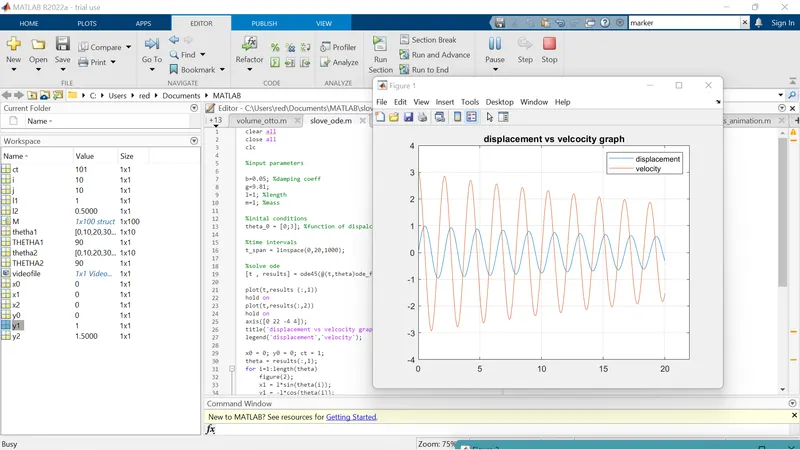
title('displacement vs velcocity graph')
legend('displacement','velocity');

x0 = 0; y0 = 0; ct = 1;
theta = results(:,1);
for i=1:length(theta)
    figure(2);
    x1 = l*sin(theta(i));
    y1 = -l*cos(theta(i));
    plot([-1 1], [0 0],'LineWidth',3,'Color','r')
    hold on
    plot([x0 x1], [y0 y1],'linewidth',3,'color','b');
    hold on
    plot(x1,y1,'o','markersize',10,'MarkerFaceColor','auto')
    hold off
    axis([-1.5 1.5 -1.5 1.5]);
    pause(0.02)
    grid on
    M(ct) = getframe(gcf);
    ct=ct+1;
end

%animation
movie(M)
videofile = VideoWriter('pendulum.avi','Uncompressed AVI')
open(videofile)
writeVideo(videofile,M)
close(videofile)


Function code :

function [dtheta_dt] = ode_fun(t,theta,b,g,l,m)
    theta1 = theta(1)
    theta2 = theta(2)
    dtheta1_dt = theta(2);
    dtheta2_dt = -b/m*theta2-(g/l)*sin(theta1);
    dtheta_dt = [dtheta1_dt;dtheta2_dt];
end
1.Input data and initaial conditions are given.
2.Here we are using the command ode45 to solve the ode equations
3.In order to plot the simple pendulum from the given data we are using a for loop
4.In the for loop the equations of the simple pendulum are given
5.Given the axis and the markersize for the bob and the plot.
6.Create a movie to save the output as a video file by using the movie and saving the file and close the videofile finally
Video :
https://www.youtube.com/watch?v=FRDAyGRtjIs
conculsion :
A program is written to solve the ode and the animation is made.