SOLVING SECOND ORDER ODES
SOLVING SECOND ORDER ODES
AIM : To solves the ODE which represents the equation of motion of a simple pendulum with damping.
OBJECTIVE :
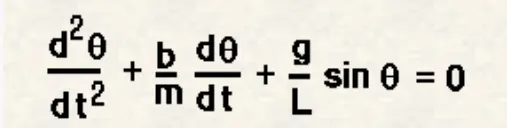
The write a program that solves the following ODE which represents the equation of motion of a simple pendulum with damping and create an animation video of output obtains by solving this ODE.
THEORY :
The motion of a simople pendulum is a basics classical example of simple harmonics motion, consisting of a small bob and a massless string . Movement of the pendulum depends on netwon's second law. When this law is writtendown,a sencond-order ordinary differential equation is formed that describes the position of the end of the pendulum write time.
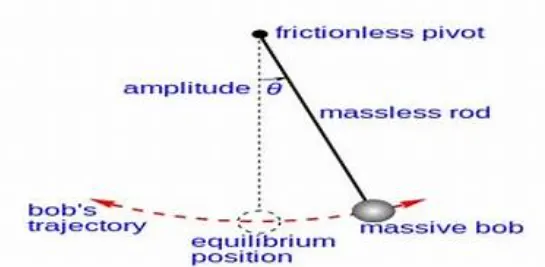
simple pendulum (with FBD)
Equation of motion is:
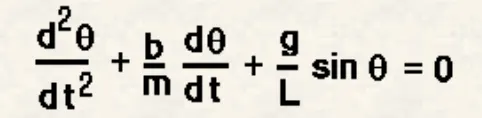
In the above equation,
* G = gravity in m|s^2.
* L = length of the pendulum in the meter.
* M = mass of the ball in kg.
* B = damping coefficient.
Since the given function is in the second-order differential equation we will convert it into first order to solve the ODE.
INPUT:
* L = 1 Metre
* M = 1 Kg
* B = 0.05
* G = 98.1m|s^2
* Time span = 0-20 sec
* Angular displacement = 0
* Angular velocity = 3rad/sec2 at time t = 0
CODE:
% Program to simulate the transient behaviour of a simple pendulum
clear all
close all
clc
% damping co efficiant
b=0.05;
%gravity
g=9.81;
%length
l=1;
%mass
m=1;
%initial condition
theta_0=[0;3];
%time points
tspan=linspace(0,20,200);
%solve ode
[t,results]=ode45(@(t,theta) ode_func(t,theta,b,g,l,m),tspan,theta_0);
% plotting
figure(1)
plot(t,results(:,1))
hold on
plot(t,results(:,2))
ylabel('velocity (red)& displacement (blue)')
xlabel('time')
% animation the pendulam oscillation
ct=1;
for i=1:length(results(:,1))
x0=0;
y0=0;
x1=l*sin(results(i,1)+pi);
y1=l*cos(results(i,1)+pi);
figure(2)
plot([x0 x1],[y0 y1],'-o','MarkerSize',10,'MarkerFaceColor','r','MarkerEdgeColor','r','LineWidth',4);
axis([-2 2 -2 2])
hold on
plot([-1 1],[0 0],'LineWidth',8,'Color','[0 0 0.5]')
title('pendulam oscillation')
pause(0.03)
M(ct)=getframe(gcf);
hold off
ct=ct+1;
end
% movie creating
movie(M)
videofile=VideoWriter('pendulum oscillation','Uncompressed AVI');
open(videofile)
writeVideo(videofile,M)
close(videofile)
CODE FOR FUNCTION PROGRAM:
% ODE function
function [dtheta_dt]=ode_func(t,theta,b,g,l,m)
theta1=theta(1);
theta2=theta(2);
dtheta1_dt=theta2;
dtheta2_dt=-(b/m)*theta2-(g/l)*sin(theta1);
dtheta_dt=[dtheta1_dt;dtheta2_dt];
end
Detail explanation each step of the program:
1. In the first step input and initial condition of a simple pendulum are fed.
2. Then the program is written to solve the ODE in which matlab inbuilt function (ode45) is used with constant theta,t,and another function program.
3. In the next step result of solved ODE is plotted write time using plot command.
4. Now iteration of co-ordinate is fed using for loop to create animation.
5. Then plot command is used to plot pendulum string and bob.
6. In the next step,the move command video of the oscillating pendulum.
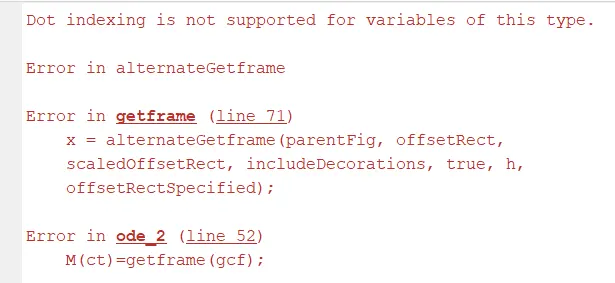
Various Error faced during programming are followed:
1. spelling mistake in writing function program .
The step taken to overcome this error:
* By correction spelling mistake from the function program by reviewing each reviewing each line of the program.
OUTPUT:
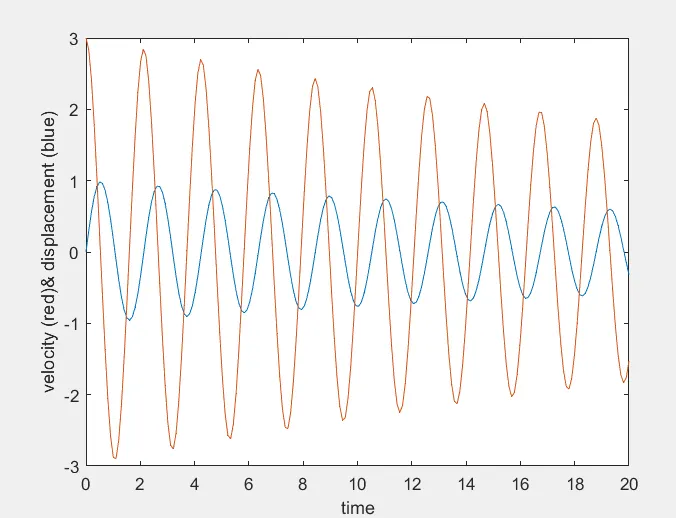
1. The output obtained is graphical representation velocity curve and displacement curve write time.
* Angular displacement and angular velocity plot were generated for a time range of 20 secs.
RESULTS :
Animation of simlpe pendulum
https://youtu.be/Yqqq8zv-_LU
Conclusion :
The simulation of the transient behavior of a simple pendulum is successfully created by using a program in MATLAB.