Week 3 - Solving second order ODEs
- INTRODUCTION: - The pendulum is a body or mass suspended from a fixed point so that it can swing back and forth under the influence of gravity. Pendulums are used to regulate the moment of clock because the interval of time for each complete oscillation, called the period, is constant. The period depends on the length of the pendulum and also to a slight degree on the amplitude, the width of the pendulum's swing.
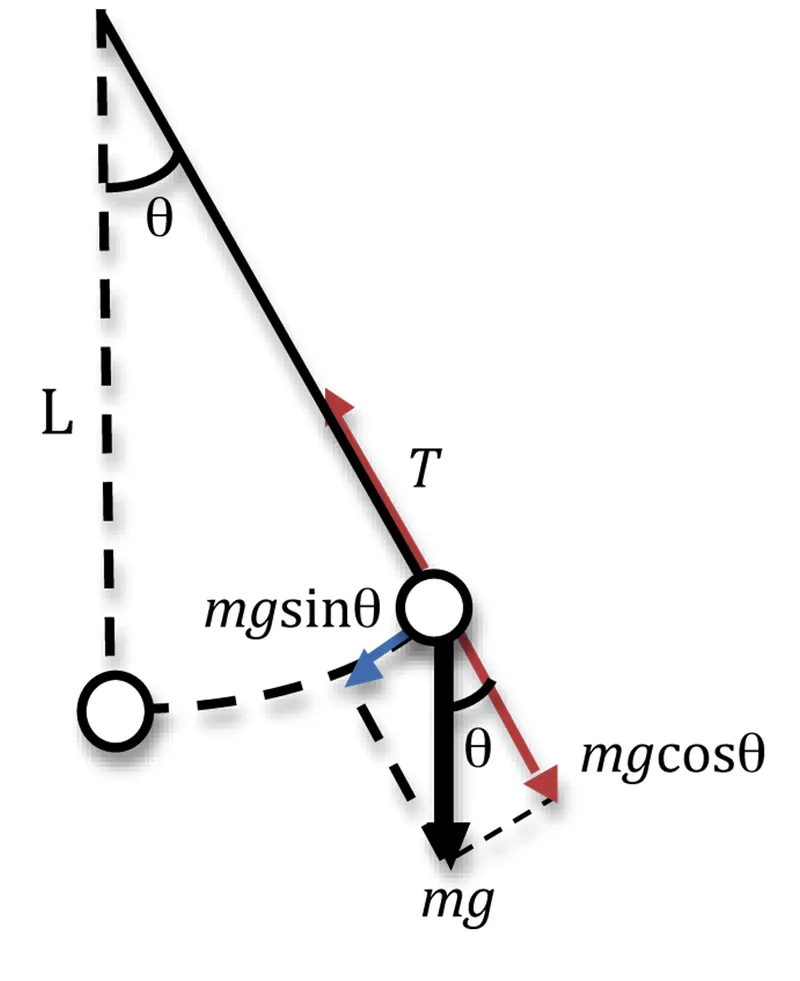
- AIM: - To solve the second order ode function using MATLAB which depends the motion of the pendulum and to create an animation of the same.
- OBJECTIVE: - To write a program that solves the following ODE. this ODE represents the equation of the motion of a simple pendulum with damping
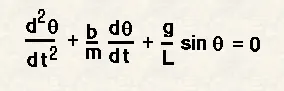
In the above equation,
g = gravity in m/s2,
L = length of the pendulum in m,
m = mass of the ball in kg,
b=damping coefficient.
- FIXED PARAMETERS
Length(L) = 1meter,
Mass(m) = 1kg,
Damping coefficient(b) = 0.05.
Acceleration due to gravity(g) = 9.81m/s^2.
for time period = 0-20sec
Angular displacement = 0, Angular velocity = 3rad/sec at time t = 0.
- FUNCTION CODE:-
function [dtheta_dt] = ode_func(t,theta,b,g,l,m)
theta1 = theta(1)
theta2 = theta(2)
dtheta1_dt = theta2;
dtheta2_dt = -(b/m)*theta2 - (g/l)*sin(theta1);
dtheta_dt = [dtheta1_dt; dtheta2_dt];
end
EXPLANATION:
- In this function program, the second-order ODE is simplified to the first-order ODE by introducing the term theta1 and theta2.
- Then theta1 and theta2 is differentiated and the dtheta_dt gives a column matrix.
- MAIN PROGRAM:
clear all
close all
clc
%input variables
b = 0.05;
g = 9.81;
l = 1;
m = 0.1;
%initial condition
theta_0 = [0;3];
%time points
t_span = linspace(0,20,500);
%solve ODE
[t, results] = ode45(@(t,theta) ode_func(t, theta,b,g,l,m),t_span,theta_0);
figure(1)
plot(t,results(:,1))
hold on
plot(t,results(:,2))
grid on
xlabel('Time')
ylabel('plot')
angle = results(:,1);
%count command for iterations
ct = 1;
for i = 1:length(results(:,1))
x0 = 0;
y0 = 0;
x1 = l*sin(results(i,1)+pi);
y1 = l*cos(results(i,1)+pi);
figure(2)
plot([x0 x1],[y0 y1],'-o','MarkerSize',10,'MarkerFaceColor','r','MarkerEdgeColor','r','linewidth',4)
axis([-2 2 -2 2])
hold on
plot([-1 1],[0 0],'linewidth',5,'color','[0 0.3 0]')
hold off
M(ct)=getframe(gcf)
ct = ct+1;
end
%myWriter = VideoWriter('ode');
myWriter = VideoWriter('ode');
myWriter.FrameRate = 10;
%open the VideoWriter object, write the movie, and close the file
open(myWriter);
writeVideo(myWriter, M);
close(myWriter);
EXPLANATION:
- In the above program, the fixed parameters are length, mass, damping coefficient, and acceleration due to gravity.
- time and angle are given as the initial condition.
- in the t_span command, 200 values are taken in between 0 to 20 times period.
- using the ode 45 command ODE function is introduced.
- using the plot command velocity and displacement is plotting in the y-axis against time in the x-axis.
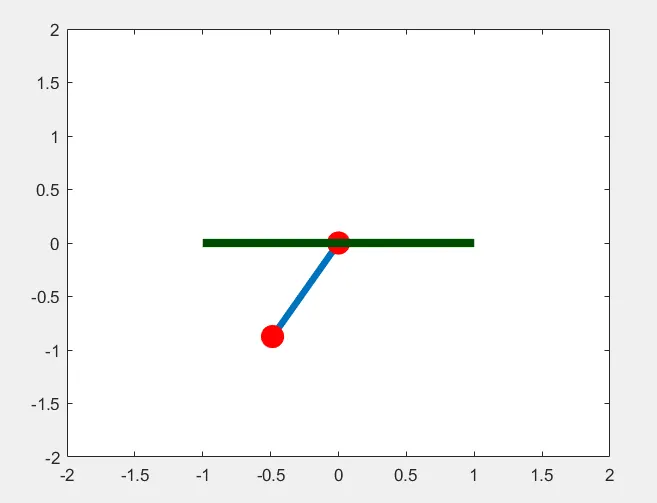
- using the for loop command the mass at various points and various times are marked in the graph and are plotted.
- using the movie command, the plot is saved as an avi file.
- OUTPUT:
- A plot is drawn between the angular acceleration and displacement of the motion of simple pendulum
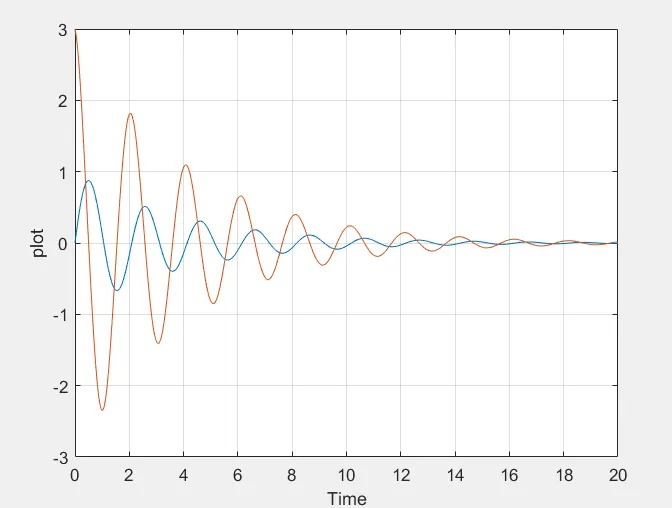
2. The blue curve is the displacement where it starts from zero. and the angular velocity is starting at 3 (rad/sec).
3. at the end of the t_span both the displacement and angular velocity becomes zero and motion of simple pendulum becomes also zero which becomes rest.
- animation(drive link):-
https://drive.google.com/file/d/1RkUKzVbU3gqI1H4HtbKQP6_Zo6eKbyyL/view?usp=sharing
- CONCLUSION:
- we have animated the simple pendulum using the ode45 solver where the second order is reduced to a simple differential equation where it is easy to solve the give equation.
- the animation is made using the different points of the bob and the motion of the simple pendulum is created.