Week 2- 2R Robotic Arm Challenge
Aim: - Write a program to simulate the forward kinematics of a 2R robotic arm using MATLAB, where one arm is fixed.
Objective: - To perform a task which is based on the 2D robotic arm which has to arm, one is fixed and another one is connected with the first arm, we have to evaluate its movement at different values of θ.
Theory: -
Work Space: - it is the possible space where robot can be reach
- calculate the position of link 1
- calculate the position of link 2
forward kinematics: - it is referred to use kinematics equation and take the input from the fixed arm and calculate the certain location and position of the end-effector.
Data Are Given: -
theta1- Angle between fixed link and first link.
theta2- Angle between first link and second link.
l1- length of the first link.
l2- length of the second link.
Calculation: -
- coordination for first link with fixed link (x0, y0)
- coordination at both links is connected (x1, y1)
- coordination at the end of the second link (x2, y2)
x0 = 0
y0 = 0
x1 = l1cosd(theta1)
y1 = l1sind1(theta1)
x2 = x1+l2cosd(theta2)
y2 = y1+l2sind(theta2)
program 1: - In this first program, the only graph will generate between two links with the value of theta, for 60 and 30 respectively.
%A program for forward kinematics of a 2R Robotic Arm
clear all
close all
clc
%Input
l1 = 1;
l2 = 0.5;
theta1 = 60;
theta2 = 30;
%Coordinates
x0 = 0
y0 = 0
x1 = l1+cosd(theta1)
y1 = l2+sind(theta1)
x2 = x1+cosd(theta2)
y2 = y1+sind(theta2)
%plotting
line ([x0 x1], [y0 y1],'linewidth',3,'color','b')
line ([x1 x2], [y1 y2],'linewidth',3,'color','r')
xlabel('x-axis')
ylabel('y-axis')
Result: -
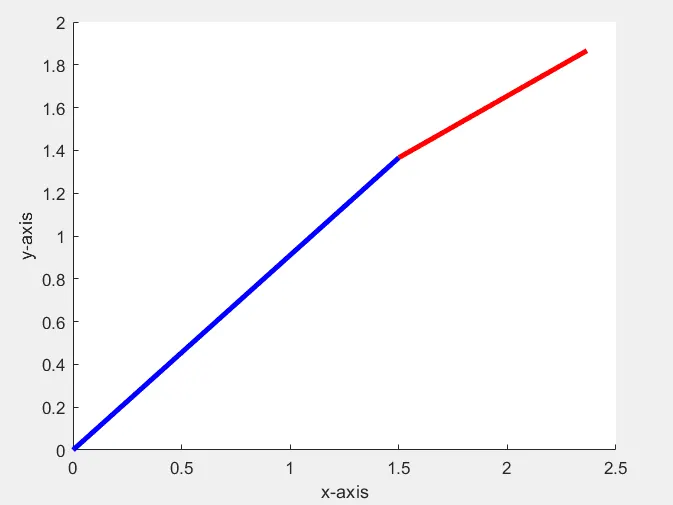
- From the above image, we can see that the difference between angle in which two arm represented.
program 2: - Two perform avi file of moving two arms with respect to each other.
%a program to simulate a robotic arm
clear all
close all
clc
%Input
%Length
l1 = 1;
l2 = 0.5;
%Angle
theta1 = linspace(0,90,10);
theta2 = linspace(0,90,10);
%Using for loop for plotting
ct = 1;
for i = 1: length(theta1)
THETA1 = theta1(i);
for j = 1: length(theta2)
THETA2 = theta2(j);
x0 = 0;
y0 = 0;
x1 = l1*cosd(THETA1);
y1 = l1*sind(THETA1);
x2 = x1+l2*cosd(THETA2);
y2 = y1+l2*sind(THETA2);
%plotting
plot([x0 x1],[y0 y1],[x1 x2],[y1 y2],'linewidth',3)
axis([-0.1 1.5 0 1.5])
pause(0.03)
M(ct) = getframe(gcf);
ct = ct+1;
end
end
movie(M)
videofile = VideoWriter('forward_kinematics.avi','uncompressed.avi');
open('videofile')
writeVideo(videofile,M)
close('videofile')
Drive link: - https://drive.google.com/file/d/1kvxtTdtJrO1vmJpd-ZXhNQQweoY3nnCK/view?usp=sharing
Discussion: - Here we can see that with the different value of θ the robotic arm performs different shapes and movie in different spaces. It’s going from 0 to 90 degree with the interval of 10.
The Result:- By using a MATLAB here we generate the avi file of 2 arm robotic and perform the task which shows the variation an angles.
Conclusion:- using MATLAB here we can find the output of forward kinematic of 2 arm robotic by giving the input in the input arm it will calculate the position in space at a certain location.