Week 3 - Solving second order ODEs
AIM: TO SIMULATE THE MOTION OF A PENDULUM WITH THE HELP OF MATLAB AND ODE45 SOLVER
GIVEN DATA;
L = 1 M;
M=1 KG;
b = 0.05
G = 9.81 MS^-2;
SIMULATE MOTION FOR A PERIOD OF TWENTY SECONDS.
THEORY: WITH DAMPING IN CONSIDERATION THE DIFFERENTIAL EQUATION IS AS FOLLOWS;
`F''(theta)+(b/M)*F'(theta)+(g/L)*sin(theta)=0`
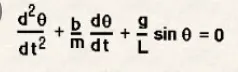
THETA INDICATES POSITION;
T INDICATES TIME IN SECONDS;
b - DAMPING COEFFICIENT
M-MASS OF BOB;
g- ACCELERATION DUE TO GRAVITY;
L- LENGTH OF STRING;
CODE AND EXPLANATION:
% function code
function xdot = pendulum_dynamics(t,x)%assigning function name with time and position
% assigning given values
b=0.05; %damping coefficient
m=1; %mass of bob
g=9.81; %acceleration due to gravity
L=1; %length of string
xdot = zeros(2,1);%assigning null matrix as initial conditions
xdot(1)=x(2);% represents angular velocity
xdot(2)=(-b/m)*x(2)-(g/L)*sin(x(1));% value at x(2) condition
end
FIRST A FUNCTION IS WRITTEN TO ASSIGN VALUES IN THE FORM OF AN ARRAY FOR TIME AND POSITION, ALSO WE ASSIGN GIVEN CONSTANTS HERE , TO SOLVE A SECOND ORDER DIFFERENTIAL EQUATION USING ODE45 WE HAVE TO CONVERT IT TO FIRST ORDER DIFFERENTIAL BY ASSIGNING THE OBTAINED CONDITIONS. THIS WILL BE USED TO CALL IN THE MAIN PROGRAM AS FOLLOWS:
MAIN PROGRAM:
clear all
close all
clc

L=1;
t = linspace (0,20,200);
x0 = [0 3];
% to solve a differential equation
[t x]= ode45('pendulum_dynamics',t,x0);
% plot to trace angular velocity and displacement
hold on
%subplot(2,1,1);% helps in creating different graphs on requirement
plot(t,x(:,1),'-b','linewidth',3);
xlabel('time in seconds');
ylabel('angular displacement/angular velocity');
% variation of angular velocity in same plot of above
%subplot(2,1,2);
plot(t,x(:,2),'-k','linewidth',1.5);
%xlabel('time in seconds');
%ylabel('angular velocity');
grid on;
% animation
X0 = 0; % assigning initial conditions
Y0 = 0;
ct =1 ;

for i=1:length(t) % loop for carrying iterations for different positions
    X1 = L*sin(x(i,1));
    Y1 =-L*cos(x(i,1));

    figure(2)
    plot([-1 1],[0 0],'linewidth',6,'color','g'); % plot the fixed line of pendulum
    axis([-2 2 -2 2]);
    line([X0 X1],[Y0 Y1],'linewidth',2,'color','b');
    hold on;
    plot (X0,Y0,'O','markersize',3,'markerfacecolor','y');
    plot (X1,Y1,'O','markersize',20,'markerfacecolor','r'); % plot the bob
    title ('damping of simple pendulum');
    legend('support rod','length of pendulum','fixed point','bob of pendulum'); % specify different parts of the suspended pendulum
    grid on;
    hold off;
    M(ct)=getframe(gcf);% captures current axes on screen as a movieframe and stores it
    ct=ct+1;
end
movie(M); % to play the movie
videofile=VideoWriter('pendulummotion','uncompressed AVI');
open(videofile); %opens specified videofile
writeVideo(videofile,M); % to write the video file
close(videofile); % to close the video file
AFTER USING LINSPACE TO ASSIGN TIME AND EQUALLY SPACED INTERVALS WE SOLVE USING ODE45 SOLVER TO GET THE VALUES BY CALLING IN THE FUNCTION AND THEN ACCESSING THE VALUES AT DIFFERENT POSITIONS OF THE MATRIX AND THEN PLOT FOR ANGULAR VELOCITY,ANGULAR DISPLACEMENT WITH RESPECT TO TIME. THEN TO CREATE AN ANIMATION WE WILL HAVE TO CAPTURE THE FRAMES FOR DIFFERENT INTERVALS AND DIFFERENT VALUES OF VELOCITY AND DISPLACEMENT, WHERE WE ALSO ALLOCATE DIFFERENT PARTS OF PENDULUM TO CAPTURE THE MOTION.
THEN WE CREATE A MOVIE AND WRITE VIDEO USING THE NECESSARY COMMANDS TO PLAY THE VIDEOFILE.
VIDEOLINK: https://www.youtube.com/watch?v=U8quKkCGHfc
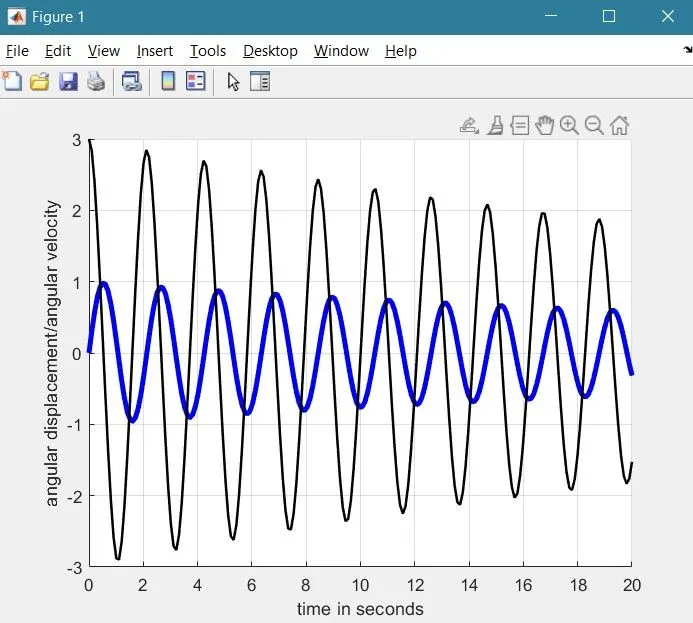
ERRORS FACED AND RESOLUTION:
IN ASSIGNING A CERTAIN ELEMENT OF A MATRIX , ASSIGNING WRONG INDEXING SYMBOLS PREVENTS EXECUTION(: IS THE RIGHT ONE).
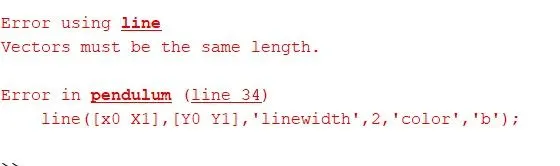
MAKING SURE THAT THE ASSIGNED VARIABLES ARE OF SAME LENGTH I.E. PROPER CASE SENSITIVITY.