Week 3 - Solving second order ODEs
AIM
Create a animation for simple pendulam
Procedure
to solve the equation `d^2theta/dt^2+b/md theta/dt+g/lsintheta=0`
% creating ODE function
function [dtheta_dt]= ode_func(t,theta,b,g,l,m)
 theta1 =theta(1);
 theta2 =theta(2);
 dtheta1_dt=theta2;
 dtheta2_dt=-(b/m)*theta2-(g/l)*sin(theta1);
 dtheta_dt=[dtheta1_dt;dtheta2_dt];
end
Explanation
The function is created for solving the ode and generating output. Here input values are time,theta,b.g,l,m. Here the 2 nd order ODE is simplified into 2 first order ODE.
% Progrme for solving simple pendulam
clear all
close
clc

% inputes
b=0.05;
g=9.81;
l=1;
m=1;
ct=1;

% initial condition
theta_0=[0;3];

% time points
t_span=linspace(0,20,600);

% solve ODE
[t,results]=ode45(@(t,theta) ode_func(t,theta,b,g,l,m),t_span,theta_0);

% plotting
figure(1)
plot(t,results(:,1))
hold on
plot(t,results(:,2))
ylabel('Velocity')
xlabel('time')
grid on

% creating animation for the pendulum
theta2 = results(:,1);
for i=1:length(theta2)
theta_x= theta2 (i);
x0 = 0;
y0 = 0;
x1 = 1*sin(theta_x);
y1 = -1*cos(theta_x);

% ploting the pendulum
figure(2)
plot([-1 1],[0 0], 'color', 'r', 'linewidth',7);
hold on
plot([x0 x1], [y0 y1], 'color', 'y', 'linewidth', 3);
hold on
plot (x1,y1, 'o', 'markers', 20, 'markerfacecolor', 'b');
hold off
axis([-1.5 1.5 -1.5 0.5]);
pause (0.002);
M(ct) = getframe(gcf);
ct = ct+1;
end
movie (M)
videofile= VideoWriter('pendulum_animation.avi', 'Uncompressed avi');
open(videofile);
writeVideo(videofile,M)
close(videofile)
Explanation
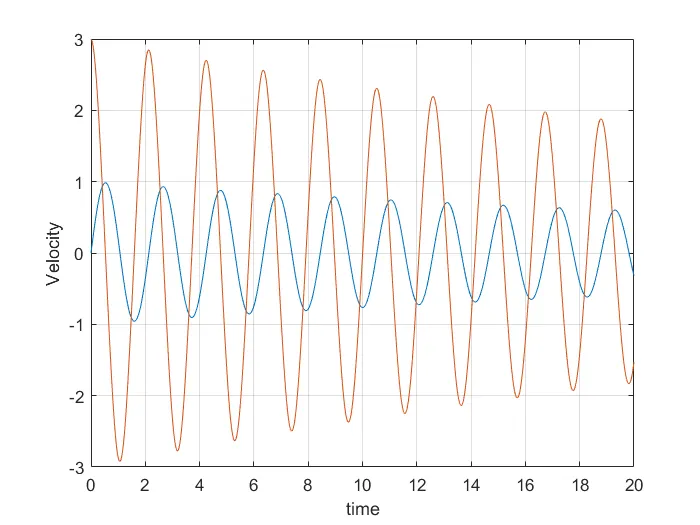
First we entered our input values b,m,g,l and ct, also inserted the inital conditions dor displacement and velocity i.e. 0 m and 3 rad/sec respectively. Next introduced a time vector to simulate the motion between 0 to 20 seconds using linspace command. To solve ODE function ode45 command is used with variables t, theta. To plot velocity v/s time graph plot command is used.
To generate the animation of the plot first we will define a new variable theta2 to the result that are generated. Then this variable is introduced into a foor loop which will later be assigned the steps to a new variable theta_x. By giving the conditions for the string x0,y0 is fixed and x1 andy1 is changing w.r.t time. For plotting the animation first fixed point is plotted then string that attached to the fixed point and bob is at the other end is plotted is plot command her marker command is used to plot bob. For generating the movie first created array 'M'. ct command used to incrementing the frame count. VideoWriter command used to generate avi file, writeVideo used to write the file lated closing the video.
Result
Angular velocity time graph
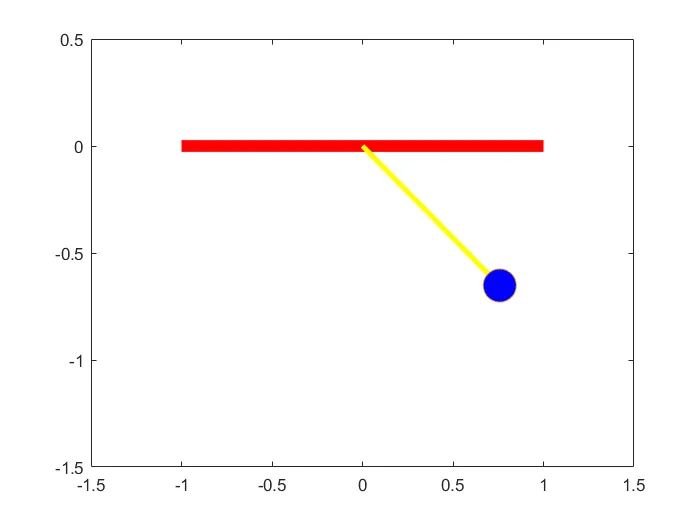
Link for the animation
Syntax of ode45
[t,y] = ode45(odefun,tspan,y0)
[t,y] = ode45(odefun,tspan,y0,options)
[t,y,te,ye,ie] = ode45(odefun,tspan,y0,options)
sol = ode45(___)