Week 3 - Solving second order ODEs
AIM:
To solve a second order ordinary differential equation of motion of a simple pendulum.
OBJECTIVE:
- To write a program that solves the ODE given which represents the equation of motion of a simple pendulum with damping using ode45 solver and create an animated video of output.
- To create the animation of a simple pendulum
THEORY:
Ordinary Differential Equation(ODEs):it is a differential equation containing one or more functions of one independant variable and the derivatives of those functions.
Simple Pendulum:
The simple pendulum is an idealized mathematical model of a pendulum.This is a weight(or bob) on the end of a massless cord suspended from a pivot,without friction.When given a initial push,it will swing back and forth at a constant amplitude.Real pendulums are subject to friction and air drag so the amplitude of their swings declines.
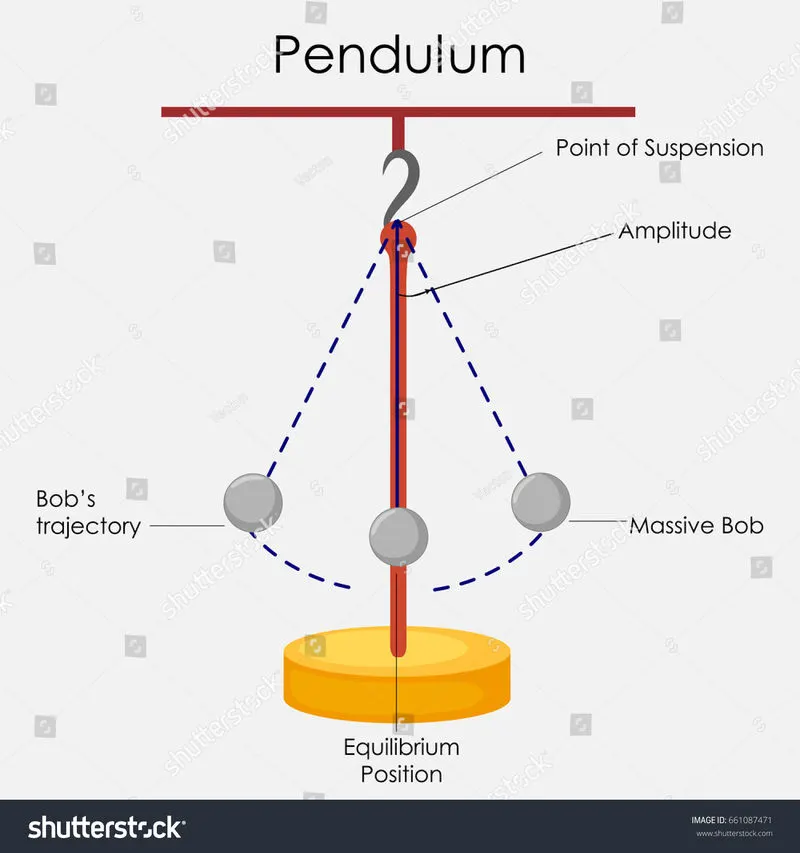
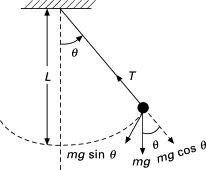
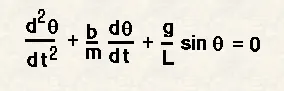
Equation of the motion is:
`/dt=-(b/m)*theta2-(g/l)*sintheta`
where,
g=gravity in m/s^2
L=length of the pendulum in the meter
m=mass of the ball in kg
b=damping coefficient
To solve ODE(1) it needs to be converts in to 1st order.
so,
let `theta=theta1`----------------(1)
`d theta`/`dt=d theta1``/dt=theta2`----------(2)
`d^2theta``/dt^2=d theta2``/dt`-------------(3)
then the second order equation become as
`d theta2``/dt=-(b/m)*theta2-(g/l)*sintheta`
By using this equation and ode45 solver we can animate the simple pendulum by writing a code in the matlab.
Input:
- L=1m
- m=1kg
- b=0.05
- g=9.81 m/s^2
- Time span=0-20sec
- angular displacement=0
- angular velocity=3rad/sec at time t=0
MATLAB CODE:
Code function of ode45 for main program
function [dtheta_dt] = ode_func(t,theta,b,g,l,m)
theta1 = theta(1);
theta2 = theta(2);

dtheta1_dt = theta2;
dtheta2_dt = (-(b/m)*theta2 - (g/l)*sin(theta1));
dtheta_dt = [dtheta1_dt; dtheta2_dt];
end
Code for simple pendulum:
% program for simple pendulum using ode45
clear all
close all
clc

% inputs
b = 0.05;
l = 1;
m = 1;
g = 9.81;

% initial condition
theta_0 =[0;3];

% time points
t_span = linspace(0,20,500);

% solve ODE
[t,results] = ode45(@(t,theta) ode_func(t,theta,b,g,l,m),t_span,theta_0);

figure(1)
plot(t,results(:,1))
hold on
plot(t,results(:,2))
xlabel('Time')
ylabel('velocity')
legend('Displacement','Angular velocity')
grid on
hold off

displacement = results(:,1);


% fixed coordinates
x0=0;
y0=0;
ct=1;

for i =1 : length(displacement)
    omega = displacement(i);
    figure(2)
    title('motion of pendulum')

    % moving coordinates of the bob
    x1 = 1*cos((3*pi/2)+omega);
    y1 = 1*sin((3*pi/2)+omega);

    % plotting of the bob motion
    plot([x0 x1],[y0,y1],'LineWidth',5,'Color','g');
    hold on;
    plot(x1,y1,'o','markers',15,'markerfacecolor','k');
    hold on;
    plot([-3 3],[0 0],'LineWidth',2,'Color','b');
    hold off
    axis([-3 3 -2 2])
    grid on
    pause(0.1)
    M(ct) = getframe(gcf);
    ct = ct+1;
end

% to create a animation of the simple pendulum
movie(M)
videofile=VideoWriter('simple pendulum.avi','Uncompressed AVI');
open(videofile)
writeVideo(videofile,M)
close(videofile)
CODE EXPLANATION:
- Clear all,close all, clc are used to clear the workspace,plots and command window.
- The inputs given are given like b=damping coefficient=0.5,g=9.81,l=length of string=1m,m=mass of the bob =1kg.
- t_span is a command used in the ode45 solver which specifies the time span of the iterations
- ode45 is a MATLAB function that solves ordinary or partial differential equations .
- The ode45 function has a syntax in which we need to specify which should be 't' and 'y' and the output(t,y,args) and a timespan for the function to work and the initial value of the equation.
- syntax od ode45 solver
[t,results] = ode45(@(t,y) ode(t,y,args),t_span,y0).
- Then the values of angular velocity and displacement are plotted
- The label command is used to label the x and y axis
- Then the legend command is used to label the angular velocity and displacement
- Then a for loop is used to create the specified set of points to keep the bob at different locations.
- x0 and y0 is the fixed point at one end of the string and x1 and y1 be the different position of bob.
- The ct command is used to count each position and stores the data
- The Movie(m) is to create a film of motion of the pendulum
- videoWriter command gives the name of file and type of data stored in it
- Open command used to open the file where the video is going to store
- Writevideo command is used to create the video animation
ERRORS:
no major errors were found.
RESULTS:
- The graph for the velocity vs time which shows displacement and angular velocity
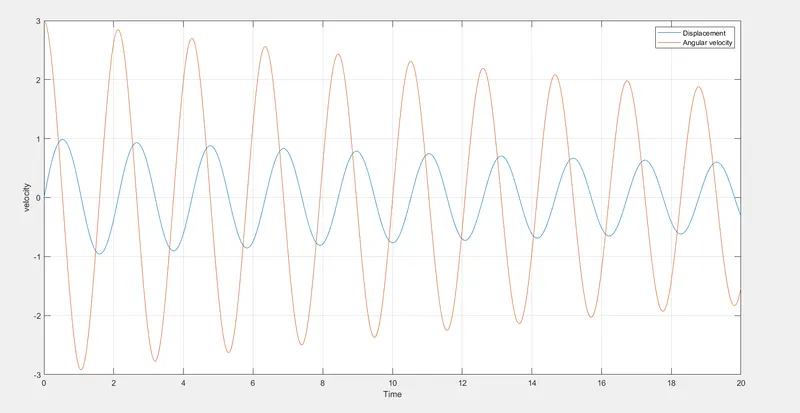
From this graph the Displacement and angular velocity is decreasing by the increased time due to the introduction of damper.
2.Animated file of the simple pendulum
https://drive.google.com/file/d/1zQ0iYrBI6jeGAq_7pLcIeqEptuSe8zFx/view?usp=sharing
CONCLUSION:
- The simple pendulum is animated using ode45 solver where the second order is reduced to a simple differential equation to solve the given equation easily.
- The animation file is made with the motion of simple pendulum.
***********************************************************************************************************************************************************