Week 2- 2R Robotic Arm Challenge
AIM:
To write a program in MATLAB to simulate the forward kinematics of a 2R Robotic Arm.
Objective:
- To create a program to simulate forward kinematics of a 2R robotic arm.
- To create a animation file from the plots obtained from the program
Theory:
Robotic Arm:
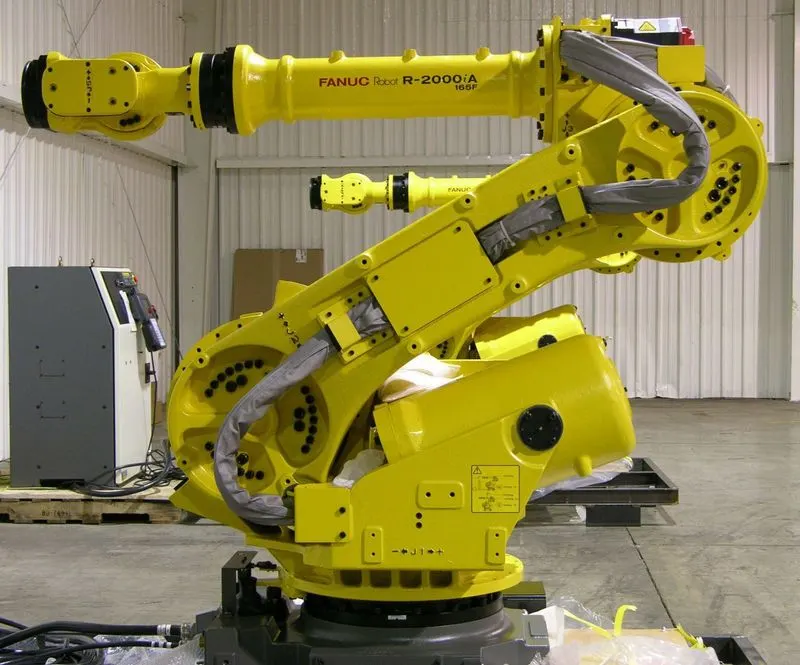
A Robotic arm is a robot manipulator,usually programmable, with similar functions to a human arm.The links of such a manipulator are connected by joints allowing either rotational motion or translational displacement.The arm may be the sum total of the mechanism or may be part of a more complex robot.The links of the manipulator can be considered to form a kinetic chain.The terminus of the kinetic chain of the manipulator is called the end effector and it is analogous to the human hand.
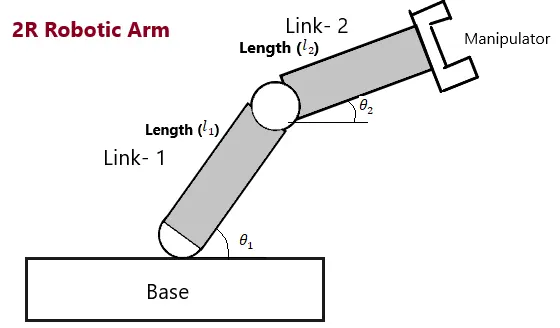
In the image shown above the robotic arm consists of 4 components,
- The Base,which is clamped to the surface and all other links are joined through hinge joint.
- Link 1(l1) making `theta`1 with horizontal.
- Link 2(l2) making `theta`2 with horizontal.
- The device attached to the manipulator which interacts with its environment to perform tasks(End effector).
Inputs:
- Here Assume that the length of link 1 and link 2 as 1 m and 0.5 m respectively.
- Provide the values for `theta`1 and `theta`2 using linspace command for `theta``degree` - 90`degree` with 15 points between them.
- The coordinates base, (the origin) is assumed as (0,0).
- The coordinates of end points of link 1 (l1) can be found by using trigonometry as,
x1 = l1.`cosd(theta1)` and y1 = l1.`sind(theta1)`
- Similarly, the coordinates of end point of link 2 (l2) as,
`x2=x1+l2.cosd(theta2)` and `y2=y1+l2.sind(theta2)`
MATLAB CODE
% Program for 2R Robotic arm challenge
clear all
close all
clc

% inputs
l1 = 1;
l2 = 0.5;
theta1 = linspace(0,90,15);
theta2 = linspace(0,90,15);
ct = 1;

% for loop
for i = 1:length(theta1)
    THETA1 = theta1(i);
  for j = 1:length(theta2)
    THETA2 = theta2(j);

 % Coordinates
 x0 = 0;
 y0 = 0;

 x1 = l1*cosd(THETA1);
 y1 = l1*sind(THETA1);

 x2 = x1+l2*cosd(THETA2);
 y2 = y1+l2*sind(THETA2);

%Plotting
plot([x0,x1],[y0,y1],[x1,x2],[y1,y2],'lineWidth',3)
axis([-0.1,2,0,1.5])
pause(0.01)
M(ct) = getframe(gcf);
ct = ct+1;
  end
end

movie(M)
videofile = VideoWriter('Robotic_Arm.avi','Uncompressed AVI');
open(videofile)
writeVideo(videofile,M)
close(videofile)
Errors:
A basic syntax error is observed

This error is rectified by putting a 'comma' between y1 and y2 in line 30.
Result/Conclusion
Thus by using matlab programming we have simulated a 2R Robotic arm and also created a movie/animation from the plots obtained.
Below is the link given for the program output for movie/animation of a 2R Robotic Arm.
https://drive.google.com/file/d/1MKblMEfpGjcosfOw4yc26NWVQ2pgZLJL/view?usp=sharing