Week 3 - Solving second order ODEs
Objective :-
Write a program that solves the following ODE. This ODE represents the equation of motion of a simple pendulum with damping.
Requirements :-
- To create an animation of simple pendulum.
- Program to solve 2 nd order ODE function using matlab.
Presentation :-
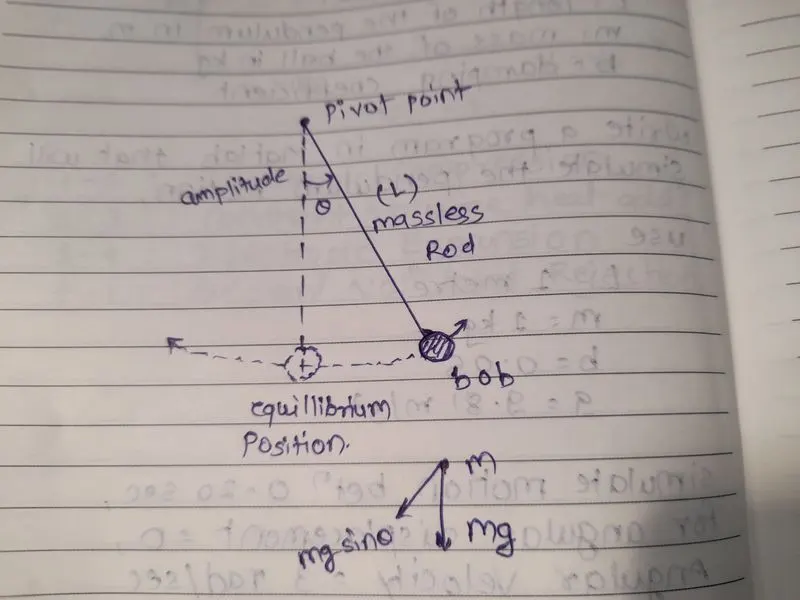
- Simple Pendulum is an idealized mathematical model. weight (bob) end of the cord suspended from pivot without friction.
- Simple pendulum consist of a mass 'm' hanging from a string of the length 'l' and fixed at a pivoted point, when displacement an initial angle 'theta' and released the pendulum will swing back to front with perodic motion.
- The ode45 solver should require simple differencial equation to solve any kind of highter Equation.
- One or more function of one independent variable and derivative of those function.
- ODE helps us to solve many engineering systems like vabration , damping harmonic.
- ode45 is usually the function of choice amoung the ODE solvers. it compares the method of order four and five estimate error and dertermine step size.
Equation :-
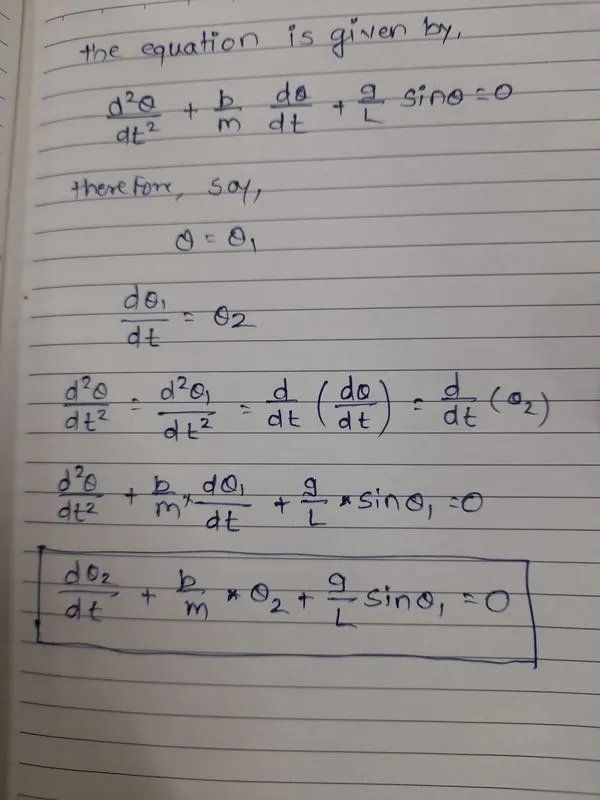
with the help of 2 nd order ODE equation will calculate velocity and position of pendulum with respect to time.
where,
- g = Gravity in m/s^2
- L = length of pendulum in m
- m = mass of the bob in kg
- b = damping coefficient
Inputs :
- L = 1 meter
- m = 1 kg
- b = 0.05
- g = 9.81 m/s^2
- simulate motion between 0-20 sec
- angular dispacement = 0
- angular velocity = 3 rad/sec
- time t = 0
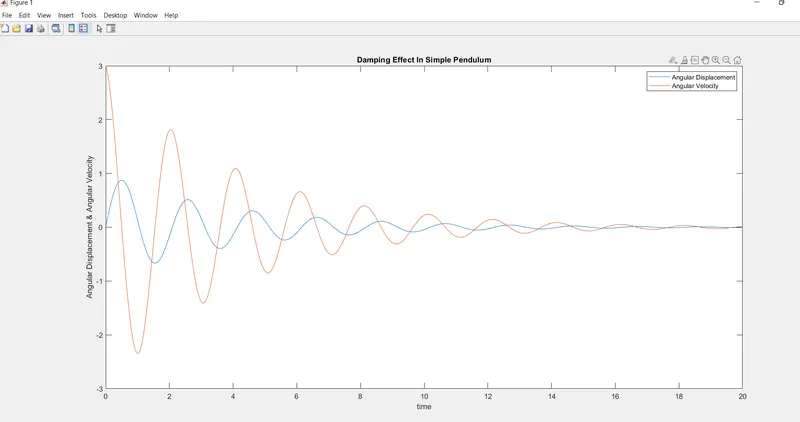
Ode45 compares methods of orders four and five to estimate error and determine step size. by using ode45 solver in program results are stoares in an array of row matrix of two column for the value of dispacement and velocity of different time periods.
Code :-
ODE Function
- Firstly te given details are assign as variables in the code. the time span of simple pendulum is set by using linspace command
- we have to define the ode_func is that the two ode equation is written and the value od some constant is given i.e. damping coefficient (b) , gravity (g) , length of pendulum (L) , mass (m).
- Discribes all input values are required pendulum settings.
- then simulate the motion between 0-20 sec, then solve ode by using ' ode45 ' function, plot figures.
- ode 45 is the function in matlab that solves ordinary or partially differencial equation is changed to simple differncial equation.
- function atleast take 2 inputs to solve the equation.
- the angular velocity and displacement will come to rest at end of the function.
- Values of angular velocity and displacement plot by using plotting command.
- label command used for x axis and y axis name.
- animate the motion of simple pendulum , a for loop is used to creat the specifies the set of points to keep the bob at different locations.
- x0 , y0 are the fixed points of one end of the string and x1 , y1 are different position of the bob.
- each and every point of the bob the 'ct' command is used to count position and stoare data
- movie M is used to create film to stoare date
- videowriter command specifies name of the file and typr of the data.
- create video animation writevideo command used.
@ - Anonymous Functions:
It is asscociate with the variable , this function not stoared in a program file. this function accept multiple inputs and return one output.
Output :-
Animation :-
Errors 1) - Spelling Mistake
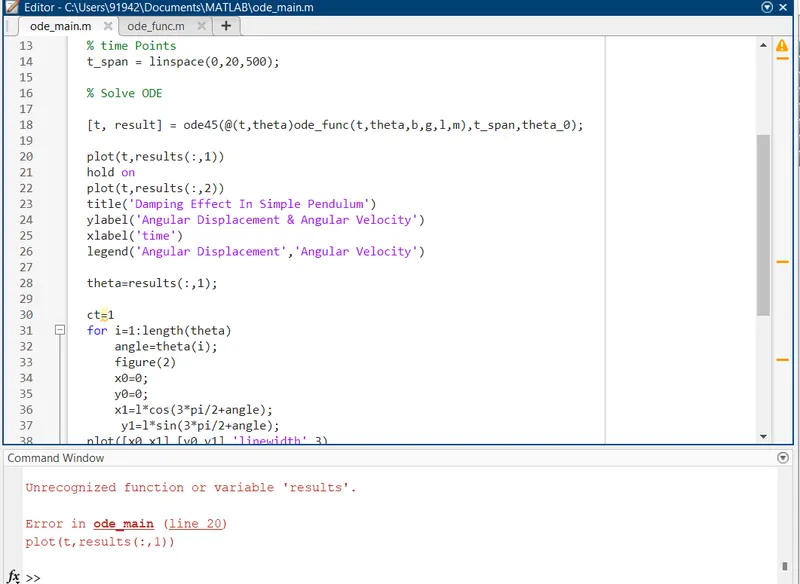
Corrective Action - correceted spelling mistake of result to results.
Error 2) - Invalid Expression
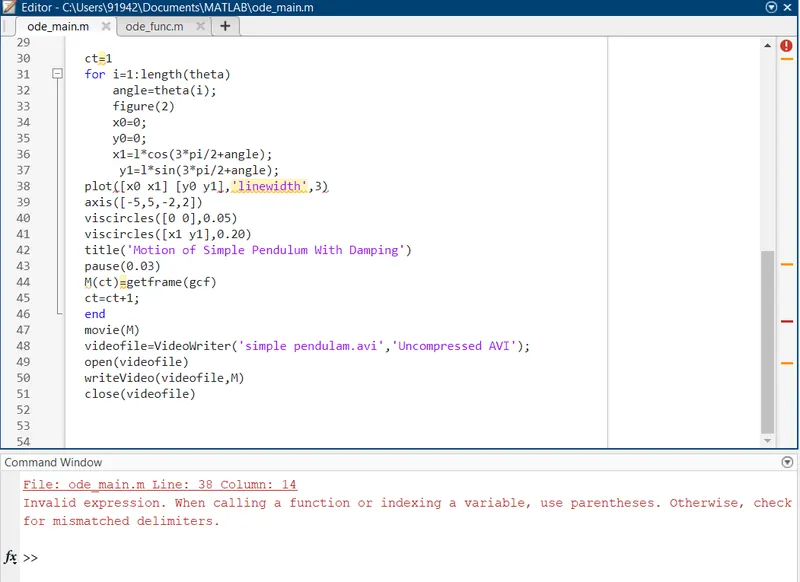
Corrective Action - addition of ','