Week 2- 2R Robotic Arm Challenge
Objective : - Write a Program in Matlab to Simulate the Forward Kinematics of a 2R Robotic Arm.
Step-wise explanation of the Code.
Create an animation File of the plot.
Robotic Arm:-
robotic arm is type of mechnaical arm , similar function of human arm.arm link such as manipulator are connectred by joints allowing either rotational motion or translational displacement. Calculating postion and orientation o the end effector in the terms of joint variables is called forward kinematics.
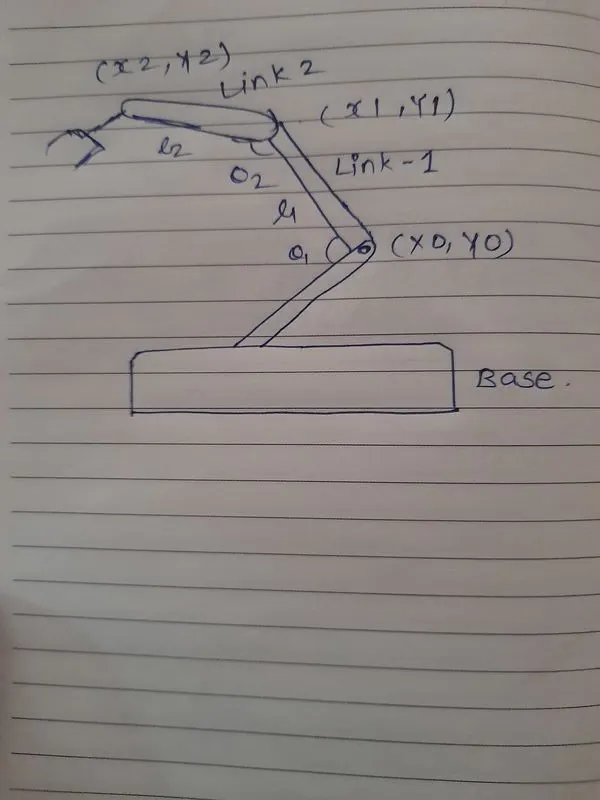
Inputs:-
Length of the link (L1) = 1;
Length of the link (L2) = 0.5;
Co-ordinates of X & Y
( X0,Y0)
Starting point of link 1 it is in fixed postion
X0 = 0
Y0 = 0
( X1,Y1)
Ending Point of the link 1 is the starting point of link 2.angle between base and link 1 is angle theta1
So X1 & Y1 will be,
X1 = L1*cosd( theta1)
Y1 = L1*sind(theta1)
(X2,Y2)
Ending Point of angle between link 1 & link 2 is represnted by angle theta 2
So X2 & Y2 will be,
X2 = X1+L2*cosd(theta2)
Y2 = Y1+L2*sind(theta2)
Code :-
- Matlab started with clear all , close all , clc command
- input value of theta 1 & theta 2 is determined with linspace command
- initialize the counter command using ct
- for moving robotic arm using for loop.
- The value of 'i' is going to change from 1 to the length of theta 1 & the value of 'j' is going to change from 1 to the length of theta 2. this original values assigned with THETA1 & THETA2. loop counter variables are used to access perticular value, So the link 1 & link 2 changes the postion with respect to theta 2.
- enter the co - ordinates
- enter the values ([X0 X1],[Y0 Y1],[X1 X2],[Y1 Y2])
- pause command used for the speed of animation.
- used getframe command individual value
- using movie command to create movie & with the help of video file command uncompressed avi file ganerated.
- video open and closed with respect to open & closed command.
Animation :-
Errors :-
1) Incorrecet used of '='
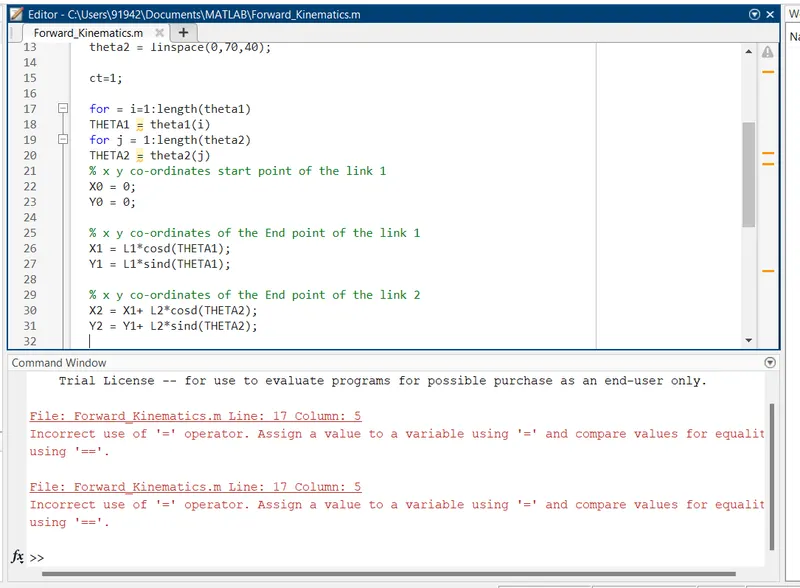
Overcome Error 1 : - by ommite the '=' sign
2) Undifined Plotting Function
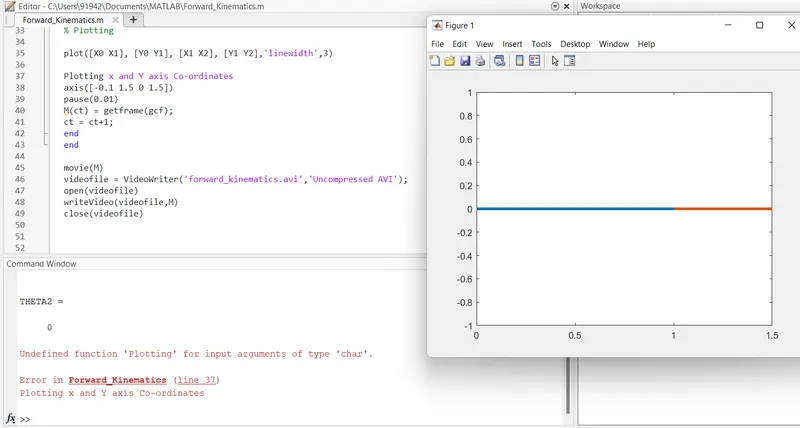
overcome Error 2 :- adding % sign