Week 3 - Solving second order ODEs
ERRORS FACED WHILE PROGRAMMING
1. Run time of the pendulum animation is short.
2. Saving the movie file.
3.Damping not done in the graph.
HOW TO OVERCOME ERRORS
1.To increase run time the damping coefficient should be low.
2.By opening and closing the movie file it will save.
3.Due to taking the value of mass incorrect.
EXPLANATION:
Initially you need to clear the command window,wrokspace and figures by using the clear all,close all,clc commands
Then need to take the values of damping coefficients(b),gravity(g),length(l),and mass(m) and then the initial condition of theta(0).
Create a for loop then in the question it is said that one end is fixed so you can take x0 and y0 has 0,0 from the above taken value has i =1:length(t_span)then the vlaue of x1 and y1 can be taken has 1*sin(THETA_1(i)) and -1*cos(THETA_1(i))
Then plotting x0 x1 and y0 y1 with linewidth and color and use hold on,then again plot x1 and y1 with the marker command to fill color inside the ball and give marker size has 30,then create a viscircles of size 0.05,now create a reactangle and give color with sime dimensions.now label the above diagram has simple pendulum has title the axis of x and y axis limits should be given and end the for loop.
Now create a movie file first open the movie file write the video file and then close the video file to create a movie file.
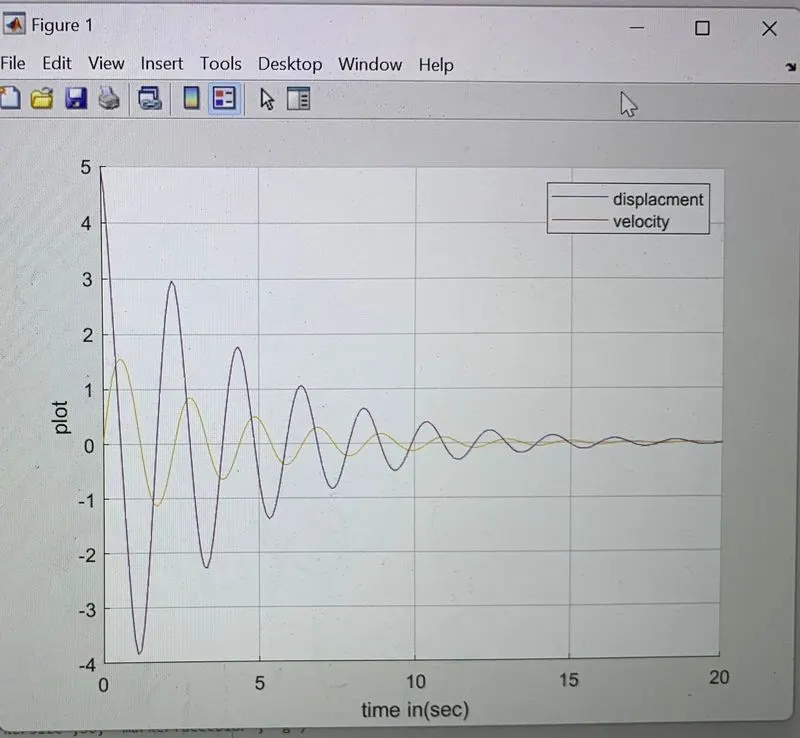
Finally label the axis and provide legends and plot time and results.
CONCLUSION:
The transistent behaviour if the simple pendulum is studied and animation motion is done.
RESULTS
Then result dispalcment and velocity is obtained and we can see how the graphs are damped has the time increases by taking the damping coefficient less.
clear all
close all
clc

% inputs
b = 0.05;
g = 9.81;
l = 1;
m = 0.1;

% initial condiition
theta_0 = [0,5];

% time points
t_span = linspace(0,10,100);

% solve ODE
[t,results] = ode45(@(t,theta) ode_function(t,theta,b,g,l,m),t_span,theta_0);
x0 = 0;
y0 = 0;
THETA_1 = (results(:,1));
ct = 1;
for  i = 1:length(t_span)
    %r = THETA_1(i);
    %x1 = 1*sin(r);
    %y1 = -1*cos(r);
    x1 = 1*sin(THETA_1(i));
    y1 = -1*cos(THETA_1(i));
    plot([x0 x1],[y0 y1],'linewidth',1,'color','bla')
   hold on
    plot(x1,y1,'marker','o','Color','g','markersize',30,'MarkerFaceColor','r')
    %plot(x1, y1, 'marker','o', 'color','g','markersize',30, 'markerfacecolor', 'g')
   hold off
    %viscircles([x1,y1],'0.05')
    rectangle('position',[-0.4 0 0.8 0.2],'FaceColor','b')
    title('simple Pendulum')
    line([0 0],[-5 0],'color','blue','linestyle','--')
    axis([-1.5 1.5 -1.4 0.3])
    M(ct) = getframe(gcf);
    ct = ct+1;

end
movie(M)
Videofile = VideoWriter('Pendulum_Animation.avi','Uncompressed AVI');
open(Videofile)
writeVideo(Videofile,M)
close(Videofile)

% displacment and velocity aganist time
close all
hold on
plot(t,results)
plot(t,results)
grid on
xlabel('time in(sec)')
ylabel('plot')
legend('displacment','velocity')


function[dtheta_dt] = ode_function(t,theta,b,g,l,m)

theta1 = theta(1)
theta2 = theta(2)
dtheta1_dt = theta2;
dtheta2_dt = -(b/m)*theta2-(g/l)*sin(theta1);
dtheta_dt  =[dtheta1_dt;dtheta2_dt];

end