Week 3 - Solving second order ODEs
AIM:- To solve second order differentiate equation of pendulum using matlab and oscillation and movement of pendulum.
INTRODUCTION:-
pendulum, body suspended from a fixed point so that it can swing back and forth under the influence of gravity. Pendulums are used to regulate the movement of clocks because the interval of time for each complete oscillation, called the periods, is constant. The formula for the period T of a pendulum is T = 2π Square root of√L/g, where L is the length of the pendulum and g is the acceleration due to gravity.
The Second Order Derivative is defined as the derivative of the first derivative of the given function. The first-order derivative at a given point gives us the information about the slope of the tangent at that point or the instantaneous rate of change of a function at that point
m = mass of the bob kg,
g = acceleration due to gravitym/s^2,
l = length of the string m.
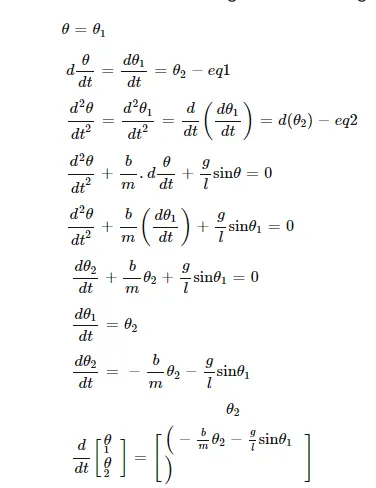
NOTE :- SOME OF THE DATA TAKEN FROM INTERNET.
Simple pendulum. Taking O as the origin and positive x- y- and θ-directions as shown, the position of the bob is x=Lsin(θ)y=−Lcos(θ). Remember that θ is a function of time t. So the above equations actually mean x(t)=Lsin(θ(t))y(t)=−Lcos(θ(t)).
A simple pendulum consists of a mass m hanging from a string of length L and fixed at a pivot point P. When displaced to an initial angle and released, the pendulum will swing back and forth with periodic motion.The Pendulum Theory is the concept that there are three basic philosophical positions Western societies occupy. Societies swing from one position to the other like the pendulum in a grandfather clock.

OBJECTIVES:-
This ODE represents the equation of motion of a simple pendulum with damping
In the above equation,
g = gravity in m/s2,
L = length of the pendulum in m,
m = mass of the ball in kg,
b=damping coefficient.
use,
L=1 metre,
m=1 kg,
b=0.05.
g=9.81 m/s2
in program.
ODE MAIN PROGRAM
clear all
close all
clc

%b= damping coefficient
b=0.02;
g=9.81;
l=1;
m=0.1;
%initial condition
theta_0 =[0;5];

%time points
t_span= linspace(0,10,500);


%solve for order differential equation
[t,results]= ode45(@(t,theta) ode_func(t,theta, b,g,l,m),t_span, theta_0);
plot(t,results(:,1))
hold on
plot(t,results(:,2))
ylabel('plot')
xlabel('time')

%to create animation for simple pendulum
ct=1;
theta_1= result(:,1);

for i= 1:length(results(:,1))
    %initial co-ordinates
    x_start=0;
    y_start=0;
    theta_2 = theta_2(i);
   %final coordinates
   x_end=1*sim(theta_2);
   y_end= -1*cos(theta_2);

   %plotting for animation
   figure(2)
   %base on pendulum
   plot([-1,1],[0,0],'linewidth',4,'Color','black')
   hold on
   %string of pendulum
   linme([x_start x_end],[y_start y_end],'linewidth',6,'color','b')
   hold on
   %BOB of pendulum
   plot(x_end,y_end,'maker','o','markersize',28,'markerfacecolor','r')
axis([-2 2 -2 2])
pause(0.03)
hold off
M(ct)=getframe(gcf);
ct=ct+1;
end

%saving file after creating movie
movie(M)
videofile= videowriter('simple_pendulum.avi','uncompressed AVI');
open(videofile);
writeVideo(videofile,M);
close(videofile);
ODE FUCTION
function [dtheta_dt]= ode _func(t,theta,b,g,l,m)
theat1= theta(1)
theta2= theta_(2)
dtheta1_dt= theta2;
dtheta2_dt= -(b/m)*theta2-(g/l)*sin(theta1);
dtheta_dt= [dtheta1_dt; dtheta2_dt];
end 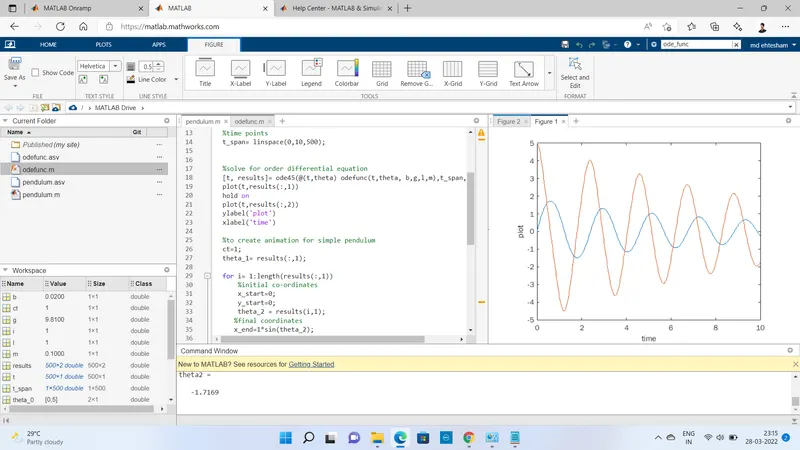
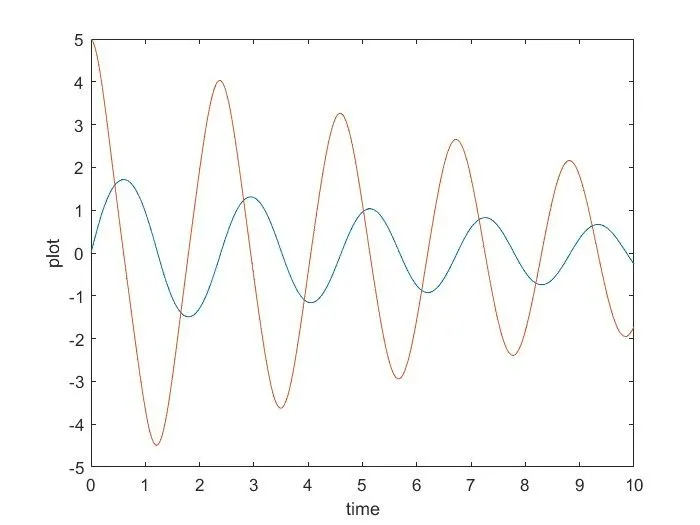
PLOTTED GRAPH FOR THE VIBRATION :-
The vibration in the pendulum shown below as you seen the vibration changes and the lines of the graph also changes oscillation of line chnages, varies from up and down according to the vibration and disturbance produces inside it.
Y-axis represents the plot and X-axis represent the time taken in sec or milli second according to the taking output and the plotted graph.
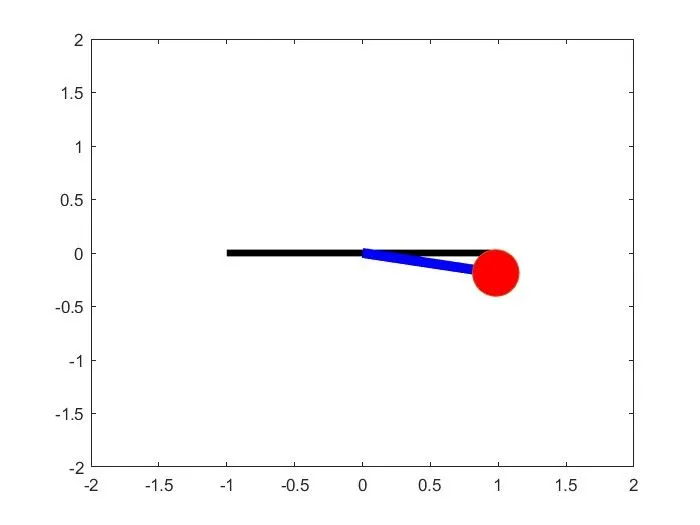
Moving pendulum
CONCULSION :-
1) We had animated the video with the help of ode45 solver. ode45 function is
used for the finding the angle.
2) The animation is made using the different displacement points and the velocity
values we will get which are stored in the excel fill we can acess the file from the
workspace.
ERRORS FACED AND STEPS TAKEN TO OVERCOME THE ERRORS :-
1) t_span are the time points. I had faced the problem for t_span.
2) [t, results]= ode45(@(t,theta) ode_func(t,theta, b,g,l,m),t_span, theta_0);
3) ode45 is a inbuild command.
4) some basic mistake in line 44
limne----->line.
5) line no 59 weite -----> to ----->Write.
6) theat1 was the mistake in line 2 which can be replaced with theta1. The error is getting
is gone after the putting theat1 to theta1.