Week 2- 2R Robotic Arm Challenge
Aim :- Matlab to simulate the forward kinematics of a 2R Robotic Arm.
Objective :-
Write the code to simulate the program of forward kinematics of a robotic arm.
To plot the graph to animate the video.
Therory :-
Kinematics is the science of describing the motion of objects using words, diagrams, numbers, graphs, and equations. A robotic arm is a type of manipulator that is both manually controlled and also functions on its own in some modes. Arms are typically composed of a rigid work envelope affixed to an end-effector, which houses the hand.
The use of robots can be seen in many industries, from automotive production to healthcare.
Robots are often used for performing repetitive and difficult tasks; for instance, welding car bodies or assembling objects such as watches or electronics goods.Kinematics is a branch of mechanics. The goal of any study of kinematics is to develop sophisticated mental models that serve to describe (and ultimately, explain) the motion of real-world objects
Kinematic link have two points . Two points connected with eachother to make a link. comibination of links for kinematic chain.
* Step-Wise explanation of code:-
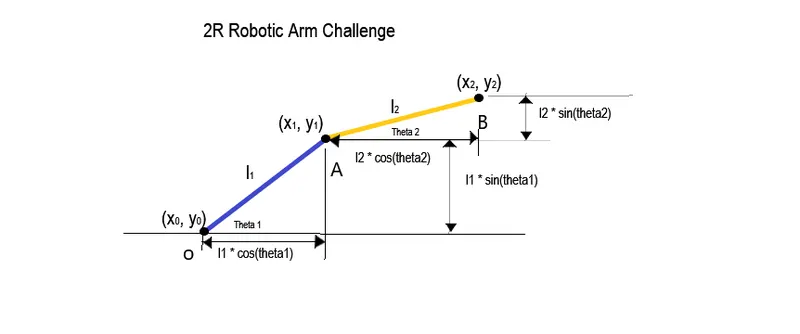
L1 and L2 are the length of the arms.
L1 and L2 both are different sizes.
θ1 and θ2 are two angles.
θ= 45.
θ= 20.
changing the degress.
finding coordinates of x1, x2, y1, y2.
we use the formula for finding x1.
we have,
x1= L1*cosd(theta1)
y1= L1*sind(theta1)
for, x2, y2
x2= x1+L2cosd(theta2)
y2= y1+L2*sind(theta2)
for ploting the graph,
put xθ, x1,x2 and yθ, y1, y2 to plot the graph.
And colouring the line putting the command 'colour' as according to colour shown on the plotted line.
Length and width of the line as according to the need and look mention it in the command before execute.
- Error facing while executing :-
1) putted the different values for arms
Error 1:-
L1 = 10m
L2 = 5m
line([x0 x1] , [y0 y1], 'linewidth', 3, 'colour', 'b')
not executing because of giving space between the x1,y1,linewidth,width, colour
line([x0 x1] , [y0 y1], 'linewidth', 3, 'colour', 'b')
not executing because of giving space between the x1,y1,linewidth,width, colour
length is in meter (m ).
i got the value for i and size ( i ) is totally different
attach file, image given below.
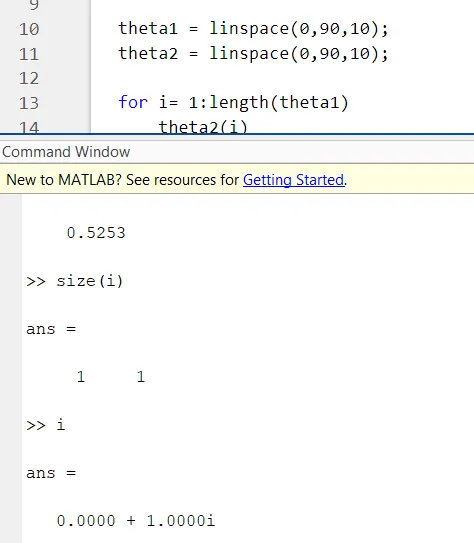
Error 2:-
2) unrecognised for property colour
forward kinematic line 30
line([x0 x1] , [y0 y1], 'linewidth', 3, 'colour', 'b')
Error 3:-
line([x0 x1] , [y0 y1], 'linewidth', 3, 'colour', 'b')
not executing because of giving space between the x1,y1,linewidth,width, colour
solved this problem after removed spaces
Error 4 :-
line([x0 x1] , [y0 y1], 'linewidth', 3, 'colour', 'b')
not executing because of giving space between the x1,y1,linewidth,width, colour
- Steps taken to overcome those errors :-
Error 1:-
L1 = 10m
L2 = 5m
change value to
l1 = 1m
l2 = 0.5m
Error 2 :-
forward kinematic line 30 Recoginsed the line 30
to take the changes in line 30.
Error 3 :-
Recognise the mistake
line([x0 x1] , [y0 y1], 'linewidth', 3, 'colour', 'b')
not executing because of giving space between the x1,y1,linewidth,width, colour
Error 4 :-
line([x0 x1] , [y0 y1], 'linewidth', 3, 'colour', 'b')
not executing because of giving space between the x1,y1,linewidth,width, colour to color
line([x0 x1] , [y0 y1], 'linewidth', 3, 'color', 'b')
%forward kinematic of a 2R robotic arm
clear all
close all
clc

%input
l1= 1;
l2= 0.5;

theta1 = linspace(0,90,10);
theta2 = linspace(0,90,10);

ct=1
for i= 1:length(theta1)
  THETA1= theta1(i);
  for j=1:length(theta2)
  THETA2= theta2(j);
%coordinate of 1st arm starting point
x0= 0;
y0= 0;

%coordinate of the first arm ending point
x1= l1*cosd(THETA1);
y1= l1*sind(THETA1);

%for finding coordinate of the second arm ending point
x2= x1+l2*cosd(THETA2);
y2= y1+l2*sind(THETA2);

%plotting the graph

plot([x0 x1],[y0 y1],[x1 x2],[y1 y2],'LineWidth',3)
axis([-0.1 1.5 0 1.5])
pause(0.03)
M(ct)= getframe(gcf);
ct=ct+1;

  end
end
 %to save the file in avi and don't compresse the file
%give the location to save the file
movie(M)
videofile= VideoWriter('forward_kinematics.avi','uncompressed AVI');
open(videofile)
writeVideo(videofile,M)
close(videofile)