Week 3 - Solving second order ODEs
Aim: To solve the second order Ordinary Diffierential Equation(ODE) using MATLAB and write a program in MATLAB that will simulate the pendulum motion.
Theory:
An ordinary differential equation (ODE) is a differential equation containing one or more functions of one independent variables and the derivatives of those functions. The term ordinary is used in contrast with the term partial differential equation which may be with respect to more than one independent variable. Here pendulum ODE has to solved with the following goverining equation.
Goverining equation:
`(d^2theta)/dt^2+b/m*(d theta)/dt+g/L*sintheta=0`
where,
g = gravity in m/s2,
L = length of the pendulum in m,
m = mass of the ball in kg,
b=damping coefficient.
Objective:
The main objective is to write a program that solves the pendulum ODE and simulate the pendulum motion.
MAIN CODE:
clear all
close all
clc

%Inputs
b=0.05;
g=9.81;
l=1;
m=1;

%Initial condition
theta_0=[0;3];

%Time points
t_span=linspace(0,20,300);

%Solve ODE
[t,results]=ode45(@(t,theta)ode_func(t,theta,b,g,l,m),t_span,theta_0);
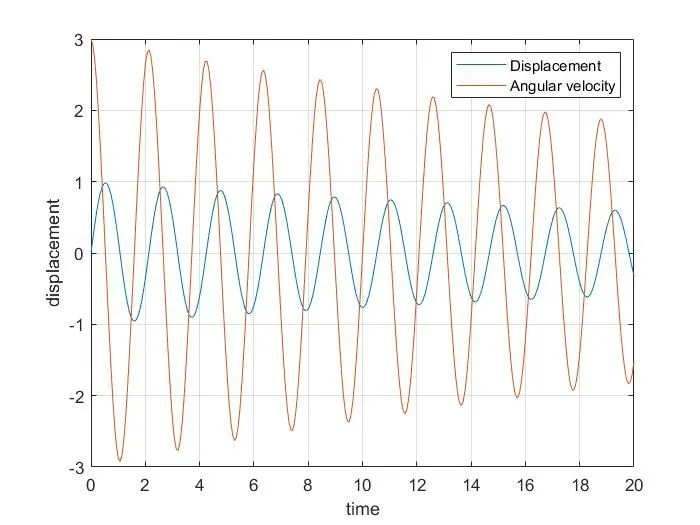
plot(t,results(:,1))
hold on
plot(t,results(:,2))
xlabel('time')
ylabel('displacement')
legend('Displacement','Angular velocity')
grid on
hold off
displacement=results(:,1);
velocity=results(:,2);

%Fixed co-ordinates
x0=1;
y0=1;
ct=1;
for i=1:length(displacement)
         %Co-ordinates
         x1=1-l*sin(displacement(i));
         y1=1-l*cos(displacement(i));
         figure(2)

         %Plot fixed link
         plot([0 2],[1 1],'linewidth',14,'color','b')
         hold on
         plot([1 x1],[1 y1],[x1 x1],[y1 y1],'-O','MarkerSize',25,'MarkerFacecolor','g','linewidth',5)
         plot(x0,y0,'-O','MarkerSize',4,'MarkerFacecolor','r')

         %Axis setting
         axis([0 2 -0.5 2])
         M(ct)=getframe(gcf)
         ct=ct+1;
         hold off
end

movie(M)
videofile=VideoWriter('simplependulum.avi','uncompressed AVI');
open(videofile)
writeVideo(videofile,M)
close(videofile)
Function code:
function [dtheta_dt]=ode_func(t,theta,b,g,l,m)
theta1=theta(1)
theta2=theta(2)
dtheta1_dt=theta2;
dtheta2_dt=-(b/m)*theta2-(g/l)*sin(theta1);
dtheta_dt=[dtheta1_dt;dtheta2_dt];
end
Explanation:
- First clear all, close all & clc commands should be used to clear previous codes,values & plots.
- Then give the inputs as mentioned in the given question/objective.
- Then by the help of function command ode_func the given ODE pendulum is solved and plotted.
- Next to get the animation of the pendulum motion the for loop is used and Marker command is used for the shape of the bob and color is mention with the MarkerFacecolor command.
- Atlast by the help of the movie(M)&VideoWriter command the animation of the pendulum motion is created.
Results:
Plot:
Animation youtube link: