Week 2- 2R Robotic Arm Challenge
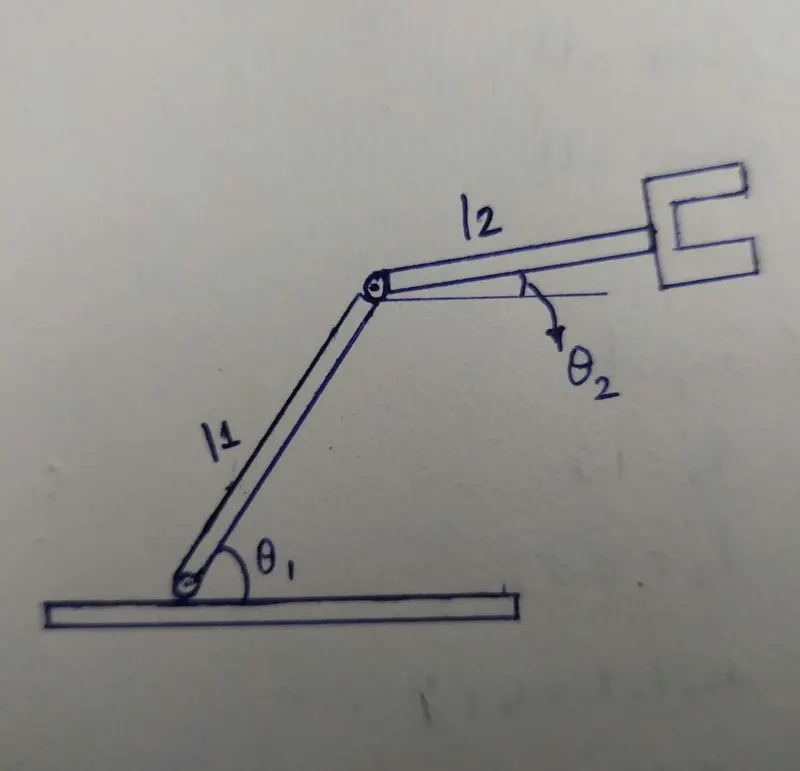
AIM: To simulate the forward kinematics of a 2R Robotic Arm.
Objective: Write a program to simulate the forward kinematics of a 2R Robotic arm and Animating and creating a movie from the plots obtained.
Theory: Forward kinematics refer to the use of the kinematics equations of a robot to compute the position of the end-effector from specific values for the joint parameters.
Program:
clear all
close all
clc

%Inputs

l1=2;
l2=1;
theta1=linspace(0,90,10);
theta2=linspace(0,90,10);
ct=1;
for i=1:length(theta1)
    THETA1=theta1(i);
    for j=1:length(theta2)
        THETA2=theta2(j);
        X0=0;
        Y0=0;
        X1=l1*cosd(THETA1);
        Y1=l1*sind(THETA1);
        X2=X1+l2*cosd(THETA2);
        Y2=Y1+l2*sind(THETA2);
        %Plotting
        plot([X0 X1],[Y0 Y1],[X1 X2],[Y1 Y2],'linewidth',2)
        axis([-0.1 4 0 4])
        pause(0.03)
        M(ct)=getframe(gcf);
        ct=ct+1;
    end
end
movie(M)
videofile=VideoWriter('forward_kinematics.avi','uncompressed AVI');
open(videofile)
writeVideo(videofile,M)
close(videofile)
Explanation:
- First write the three commands to clear all the previous programs and plots, they are clear all, close all & clc.
- Then give the inputs for the program like length and theta.
- Now by using for loop command we can repeat the every position of the link l1 and link l2 with respect to theta1 and theta2.
- Then with in the for loop, plot command is used for plotting.
- Now by using the movie and VideoWriter commands a video of animation id created in AVI format.
Youtube simulation video and results: https://youtu.be/7AVqtPAYmG8
Conclusion: By using the MATLAB programming, the written program simulates the position of a 2R Robotic arm. Results shows the maximum reach of a robotic arm.