Week 3 - Solving second order ODEs
AIM: To create a code for animating the simple pendulum using matlab.
EQUATION: Second order differential equation.
g = gravity in m/s2,
L = length of the pendulum in m,
m = mass of the ball in kg,
b=damping coefficient.
OBJECTIVES: Is to write a program that solves the following ODE. This ODE represents the equation of motion of a simple pendulum with damping.
BODY OF THE CONTENT: code to create movie for simple pendulum and function for second odes.
% To create a code for animating simple pendulum.
clear all
close all
clc

% inputs
b= 0.05;
g= 9.81;
l= 1;
m= 1;

%initial condition
theta_0 = [0,3];

%time points
t_span = linspace(0,20,200);

%solve 2nd order ode
[t,results]= ode45(@(t,theta) ode_fuunc(t,theta,b,g,l,m),t_span,theta_0);
figure(1)
plot (t,results(:,1))
hold on
plot (t,results(:,2))
xlabel('plot')
ylabel('time')

%% animating
 x0=0;
 y0=0;
%counter actually represents every frame
ct=1
for i=1:length(t_span)

x1=l*sin(results(i,1));
y1=-l*cos(results(i,1));

figure(2)

plot([1 -1],[0 0],'LineWidth',6,'Color','g');
hold on
axis ([-2 2 -2 2]);
plot([x0 x1],[y0 y1],'linewidth',2,'color','b');

plot(x1,y1,'Marker','o','MarkerSize',15,'MarkerEdgeColor','r','MarkerFaceColor','r');
hold off
M(ct)= getframe(gcf);
ct=ct+1;
end
movie(M)
videofile= VideoWriter('pendulum.avi')
open(videofile)
writeVideo(videofile,M)
close(videofile)
function [dtheta_dt]= ode_fuunc(t,theta,b,g,l,m);
theta1 = theta(1);
theta2 = theta(2);
dtheta1_dt = theta2;
dtheta2_dt = -(b/m)*theta2 - (g/l)*sin(theta1);
dtheta_dt = [dtheta1_dt ; dtheta2_dt];
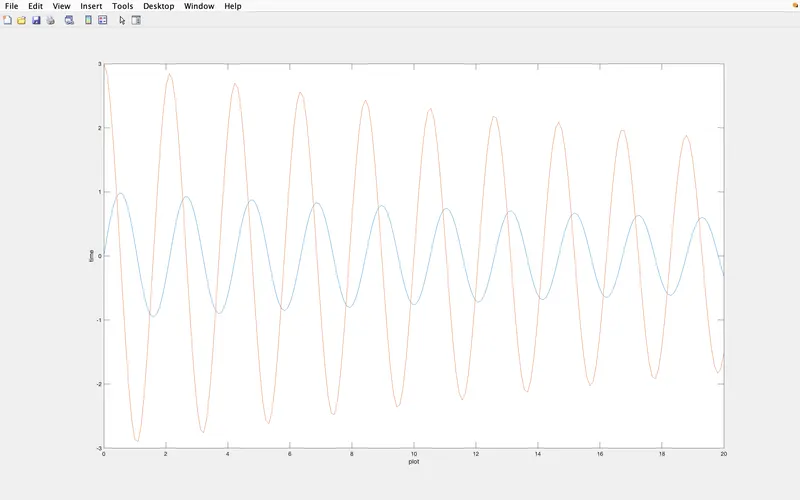
endEXPLANATION:Starting with a comment for the code and giving a clearing layout commands . Inputs as shown in the challlenge. Giving initial conditions and time _ points as given in the challenge . Solving the 2nd ode with the equation [t,results]= ode45(@(t,theta) ode_fuunc(t,theta,b,g,l,m),t_span,theta_0) , this equation is given to find plot for displacement and velocity and writing the function programme to solve the 2nd ode to form ode as it make the results and t to calculate the ode. Coming to the equation ode45 is solver used in matlab for a function and t, theta are the inputs of a function following with the ode_fuunc of the inputs are described from the function code and t_span is time point and theta_0 is the angle which the bob is moving wrt time. plotting t, results to show the displacement and velocity are correctly plotted . And to animate the simple pendulum we have given (x0,y0) (x1 ,y1) for the angle created wrt time. ct represents every frame. Giving all the neccesary inputs to plot the the simple pendulum. Here we use the Marker command to create a bob.In array M (ct) the get frame is saved and the ct is incremented whenever the for loop is excecuted. end for closing the both the variables of for loop concept (i). movie (M) is to create movie file and giving the video file name and storing it as avi.file , and it opens video file and write the array of videofile and M , closes the video file.
ERROR WHILE DOING THIS PROGRAMME:
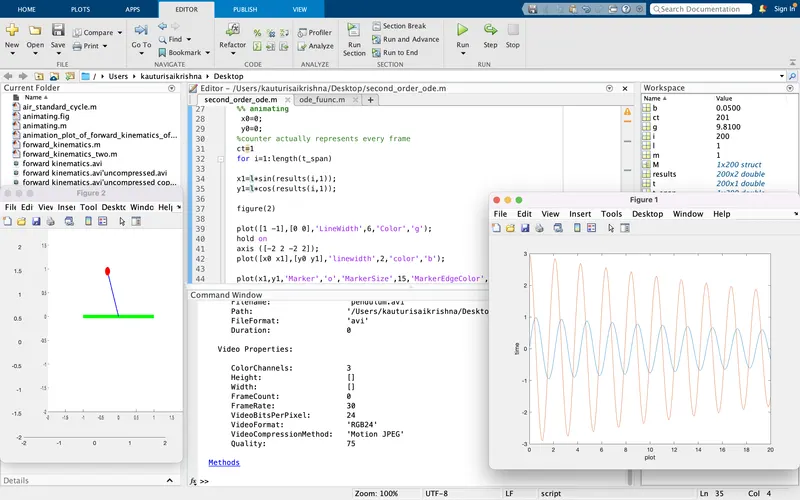
explanation of error: Here at y1 i didn't give negative sign so the movie of the pendulum is showing upside.
To overcome this error i would just keep negative sign for y1.
solved errror:
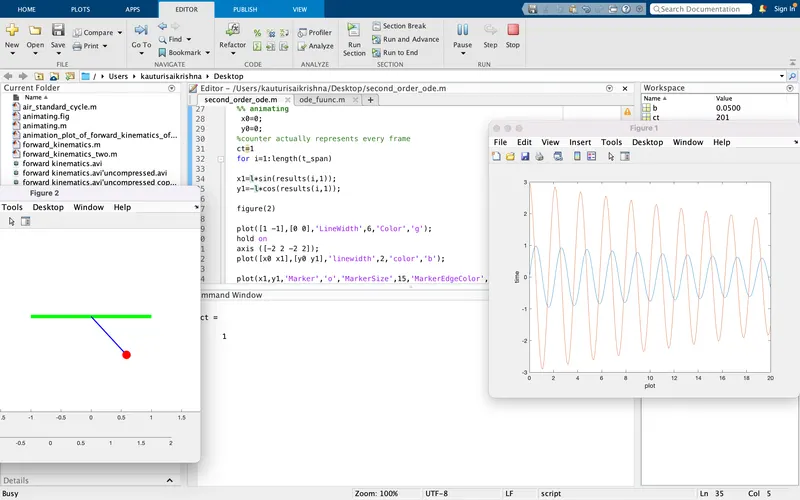
RESULTS: PLOT FOR DISPLACEMENT AND VELOCITY.
2. LINK FOR MOVIE
https://drive.google.com/file/d/1tUzmVBSQluNeq34RkOEwX0vEwT87h-nm/view?usp=sharing
CONCLUSION: The bob of mass(m) is is moving wrt time and constant points.