Week 2- 2R Robotic Arm Challenge
AIM:To write a program in Matlab to simulate the forward kinematics of a 2R Robotic Arm.
1.To create an animation file of the plot.
OBJECTIVES: To simulate the forward kinematics of a 2R Robotic Arm and animating the plot made with program created from matlab.
Body of the content:
1. Simple forward kinematic simulator
% forward kinematics of a 2R robotic arm manipulator
clear all
close all
clc

%inputs
l1= 1
l2= 0.5

theta1=45
theta2=90

%coordinates
x0=0
y0=0

x1 =l1*cosd(theta1)
y1 =l1*sind(theta1)

x2 = x1+l2*cosd(theta2)
y2 = y1+l2*sind(theta2)

%plotting
line([x0 x1],[y0 y1],'linewidth',3,'color','b')
line([x1 x2],[y1 y2],'linewidth',3,'color','r')
Explanation: This code is the simple forward kinematic simulator.
Starting with the comment(%) and using the commands for clearing command window,editor,workspace. Giving the inputs to link1(l1) and link2(l2) and giving the angle theta1 with respect x-axis of l1 and theta2 with respect to x-axis of l2. And coordinates at starting point of l1 (x0 y0) and at end of l1 and starting of l2 (x1 y1) and ending of l2 that is near manipulator (x2 y2). In the equations the angle that is theta1 , theta2 is in degrees so we have to keep (cosd,sind) for the answer we get in degrees. Plotting the line commandfor the output and giving the linewidth to see the plot thicker and color for differentiate the link 1 and link2.
Errors while running the code:
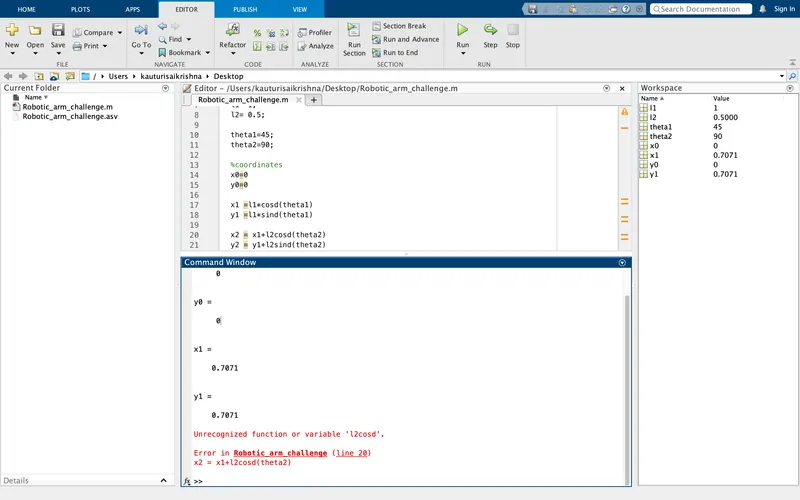
Explanation of error : Here the code didn't determine the values of (x2 y2) because of unrecognized variable or function `x2 = x1+l2cosd(theta2)`and `y2= y1+l2sind(theta2)`. so here the error was`l2cosd`and`l2sind`. It should be `l2*cosd`,`l2*sind` in the multiplication link and angle.
After changing the error:
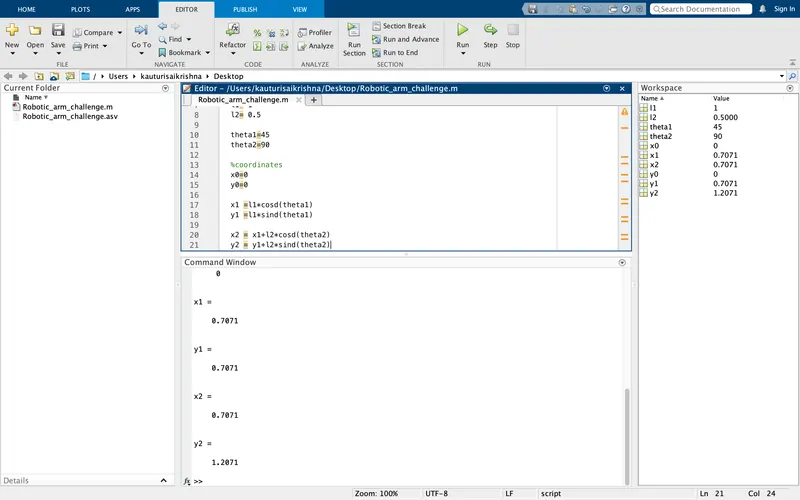
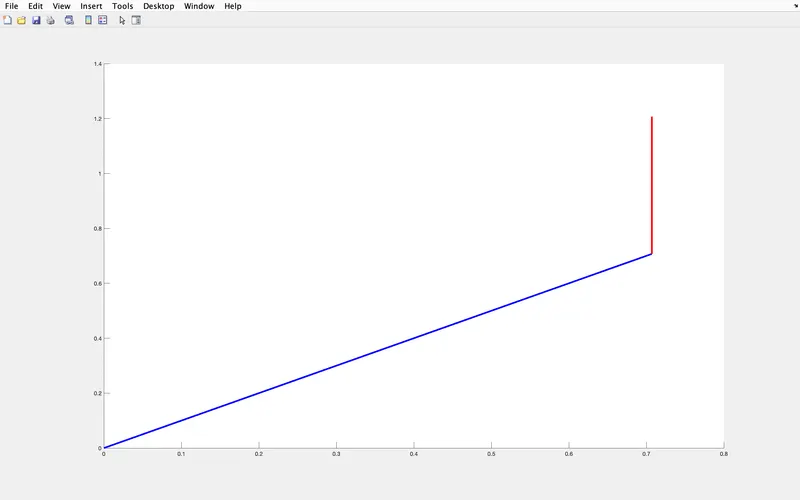
here we can see in the image that the values of (x2 y2) are derived.
2.Now to animate it we need change some commands .
 %forward kinematics of a 2R robotic arm manipulator
clear all
close all
clc
%inputs
l1 = 1;
l2 = 0.5;

theta1 = linspace(0,90,10)
theta2 = linspace(0,90,10)


ct=1
for i= 1: length(theta1);
    THETA1=theta1(i);
   for  j= 1:length(theta2);
        THETA2=theta2(j);

     %coordinates
x0=0
y0=0

x1 =l1*cosd(THETA1)
y1 =l1*sind(THETA1)

x2 = x1+l2*cosd(THETA2)
y2 = y1+l2*sind(THETA2)

%plotting

plot([x0 x1],[y0 y1],[x1 x2],[y1 y2],'linewidth',3)


axis([-0.2 1.7 -0.2 1.7])
pause(0.03)
M(ct)= getframe(gcf);
ct=ct+1
   end
end

movie(M)
videofile= VideoWriter('forward kinematics.avi''uncompressed.avi')
open(videofile)
writeVideo(videofile,M)
close(videofile)
Explanation:
Starting with the comment(%) and using the commands for clearing command window,editor,workspace. Giving the inputs to link1(l1) and link2(l2). Here we use linspace command for angle theta because the simulater should be at different points so the linspace helps the angle at different positions to calculate the workspace.Here we are using for loop concept to variables i,j using those we are finding THETA1 , THETA2 and replacing them with theta1 , theta 2 from the simple forward kinematics code used . Thus the coordinates are writtenwith respect to THETA1 AND THETA2 .In Plotting the line command is changed to plot to derive the simulator, the linewidth is given because the line thicker while plotting and give some axis points so that it will on the axis points of the plot.Pause command is used because to pause the manipulator at the given axis points . in array M (ct) the get frame is saved and the ct is incremented whenever the for loop is excecuted. Two times end for closing the both the variables of for loop concept (i,j). movie (M) is to create movie file and giving the video file name and storing it as avi.file , and it opens video file and write the array of videofile and M , closes the video file.
Error while writing this program:
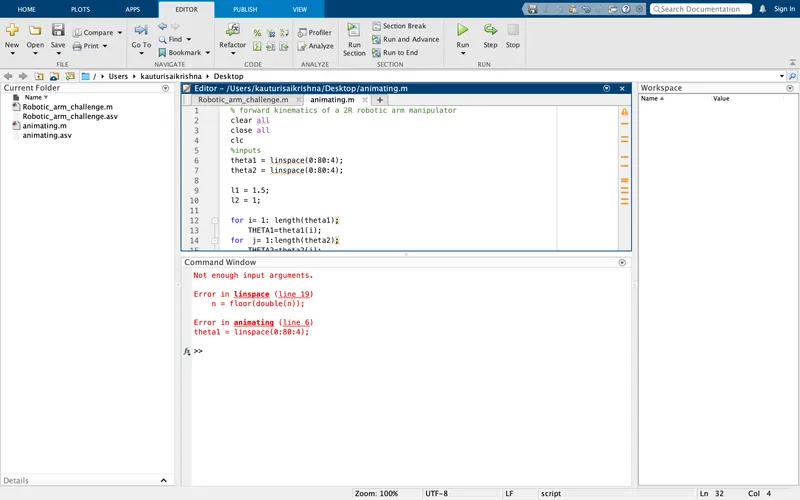
explanation : Here I used colon instead of comma when linspace command is given and in place THETA , small theta is given.
After changing the error:
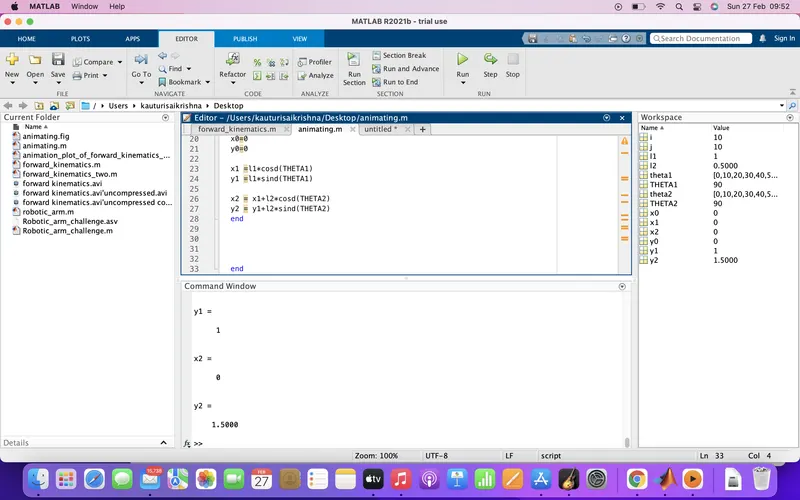
RESULTS :
1. PLOT FOR SIMPLE FORWARD KINEMATICS
2.
Animated video link:
https://drive.google.com/file/d/1FH1fLnPNYPM0-WYqt-k_UtM1b2lqu0V_/view?usp=sharing
CONCLUSION:Using specified angle does'nt give you animated or simulated video. Using different angles for the arm and using for loop and movie concept we have created a animated movie for forward kinematics 2r robotic arm.