Week 3 - Solving second order ODEs
1. Function Code :
function [dtheta_dt] = ode_func(t,theta,b,g,l,m)


theta1 = theta(1)
theta2 = theta(2)
dtheta1_dt = theta2;
dtheta2_dt = -(b/m)*theta2-(g/l)*sin(theta1);
dtheta_dt = [dtheta1_dt;dtheta2_dt];
end
Explanation : This function will be used in ode45 to determine the pendulum.
2. Writing the program for Plotting Velocity vs Diplacement and Making animation of Pendulum.
% Solving 2nd Order ODE usin MATLAB
% Step 1:
% Inputs
% damping coefficient
b = 0.05;

% gravty, m^2/s
g = 9.81;

% length of pendulum (m)
l = 1;

% mass of pendulum (kg)
m = 1;

% Step 2:
% Initial conditionis
% 0 is angular dispacement and 3 is angular velocity.
theta_0 = [0;3];

% Step 3:
% time point
t_span = linspace(0,20,200);

% Step 4:
% Solve ODE, ode45 is inbuilt solver in matlab
[t,results] = ode45(@(t,theta)ode_func(t,theta,b,g,l,m), t_span, theta_0);
figure(1)
plot(t, results(:,1));
hold on
plot(t, results(:,2));
xlabel('Displacement');
ylabel('Velocity');
theta_0 = [0;3];
title('Plot of Angular displacement and Angular verlocity w.r.t Time');
legend('Angular Displacement', 'Angular Velocity');


X0=0;
Y0=0;
% Counter represents each and every frame
ct = 1;
% Using for loop
for i = 1:length(t_span)
    X1=l*sin(results(i,1));
    Y1=-l*cos(results(i,1));

    figure(2)
    plot([-1 1], [0 0],'linewidth',5,'color','g');
    axis([-2 2 -2 2]);
    line ([X0 X1], [Y0 Y1], 'linewidth',1,'color','b');
    hold on
    plot(X0, Y0, 'O','markersize',2,'markerfacecolor','y');
    plot(X1, Y1, 'O','markersize',5,'markerfacecolor','r');
    title('Damping of simple Pendulum');
    legend('Support rod','length of pendulum','fixed point','Bod of pendulum');
    grid on;
    hold off;
    M(ct) = getframe(gcf);
    ct = ct+1;
end

movie(M);
videofile = VideoWriter('simple_pendulum.avi', 'Uncompressed AVI');
open(videofile);
writeVideo(videofile,M);
close(Videofile);
Explanation : The ode45 is a inbuilt solver in matlab. The requirement of the ode45 solver is of two types:
(1) inital conditon
(2) Time span
The output acquired is stored in 'results'. If we click on results we can observe the values of velocity and displacement.
To creat animation of pendulum we have to first creat a movie like we did in 2R Robotic arm assignment.
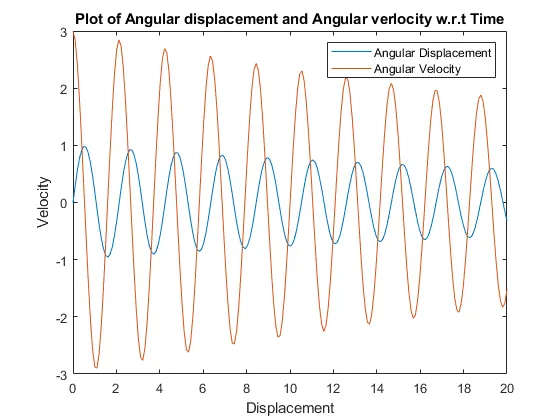
3. Result of the above program
(1) velocity vs Displacement plot w.r.t time.
(2) Animation of Simple Pendulum
https://drive.google.com/file/d/1SILRpywwjOT225QdkWi8ZC11JzH24K56/view?usp=sharing