Week 3 - Solving second order ODEs
%Program for solving second order ODE (Pendulum System)
clear all
close all
clc
%Inputs of Damping System Explanation : Assuming inputs for Pendulum System
b=0.05
g=9.8
l=1
m=1
%Intial conditions Explanation : Initial conditions of displacement and velocity
theta_0=[0;3];
%Time points Explanation : Defined time span for pendulum to be simulate
tspan=linspace(0,20,500);
%Solving Second Order Equation of Damping Equation
Explanation : Standard equation to be used for solving differrent order ODE
[t,results] = ode45(@(t,theta) ode_shri(t,theta,b,g,l,m),tspan,theta_0);
Explanation : ode45(@(t,theta) Defining ODE as function of time and theta
Explanation : ode_shri(t,theta,b,g,l,m) Defining function for ODE using inputs
Explanation : tspan,theta_0 Initial conditions with time integration and initial conditions w.r.t starting of time
%Plotting Results
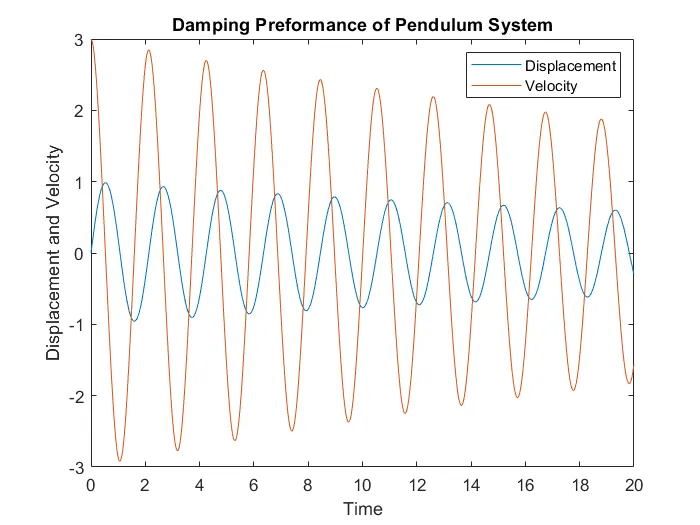
plot(t,results(:,1)) Explanation : Plotting displacement vector values
hold on Explanation : Ovelapping graphs over one another
plot(t,results(:,2)) Explanation : Plotting velocity vector values
title('Damping Preformance of Pendulum System') Explanation : Plotting addiitonal informative texts
xlabel("Time")
ylabel("Displacement and Velocity")
legend('Displacement','Velocity')
%Creating Pendulum Animation
ct=1; Explanation : Set initial counter value for first iteration of looping
for i=1:length(results(:,1)) Explanation : Looping for displacement vector values
x0=0;
y0=0;
x1=l*sin(results(i,1)+pi); Explanation : Points plotted using sine function for different vlues of displacement vectors
y1=l*cos(results(i,1)+pi); Explanation : Points plotted using cos function for different vlues of displacement vectors
%Plotting Pendulum Animation Results
plot([x0 x1],[y0 y1],'-o','MarkerSize',20,'MarkerFaceColor','k','LineWidth',3) Explanation : Plotting cooresponding points
axis([-2 2 -2 2]) Explanation : Axes limits defined
hold on Explanation : Ovelapping graphs over one another
plot([-1 1],[0 0],'LineWidth',3,'Color','r') Explanation : Plotting line which seems to be fixed/rigid support for pendulum
%Framing Pendulum Animation Results
M(ct)=getframe(gcf) Explanation : Framing graphical results
hold off Explanation : Display latest /spontaneous frames
ct=ct+1; Explanation :Incrementing counter before subsequent frame got saved
end
%Creating Movie of Pendulum System Animation
movie(M) Explanation : Defining movie
Videofile= VideoWriter('Pendulum_System.avi','uncompressed AVI'); Explanation : Naming and format of the movie
open(Videofile) Explanation : To open movie
writeVideo(Videofile,M) Explanation : To write movie
close(Videofile) Explanation : To close movie
MATLAB PROGRAM
%Program for solving second order ODE
clear all
close all
clc

%Inputs of Damping System
b=0.05
g=9.8
l=1
m=1

%Intial conditions
theta_0=[0;3];

%Time points
tspan=linspace(0,20,500);

%Solving Second Order Equation of Damping Equation
[t,results] = ode45(@(t,theta) ode_shri(t,theta,b,g,l,m),tspan,theta_0);

%Plotting Results
plot(t,results(:,1))
hold on
plot(t,results(:,2))
title('Damping Preformance of Pendulum System')
xlabel("Time")
ylabel("Displacement and Velocity")
legend('Displacement','Velocity')

%Creating Pendulum Animation
ct=1;

for i=1:length(results(:,1))
    x0=0;
    y0=0;
    x1=l*sin(results(i,1)+pi);
    y1=l*cos(results(i,1)+pi);

%Plotting Pendulum Animation Results
 plot([x0 x1],[y0 y1],'-o','MarkerSize',20,'MarkerFaceColor','k','LineWidth',3)
 axis([-2 2 -2 2])
 hold on
 plot([-1 1],[0 0],'LineWidth',3,'Color','r')

%Framing Pendulum Animation Results
M(ct)=getframe(gcf)
hold off
ct=ct+1;

end

%Creating Movie of Pendulum System Animation
movie(M)
Videofile= VideoWriter('Pendulum_System.avi','uncompressed AVI');
open(Videofile)
writeVideo(Videofile,M)
close(Videofile)
GRAPH SHOWING DAMPING PERFORMANCE
ERROR FACED DURING PROGRAMMING

SOLUTION FOR ERROR

LINK FOR ANIMATION RESULT
https://drive.google.com/drive/folders/1P_qJDJvpTx6yVJ93dkn9vvUgNKAhRZtp?usp=sharing