Week 3 - Solving second order ODEs
- code
%solving second order ODEs of a Pendulum
clear all
close all
clc
%inputs
%damping coefficient
b = 0.05
%gravity
g = 9.81
%length of the spring
l = 1
%mass of the ball
m= 1
%initial condition
%angular displacement is 0 and angular velocity is 3
theta_0 =[0;3]
%time span of pendulum osillates between 0-20sec
t_span=linspace(0,20,500)
% solving ODE
[t,results] = ode45(@(t,theta)ode_func(t,theta,b,g,l,m),t_span,theta_0);
%plotting
figure(1)
hold on
plot(t,results(:,1))
plot(t,results(:,2))
title('Damped harmonic motion of a pendulum')
legend('Angular displacement ','Angular velocity')
ylabel('plot')
xlabel('Time (seconds)')
%for loop
ct =1
for i=1:length(results(:,1))
x_start =0
y_start =0
x_end=1*sin(results(i,1))
y_end = -1*cos(results(i,1))
%plotting the animation
figure(2)
plot([-1 1],[0 0],'linewidth',5)
hold on
plot([x_start x_end],[y_start y_end],'linewidth',3)
hold on
plot(x_end,y_end,'o','markersize',20,'markerFacecolor','y')
title('Animation of transient behaviour of a pendulum')
axis([-1.5 1.5 -1.5 1])
pause(0.03)
hold off
M(ct)=getframe(gcf)
ct =ct+1
end
%Animation of the pendulum
movie(M)
videofile=VideoWriter('Pendulum movement Animation.avi','uncompressed avi')
open(videofile)
writeVideo(videofile,M)
close(videofile)
- function code
function [dtheta_dt] = ode_func(t,theta,b,g,l,m)
theta1 = theta(1)
theta2 = theta(2)
dtheta1_dt = theta2
dtheta2_dt = -(b/m)*theta2 -(g/l)*sin(theta1)
dtheta_dt =[dtheta1_dt; dtheta2_dt]
end
- output of the code
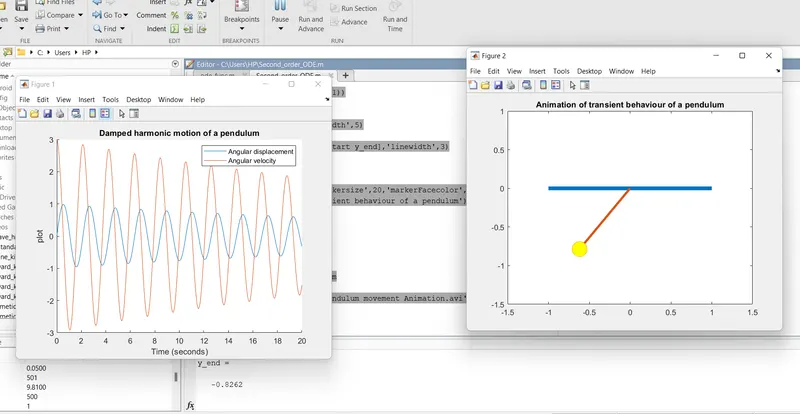
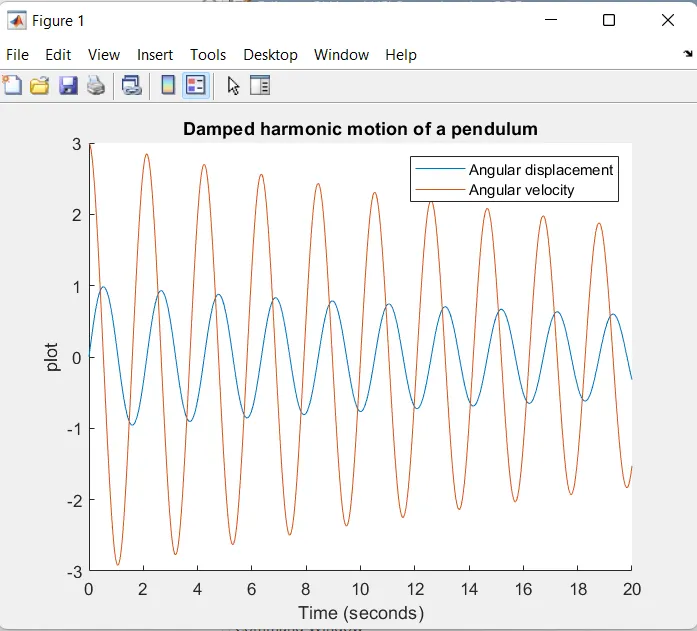
- damping of pendulum
- Animation link of pendulum :https://youtu.be/-DPWa7PK0-8
- explanation
- start your code with close all ,clear all and clc
- define inputs such as gravity-g ,mass of ball -m lenght of pendulum string-l etc.
- define initial condition of the pendulum i.e angular displacement,time span and angular velocity.
- use ode45 which is used to solve equtioin by numerical method.
- also creat function file of eqution having same name file name as fution name
- etablish for loop
- for loop is used where all values of time span are assigned to variable 'i' one value at a time.
- calculate the code output
- plot the graph
- define axis
- use pause command to pause a code with required duration
- use ct
- use M commad to caputre current frame every time
- use ct+1
- creat animation file using VideoWriter