Week 3 - Solving second order ODEs
clear all
close all
clc
b=0.5; (DAMPING COEFFICIENT)
g=9.81; (GRAVITY)
l=1; (LENGTH OF SIMPLE PENDULUM)
m=1;(MASS)
%initial condition
theta_0=[0;5];
%time points
t_span=linspace(0,10,500);
%solve ODE
[t,results]=ode45(@(t,theta)ode_function(t,theta,b,g,l,m),t_span,theta_0);
figure(1)
plot(t,results(:,1)) (ANGULAR DISPLACEMENT)
hold on
plot(t,results(:,2)) (ANGULAR VELOCITY)
ylabel('plot')
xlabel('time')
grid on
%creating animation of simple pendulum
figure(2)
ct=1;
for i=1:length(t_span)
THETA=results(i,1);
x1=l*sin(THETA);
y1=-l*cos(THETA);
plot([-0.5,0.5],[0,0],'linewidth',3,'color','b')
line([0,x1],[0,y1],'linewidth',3,'color','r');
hold on
plot(x1,y1,'o','markers',30,'markerfacecolor','g')
grid on
axis([-2 2 -2 1.5])
pause(0.0001)
hold off
M(ct)=getframe(gcf)
ct=ct+1
end
movie(M)
videofile=VideoWriter('simple_pendulum.avi')
open(videofile);
writeVideo(videofile,M);
close(videofile)
EXPLAINATION
1:-WITH THE GIVEN EQUATION
BREAK THE HIGHER ODE INTO THE LOWER ODE
2:-COMPUTE THE ANGULAR DISPLACEMENT AND ANGULAR VELOCITY. BY PROVIDING THE INPUTS OF b,l,g,m.
3:-USE THE COMMAND TO PROVIDE THE TIME SPAN
t_span=linspace(0,10,500);
4:-USE THE FOLLOWING COMMAND TO SOLVE THE ODE
[t,results]=ode45(@(t,theta)ode_function(t,theta,b,g,l,m),t_span,theta_0);
HERE t and results is the input vectors to solve the ODE
ode45 is the inbuilt command which is use as a solver to solve (t,and theta)
5:-ode_function(t,theta,b,g,l,m) which is used to calculate the value of theta
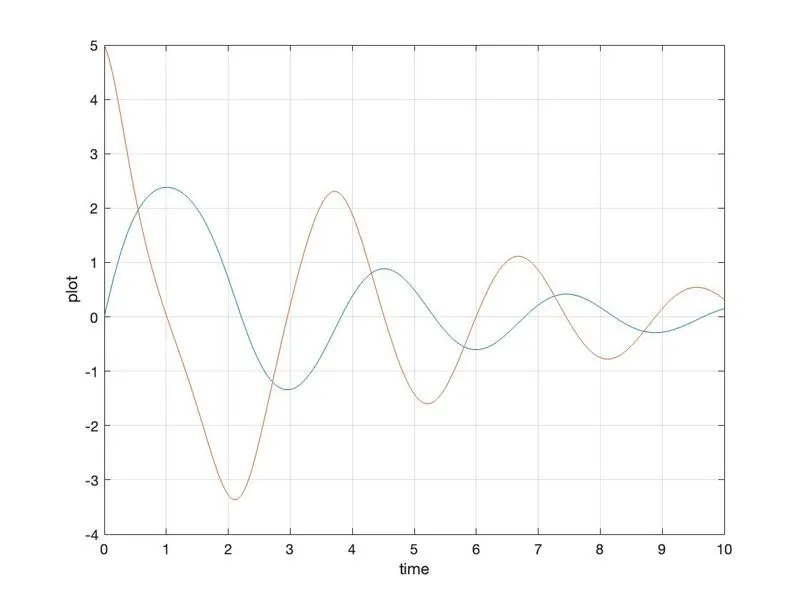 FIGURE2:-
function [dtheta_dt]=ode_function(t,theta,b,g,l,m)
theta1=theta(1)
theta2=theta(2)
dtheta1_dt=theta2;
dtheta2_dt=-(b/m)*theta2-(g/l)*sin(theta1);
dtheta_dt=[dtheta1_dt;dtheta2_dt];
end
t_span=linspace(0,10,500) is the command to calculate the time span
theta_0 is the value initiated from [0,5]
plotting
figure(1)
plot(t,results(:,1)) (ANGULAR DISPLACEMENT)
hold on
plot(t,results(:,2)) (ANGULAR VELOCITY)
ylabel('plot')
xlabel('time')
grid on
here plotting is done as a figure 1
(t,results(:,1) is the angular displacement
(t,result) is the solved ODE
(t,results(:,2)) is the angular velocity
6:-for creating animation of simple pendulum
use the following command
%creating animation of simple pendulum
figure(2)
ct=1;
for i=1:length(t_span)
THETA=results(i,1);
x1=l*sin(THETA);
y1=-l*cos(THETA);
plot([-0.5,0.5],[0,0],'linewidth',3,'color','b')
line([0,x1],[0,y1],'linewidth',3,'color','r');
hold on
plot(x1,y1,'o','markers',30,'markerfacecolor','g')
grid on
axis([-2 2 -2 1.5])
pause(0.0001)
hold off
M(ct)=getframe(gcf)
ct=ct+1
end
movie(M)
videofile=VideoWriter('simple_pendulum.avi')
open(videofile);
writeVideo(videofile,M);
close(videofile)
here using of for loop as
i=starting from 1 to the length of time span
THETA=results(i,1)
calculating x1 from the formula mention above likewise y1 also
plotting starting from [-0.5,0.5]and [0,0] using a linewidth command.
plot the line from the given command
line([0,x1],[0,y1],'linewidth',3,'color','r');
use the hold on command to hold the figure.
plot the sphere by using the following command
plot(x1,y1,'o','markers',30,'markerfacecolor','g')
grid on
axis([-2 2 -2 1.5])
pause(0.0001)
hold off
M(ct)=getframe(gcf)
ct=ct+1
use the marker command to give the sphere color
and also provide the axis interval
M(ct) command to getframe(gcf)
ct=ct+1 which means consecutive motion of contour
end the for loop
for generating movie
use the following command
movie(M)
videofile=VideoWriter('simple_pendulum.avi')
open(videofile);
writeVideo(videofile,M);
close(videofile)
to generate the movie animation of the simple pendulum.
FIGURE1
ANIMATION MOVIE OF SIMPLE PENDULUM
https://drive.google.com/file/d/19oHhBUBzk42DvdTT1hL8jPdml8_C0_iA/view?usp=sharing