Week 3 - Solving second order ODEs
Simple pendulum having a mass'm' of ball m=0.15 which is hanging in a string of length l=2m and the damping coefficientis 0.09, gravity g=9.81.
Equation of simple pendulum hormonic motion is
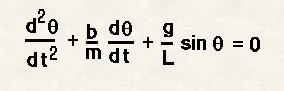
simplifying the 2nd order ODE into First order ODE
theta=theta1
dtheta/dt=dtheta1/dt=theta2
dtheta2/dt=d/dt(theta1)=dtheta2/dt
Solving ODE function
function[dtheta_dt]=ode_func(t,theta,b,g,l,m)
theta1=theta(1)
theta2=theta(2)
dtheta1_dt=theta2
dtheta2_dt=-(b/m)*theta2-(g/l)*sin(theta1)
dtheta_dt=[dtheta1_dt;dtheta2_dt]
end
%program to simulate the motion of pendulum
clear all
close all
clc
b=0.05 %damping coefficient
g=9.81 %Acceleration due to gravity
m=1 %mass of he object
l=1 %length of the string
%At initial condition, initial displacement is 0 angular velocity is 3rad/sec
theta_0=[0;3]
%intergrating the ODE for which we define time of 20 seconds.
t_span=linspace(0,20,500)
%solving ODE45 function
[t,results]=ode45(@(t,theta)ode_func(t,theta,b,g,l,m),t_span,theta_0)
%plotting the reults
figure(1)
hold on
plot(t,results(:,1))
plot(t,results(:,2))
xlabel('time')
ylabel('theta')
legend('Angular_Displacement','Angular_Velocity')
hold off
%to show the animation of simple pendulum for loop is used
%count variable is used to each frame
count=1
for i=1:length(t)
j=results(i,1)
%x0,y0 are the coordinates of pendulum-rod fixed point
x0=0
y0=0
%x1,y1 are the coordinates of pendulum another end point
%x1 coordinate is l*sin(j)
x1=l*sin(j)
%y1 coordinate is -l*cos(j), because y1 lies in -quadrant
y1=-l*cos(j)
figure(2)
%plotting the x0,x1,y0,y1 coordinates
plot([x0 x1],[y0 y1],'linewidth',4)
hold on
%plotting the pendulum rod fixed line
plot([-4 4],[0 0],'LineWidth',5)
plot([0 0],[-4 4],'LineWidth',1)
%to show the pendulum ball lies on x1,y1 coordinate
%marker command is used to show ball structure
plot(x1,y1,'marker','.','markersize',50)
axis([-2 2 -2 2])
hold off
%To create a movie file, getting individual frame and saving in an array name M
M(count)=getframe(gcf);
count=count+1
end
%movie command used to create movie.
movie(M)
videofile=VideoWriter('simple pendulum.avi','Uncompressed AVI')
open(videofile)
writeVideo(videofile,M)
close(videofile)
youtube link- https://youtu.be/TwJwy57QBXE
problem faced during programing
hold on, hold off command usage problem
%program to define ODE function

function[dtheta_dt]=ode_func(t,theta,b,g,l,m)
theta1=theta(1)
theta2=theta(2)
dtheta1_dt=theta2
dtheta2_dt=-(b/m)*theta2-(g/l)*sin(theta1)
dtheta_dt=[dtheta1_dt;dtheta2_dt]
end

%program to simulate animation of simple harmonic motion

clear all
close all
clc

b=0.05  %damping coefficient
g=9.81  %Acceleration due to gravity
m=1  %mass of he object
l=1    %length of the rod
%At initial condition, initial displacement is 0 angular velocity is 3rad/sec
theta_0=[0;3]

%intergrating the ODE for which we define time of 20 seconds.
t_span=linspace(0,20,500)

%solving ODE45 function
[t,results]=ode45(@(t,theta)ode_func(t,theta,b,g,l,m),t_span,theta_0)

%plotting the reults
figure(1)
hold on
plot(t,results(:,1))
plot(t,results(:,2))
xlabel('time')
ylabel('theta')
legend('Angular_Displacement','Angular_Velocity')
hold off

%to show the animation of simple pendulum for loop is used
%count variable is used to each frame
count=1

for i=1:length(t)
j=results(i,1)

%x0,y0 are the coordinates of pendulum-rod fixed point
x0=0
y0=0

%x1,y1 are the coordinates of pendulum another end point
%x1 coordinate is l*sin(j)
x1=l*sin(j)

%y1 coordinate is -l*cos(j), because y1 lies in -quadrant
y1=-l*cos(j)

figure(2)
%plotting the x0,x1,y0,y1 coordinates
plot([x0 x1],[y0 y1],'linewidth',4)
hold on

%plotting the pendulum rod fixed line
plot([-4 4],[0 0],'LineWidth',5)
plot([0 0],[-4 4],'LineWidth',1)

%to show the pendulum ball lies on x1,y1 coordinate
%marker command is used to show ball structure
plot(x1,y1,'marker','.','markersize',50)
axis([-2 2 -2 2])
hold off
%To create a movie file, getting individual frame and saving in an array name M
M(count)=getframe(gcf);
count=count+1
end

%movie command used to create movie.
movie(M)
videofile=VideoWriter('simple pendulum.avi','Uncompressed AVI')
open(videofile)
writeVideo(videofile,M)
close(videofile)