Week 3 - Solving second order ODEs
AIM : TO WRITE A PROGRAM AND SLOVE THE EQUATION OF A MOTION FOR THE SIMPLE PENDULUM USING MATLAB.
OBJECTIVE :
1. To write a program for simple penduulum
2. And creat a animation and movie for their plot obtained through programming.
INTRODUCTION :
A simple pendulum consists of a large mass (bob) suspended by a light string from a rigid support (Figure 1). The length of the string is large compared to the dimensions of the bob. A stationary pendulum has its string in a vertical position with the bob hanging straight down. This is known as the pendulum's equilibrium position (since if left undisturbed, the pendulum will remain in this position). Oscillations (to and fro motion) are set up in a pendulum by displacing the bob from its equilibrium positions and releasing it.
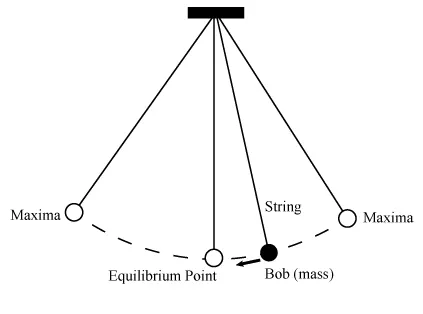
The period of the pendulum is the time required for the pendulum bob to complete one oscillation (cycle). One oscillation is the motion of the pendulum beginning at some reference point and continuing until the reference point is reached again (and the motion starts to repeat itself). The reference points that we will use are the equilibrium point and one of the two maxima (points of maximum displacement from equilibrium). Note that in one cycle the bob reaches the equilibrium point twice, once while traveling to the left and once while traveling to the right.
to slove a mathematically equation,
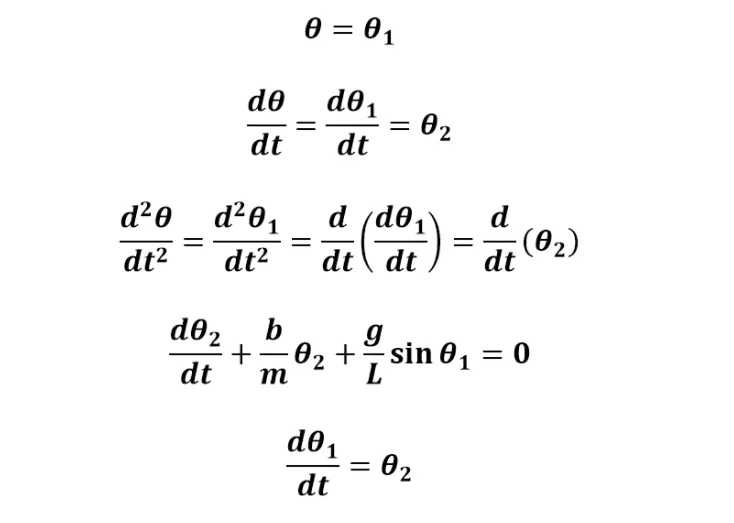
where ,
b = damping
g = accelaration due to gravity
l = length of a string
m = mass of a bob
CODE :
clear all
close all
clc


b = 0.05;
g = 9.81;
l = 1;
m = 0.1;

% intial condition
theta_0 = [0;3];

% time points

t_span = linspace(0,20,500);

% slove ode

[t,results] = ode45(@(t,theta)ode_func(t,theta,b,g,l,m),t_span,theta_0);

figure(1)

plot(t,results(:,1),'r','linewidth',2)
hold  on
plot(t,results(:,2),'b','linewidth',2)
ylabel('plot')
xlabel('time')
legend('dispalcement','velocity')
title('displacement and velocity of a simple  pendulum')

ct=1;
for i=1:length(t)

x=l*sin(results(i,1));
y=-l*cos(results(i,1));
figure(2)
plot([-1,1],[0,0],'LineWidth',3,'Color','k')
hold on
plot([0,x],[0,y],'LineWidth',3,'Color','b')
plot(x,y,'o','MarkerSize',25,'MarkerFaceColor','r')
axis([-2 2 -2 2])
hold off
M(ct)=getframe(gcf);
ct=ct+1;
end
movie(M)
videofile = VideoWriter('ode_pend.avi');
open(videofile)
writeVideo(videofile,M)
close(videofile)
FUNCTION CALLING OF A CODE :
function  [dtheta_dt] = ode_func(t,theta,b,g,l,m)

theta1 = theta(1);
theta2 = theta(2);
dtheta1_dt =theta2;
dtheta2_dt = -(b/m)*theta2-(g/l)*sin(theta1);
dtheta_dt = [dtheta1_dt;dtheta2_dt];


end
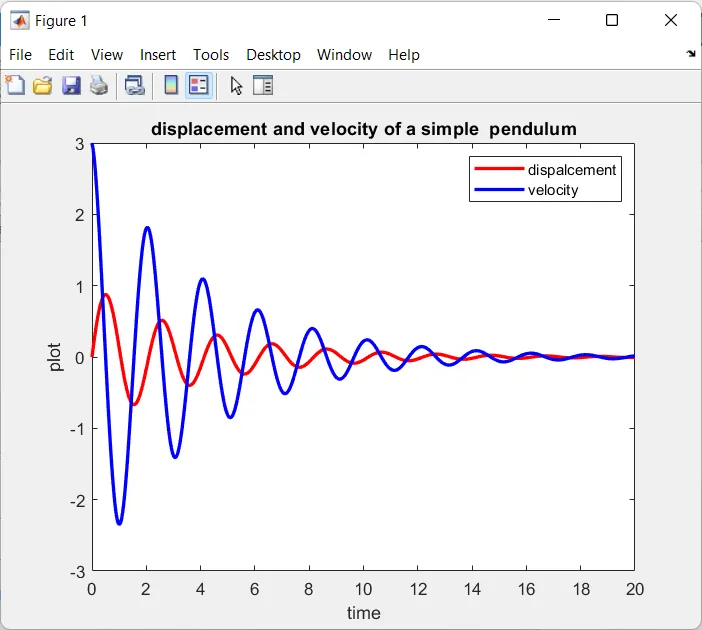
GRAPH : DISPLACEMENT AND VOLUME OF A SIMPLE PENDULM
ANIMATION LINK FOR A SIMPLE PENDULUM :
https://studio.youtube.com/video/TggXb95ZFk4/edit
CONCLUSION :
Thus, to write programing and animation for simple pendulum has been done.