Week 3 - Solving second order ODEs
Aim: -
The main aim of this project is to simulate the transient behavior of the simple pendulum and to create animation of its motion using MATLAB program by solving the second order ODE.
Simple pendulum: -
A Simple pendulum consists of a mass m hanging at the end of a string of length L. the period of a pendulum or any oscillatory motion is the time required for one complete cycle, that is, the time to go back and forth once. If the amplitude of motion of the swinging pendulum is small, then the pendulum behaves approximately as a simple harmonic oscillator, and the period T of the pendulum is given approximately by T = .
Simple harmonic motion: -
In mechanics and physics, simple harmonic motion is a special type of periodic motion or oscillation where the restoring force is directly proportional to the displacement and acts in the direction opposite to that of displacement.
The motion of a particle moving along a straight line with an acceleration whose direction is always towards a fixed point on the line and whose magnitude is proportional to the distance from the fixed point is called simple harmonic motion.
By applying Newton’s second law of rotational motion, we can get the equation of motion for the pendulum with damping co-efficient is.
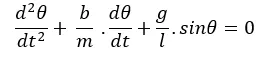
In the above equation.
G = gravity in .
L = length of the pendulum in m.
M = mass of the ball in KG.
B = damping coefficient.
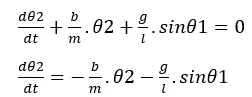
Now, for solving this kind of higher order ODE. We can break the equation into first order ODE.
Let us consider theta = theta1.
Then 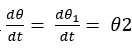 equation no 1.
 equ 2.
Substuiting theta = theta1 in the original given equation.

Then submitting equ 1 and 2
The above equation is the solution vector in the form of matrix.
Lets us assume the input parameters as follows.
L = 1M
M = 1kg
B = 0.05
G = 9.81m/s2
Time = 0-20sec (simulation)
Angular displacement = 0
Angular velocity = 3rad/sec
The architecture of this program is like
Declaring the input parameters:
Here the required input parameters are declared like length of the string mass of the bob, damping coefficient and the acceleration due to gravity.
Initial condition and time period: -
Here we are defining the initial conditions like angular displacement and angular velocity in the form of array into a new variable called theta_0. Then the time period for the oscillation is declared with the help of line space command from 0 to 10 with 500 points and assuming it to the variable called timespan.
Calling the function ODE45: -
In this step we are solving the ODE equation with the help of inbuilt ODE solver command in matlab.
Plotting graph: -
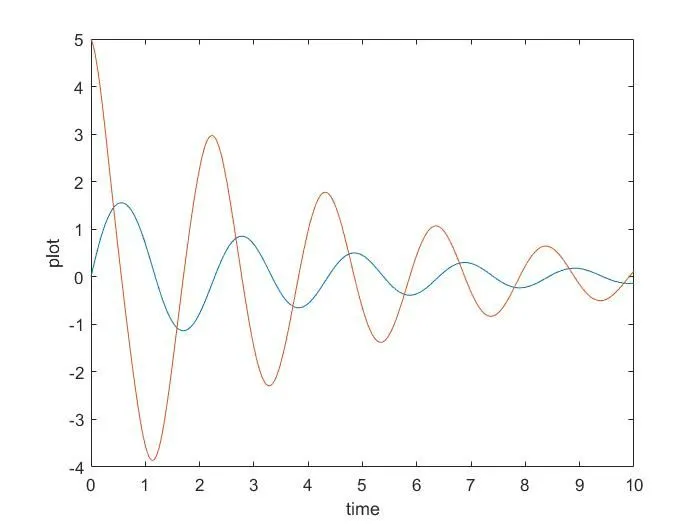
We are plotting the graph which shows the angular displacement and the angular velocity with respect to the time period of oscillation. We can observe the changes in the graph by changing the damping coefficient also.
Creating animation with for loop: -
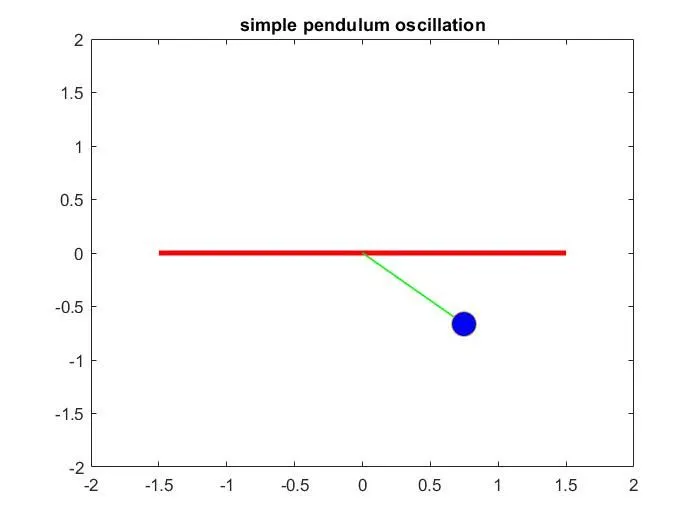
In for loop we are declaring the value with the range operator to the result value1, is nothing but displacement values. Then we are assigning into the new variables called. Next process is to give the co-ordinates value for where the ball is hanging x0,y0 and x1,y1 are the variables which stores the value of string.
MATLAB program: -
b=0.05;
g=9.81;
l=1;
m=0.1;
%intial condition
theta_0 = [0;5];
%time points
t_span = linspace(0,10,500);
%solve ODE
[t, results] = ode45(@(t,theta) ode_func(t,theta, b,g,l,m),t_span, theta_0);
plot(t,results(:,1))
hold on
plot(t,results(:,2))
ylabel('plot')
xlabel('time')
% creating animation
ct = 1;
for i = 1:length(results(:,1))
x0 = 0;
y0 = 0;
x1 = 1*sin(results(i,1));
y1 = -1*cos(results(i,1));
figure(2)
plot([-1.5,1.5],[0,0],'linewidth',3,'color','r');
hold on
plot([x0 x1],[y0 y1],'linewidth',1,'color','g');
plot(x1,y1,'marker','o','markerface','b','markersize',15);
axis([-2,2,-2,2]);
title('simple pendulum oscillation');
pause(0.0);
hold off
M(ct) = getframe(gcf); %capture current figure using getframe command
ct=ct+1; % loop counter
end
movie(m) %stiching all the frame in the m array to create an animation
videofile = videowriter('simple_pendulum.avi','uncompressed AVI');
open(videofile)
writevideo(videofile,M)
close(videofile)
function code:-
function [dtheta_dt] = ode_func(t,theta,b,g,l,m)
theta1 = theta(1)
theta2 = theta(2)
dtheta1_dt = theta2;
dtheta2_dt = -(b/m)*theta2 - (g/1)*sin(theta1);
dtheta_dt = [dtheta1_dt; dtheta2_dt];
end