Week - 3 Drop test Challenge
Skill-lync assignment 3
Aim: The objective of this assignment is to create a complete simulation file for the given component. The final keyword file must include all the relevant material properties, element properties and boundary conditions.
Case setup: The given keyword file is a mesh of a mobile phone and the ground. The component is to simulate the drop of the phone on the ground.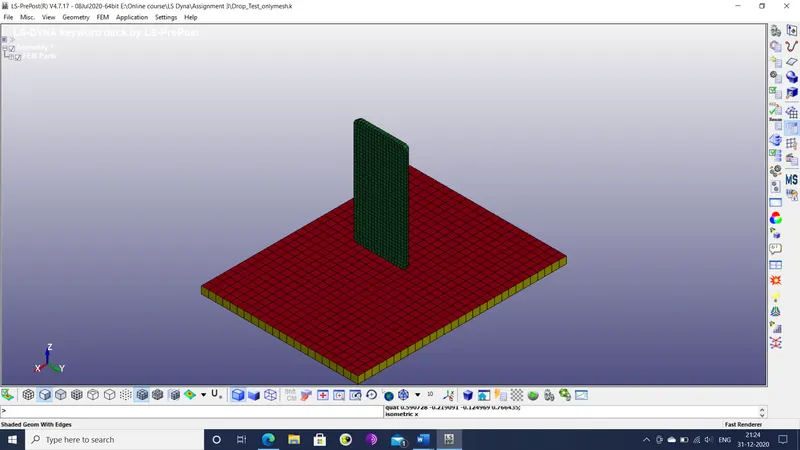
Figure 1: Phone and ground mesh
The additional inputs required in this component include material behavior, rigid wall definition and initial velocity.
Initial conditions: The following initial conditions are decided for the component.
- The material of the entire phone is assumed to be steel with Johnson-cook plastic behavior. So the material type 15 is chosen to represent plastic behavior.
- The phone is assumed to fall from a distance of 1 m. So the initial velocity for the simulation is given by v = sqrt(2*g*1) = 4.429 mm/ms.
- The total run time for the simulation is decided to be 100 ms. The time step is set as 0.5 microseconds or 0.0005 ms.
Procedure: The simulation file is prepared through the following sequence of steps.
- The keyword file of the component is imported into the LS-PrePost workspace.
- The keyword manager is opened and the SECTION>SOLID keyword id edited to assign a section to the solid mesh elements. Element formulation (ELFORM) is chosen to be 6 (1 point Eulerian). Section ID (SID) is set as 1.
- The MAT>15-JOHNSON_COOK keyword is edited to assign material properties to the mesh. Referring to literature for steel, the following properties are set considering the kg mm ms units.
- Density (RO): 7.8e-6
- Shear modulus (G): 79000
- Young’s modulus ( E ): 210000
- Poisson’s ratio (PR): 0.33
- Minimum time step for element deletion (DTF): 0.0002
- The PART>PART keyword is edited so that the phone mesh region (PID: 3) is assigned section ID as 1 (defined for solid mesh) and material ID is 1 (Steel).
- The CONTROL>CONTACT keyword is edited so that initial penetration check (ISLCHK) is set to 2 (full check of initial penetration). Thus allows for checking for penetrations between nodes of phone and ground surface.
- The CONTROL>HOURGLASS keyword is included with value of default hourglass viscosity type (IHQ) set as 1 (default).
- The CONTROL>SOLID keyword is included in the model.
- The create entity tool is opened to create a node set for the ground surface. The SET_NODE keyword is selected for creation and the nodes on the ground surface are chosen. A second iteration of this keyword is used for nodes on the phone mesh. The two node sets are shown below.
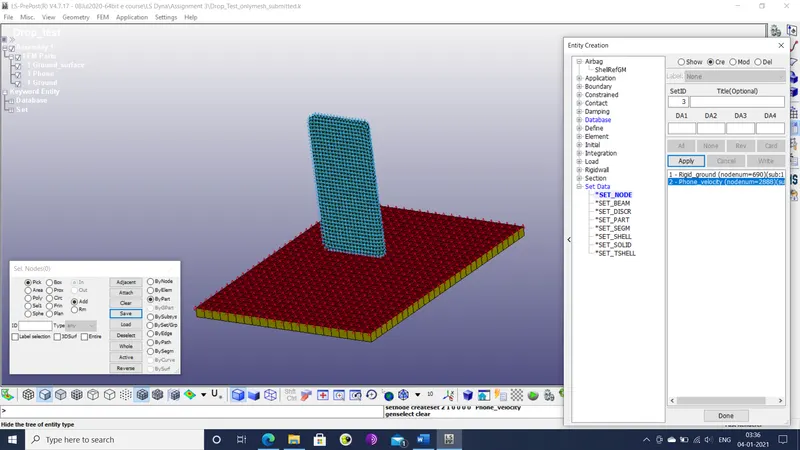
Figure 2: Node sets for ground surface and phone
- The RIGIDWALL_PLANAR keyword is edited to create the rigid wall that represents the ground. The coordinates of the tail end of the normal vector is set as (0,0,-485). The slave nodes are set by NSID 2 (phone mesh). Interface friction (FRIC) is set to 0.1. The offset is set to 100 mm.
- The INITIAL>VELOCITY keyword is edited so that phone mesh (NSID 2) has a velocity of -4.429 mm/ms in the z direction.
- The CONTROL>TERMINATION keyword is edited to specify the time step and run time for the animation. The run time (ENDTIM) is set as 100 (ms) and the minimum time step (DTMIN) is set as 0.0005 (ms).
- The DATABASE>BINARY_D3PLOT keyword is edited so that time interval between outputs (DT) is 0.0005 ms.
- The DATABASE>EXTENT_BINARY keyword is edited so that STRFLG is set to 1, so that strain tensor data is written in the d3 output file.
- The DATABASE>HISTORY_NODE keyword is edited so that node 8043 on the phone mesh is selected for history output.
- The DATABASE>ASCII_option is edited so that DT is 0.0002 ms.
- The KEYWORD>KEYWORD_ID keyword is edited so that a keyword ID named “Drop_test_01_submitted” is assigned to the file. The file is then saved as a keyword file.
Conclusions: The input file has been sufficiently prepared for simulation. The input file now contains boundary conditions (rigid wall), initial conditions (velocity), element & material properties and output parameters (time step & run time).