Week-3 Challenge: ADVISOR Tool
Aim: Use the ADVISOR tool and perform the simulation of the vehicle by changing parameters.
Objective:
1. For EV_defaults_in file, if cargo mass is 500 kg with all other default conditions, can the vehicle travel for 45 km with FTP drive cycle? Conclude your observations.
2. In the above case, try changing the battery capacity and repeat the simulation.
3. Perform gradeability test with PRIUS_Jpn_defaults_in file. Compare your results in a table and conclude.
Theory:
Advanced Vehicle Simulator (ADVISOR) was first developed in November 1994 at the National Renewable Energy Laboratory. It was designed as an analysis tool to assist the US Department of Energy (DOE) in developing technologies for hybrid electric vehicles (HEV) through the Hybrid Electric Vehicle Propulsion System contracts with Ford, General Motors, and DaimlerChrysler. Its primary role is to highlight the system-level interactions of hybrid and electric vehicle components and their impacts on vehicle performance and fuel economy. ADVISOR was first released publicly via the Internet (www.nrel.gov/transportation/analysis) in September 1998. The number of public users of the software tool has grown steadily from a small group of about 30 initial partners to a group of over 4500 individuals that have downloaded the software. The majority (68%) of ADVISOR users are members of the industry while 29% are members of academia with the remaining 3% representing government entities. This large user community provides feedback necessary to improve the models and component data to be used within the models. Since first introduced, several updated versions of the software have been periodically distributed via the Internet.
ADVISOR uses basic physics and measured component performance to model existing or future vehicles. Its real power lies in the prediction of the performance of vehicles that have not yet been built. It answers the question “what if we build a car with certain characteristics?” ADVISOR usually predicts fuel use, tailpipe emissions, acceleration performance, and gradeability. In general, the user takes two steps:
- Define a vehicle using measured or estimated component and overall vehicle data.
- Prescribe a speed versus time trace, along with road grade, that the vehicle must follow.
ADVISOR then puts the vehicle through its paces, making sure it meets the cycle to the best of its ability and measuring (or offering the opportunity to measure) just about every torque, speed, voltage, current, and power passed from one component to another. ADVISOR will allow the user to answer questions like:
- Was the vehicle able to follow the speed trace?
- How much fuel and/or electric energy were required in the attempt?
- How does the state-of-charge of the batteries fluctuate throughout a cycle?
- What were the peak powers delivered by the drivetrain components?
- What was the distribution of torques and speeds that the piston engine delivered?
- What was the average efficiency of the transmission?
By iteratively changing the vehicle definition and/or driving cycle, the user can go on to answer questions such as:
- At what road grade can the vehicle maintain 55 mph indefinitely?
- What’s the smallest engine I can put into this vehicle to accelerate from 0 to 60 mph in 12 s?
- What’s the final drive ratio that minimizes fuel use while keeping the 40 to 60 mph time below 3 s?
- What is the fuel economy sensitivity to mass, aerodynamic drag, or other vehicle or component variations?
1. For EV_defaults_in file, if cargo mass is 500 kg with all other default conditions,can the vehicle travel for 45 km with FTP drive cycle? Conclude your observations.
Steps in simulation:
1. Firstly, open the MATLAB software and change its path directory to the folder where ADVISOR tool is downloaded.
2. To open the ADVISOR software, run 'advisor.m' file.
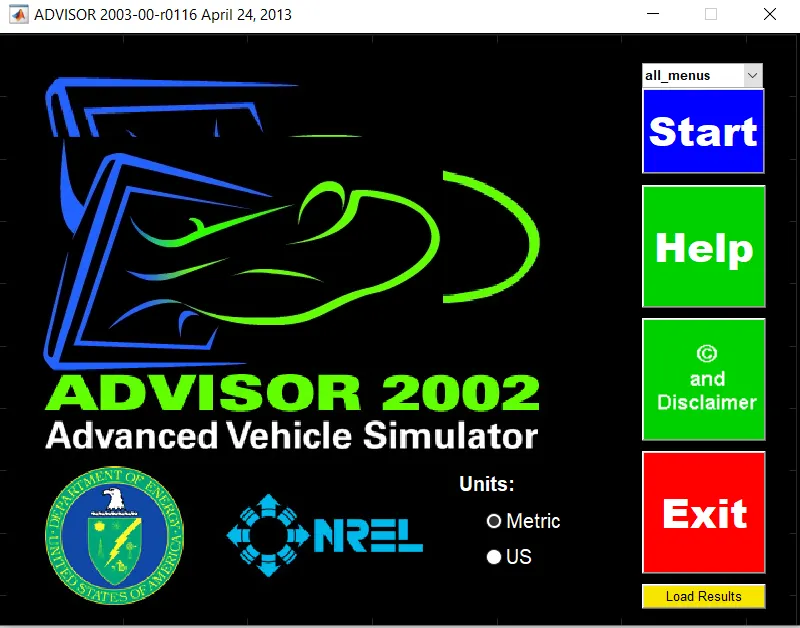
3. When the software will open, change its units into 'Metric' then the new window will open.
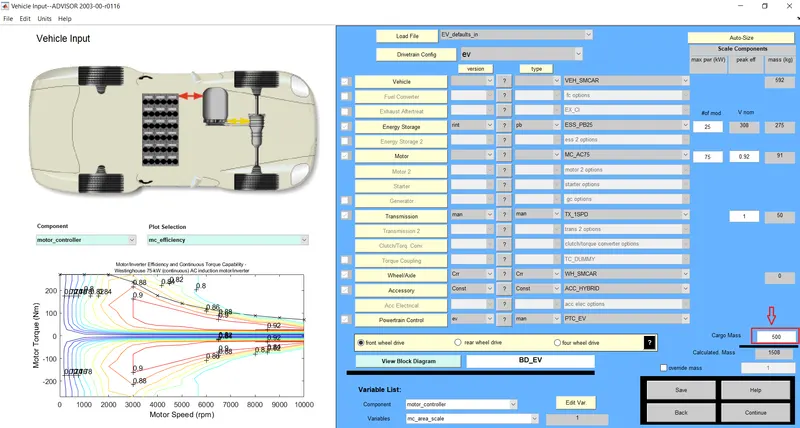
4. After that go to 'load file' option to change the Vehicle Input and load 'EV_defauts_in' from dropdown menu.
5. Enter the cargo mass value= 500 kg and leave all other inputs as defaults.
6. Now click the continue button to go on next part.
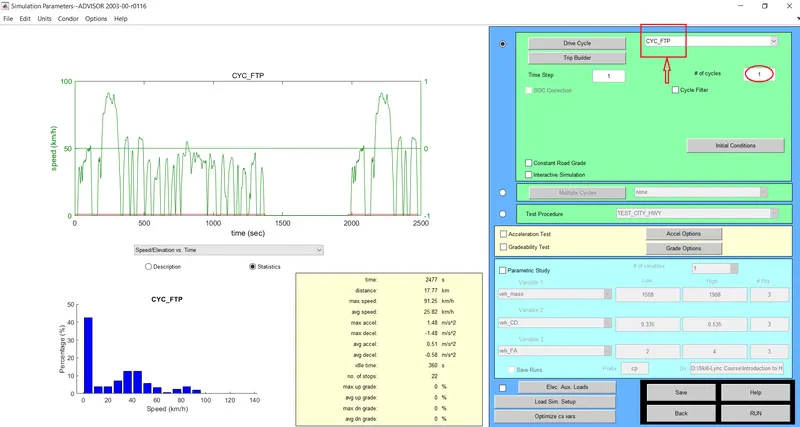
7. Now, from the Drive Cycle menu load 'CYC_FTP' drive cycle and Enter no. of cycle=1.
8. After that click on the RUN button to perform the simulation and see the results.
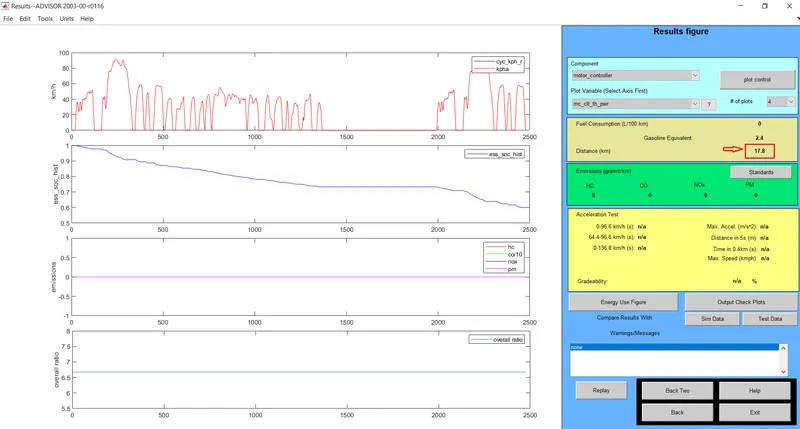
Results 1: (#no. of cycle=1)
Here, we can see that the distance covered by the vehicle is 17.8 km only. It can be observed that the SOC is not 0, so we can add more no. of the cycle in this particular drive cycle.
9. Now, press the back button to go to the previous page and Enter no. of cycle=2 and see the results.
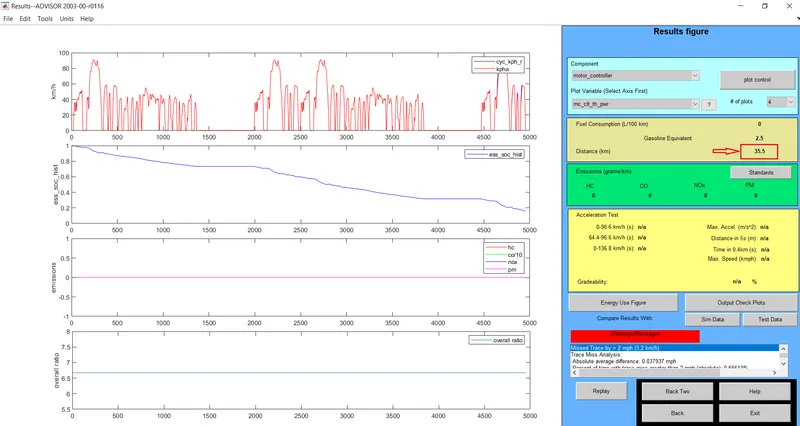
Results 2: (#no. of cycle=2)
In Result-2, we can see that the distance covered by the vehicle is 35.5 km. It can be observed that the SOC is not 0, so we can increase the no. of the cycle in this particular drive cycle.
10. Now, again press the back button to go to the previous page and Enter no. of cycle=3 and see the results.
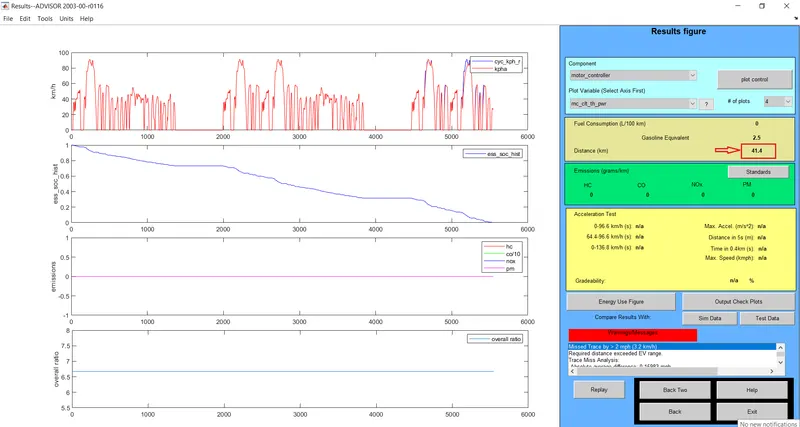
Results 3: (#no. of cycle=3)
In Result-3, we can see that the distance covered by the vehicle is 41.4 km. It can be observed that the SOC is 0, so we can't increase more no. of the cycle.
Observation Data:
|
No. of Cycle |
Distance Covered (km) |
|
1 |
17.8 |
|
2 |
35.5 |
|
3 |
41.4 |
Therefore
- EV_defaults_in can't travel for 45 km, if cargo mass is 500 kg with all other default conditions, with FTP drive cycle.
2. In above case, try changing the battery capacity and repeat the simulation.
In the previous, we observed that 'EV_defaults_in' was not able to travel for 45 km due to insufficient battery or SoC. Therefore, in this part, we will be varying the battery capacity by changing its parameter and then we see the results.
Steps in simulation:
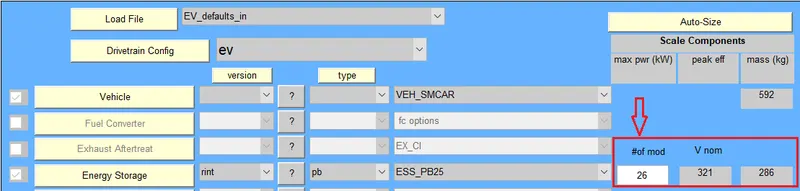
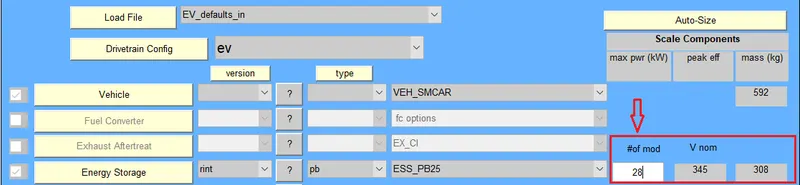
1. Now go to the first page of the tool and change the #of mod (Module number of battery). By default, #of mod is 25, so we will change it to 26 keep other parameters as previous. By changing the module number of the battery, the nominal voltage and weight of the battery will also change.
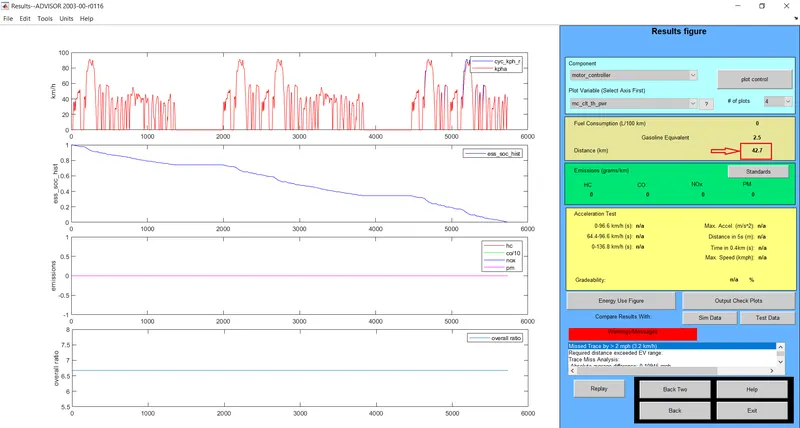
Results 1: (#of mod=26)
In Result-1, we can see that the distance covered by the vehicle is increased to 42.7 km, when increased the battery capacity.
2. It was observed from the previous results that, by increasing the battery capacity, vehicle can cover more distance. So let's again increase the #of mod=27 and see the results.
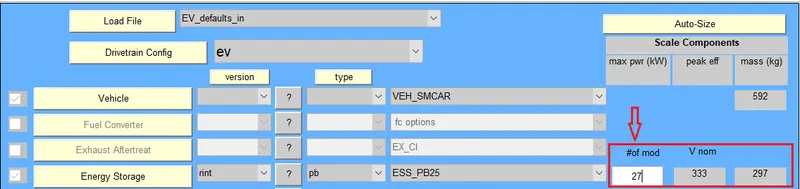
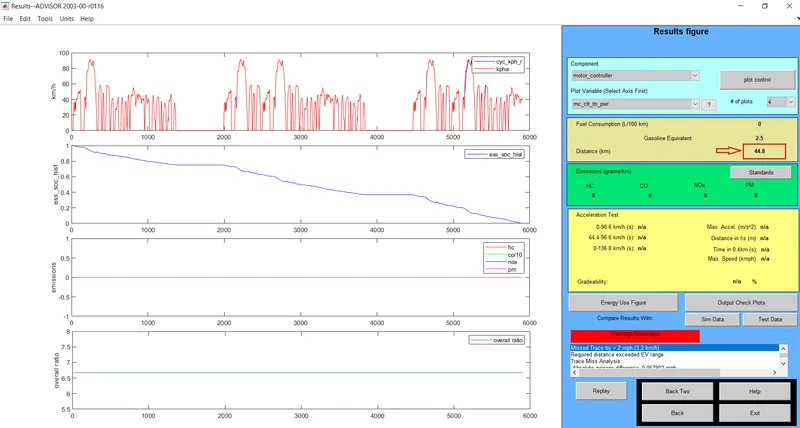
Results 2: (#of mod=27)
In Result-2, we can see that the distance covered by the vehicle is increased to 44.8 km.
3. When #of mod=28
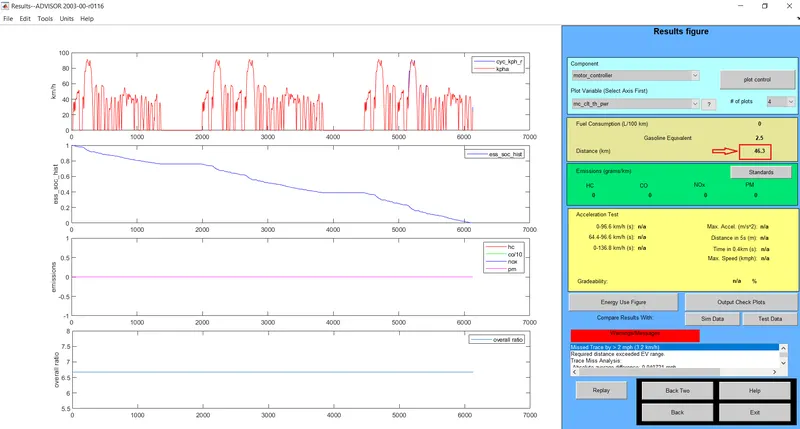
Results 3: (#of mod=28)
In Result-3, we can see that the distance covered by the vehicle is increased to 46.3 km.
Observation Data:
|
#of mod |
Distance Covered (km) |
|
26 |
42.7 |
|
27 |
44.8 |
|
28 |
46.3 |
Therefore
- EV_defaults_in can travel for 45 km, if cargo mass is 500 kg, with FTP drive cycle where no. of cycle=3, #of mod=28.
- Changing the battery capacity of the vehicle gives satisfactory results.
3 . Perform gradeability test with PRIUS_Jpn_defaults_in file.Compare your results in table and conclude.
Gradability:
A car's gradability is its ability to climb slopes. Gradability is measured either in degrees or percentage. A 45 degrees gradient is equivalent to 100 per cent. Gradability is dependent on engine power, drivetrain type, gear ratio, weight, weight distribution, car's centre of gravity and traction.
Steps in simulation:
1. Open the ADVISOR software and then load PRIUS_JPN_defaults_in file in vehicle input. Leave all other parameters default and then click on continue.
2. On the next page, choose the drive cycle 'CYC_FTP' and enter no of cycle=1.
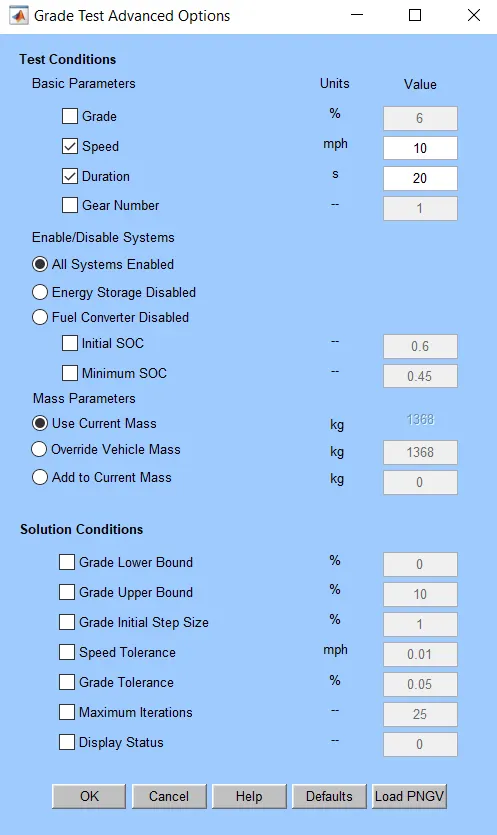
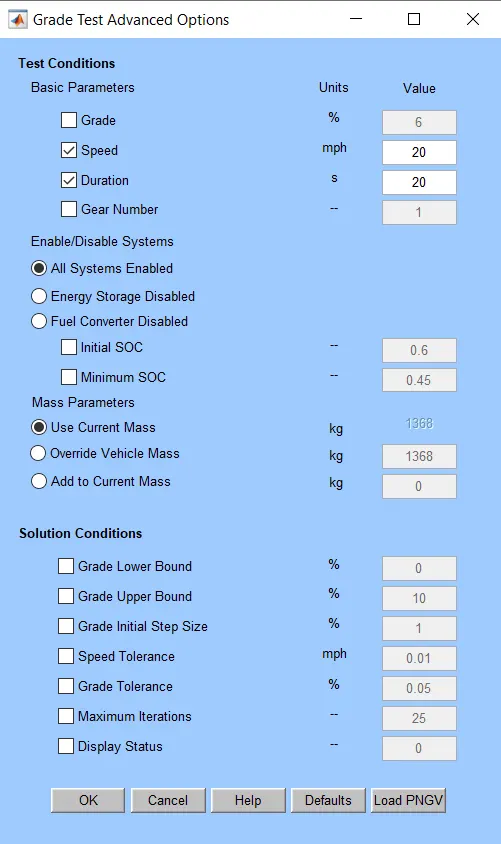
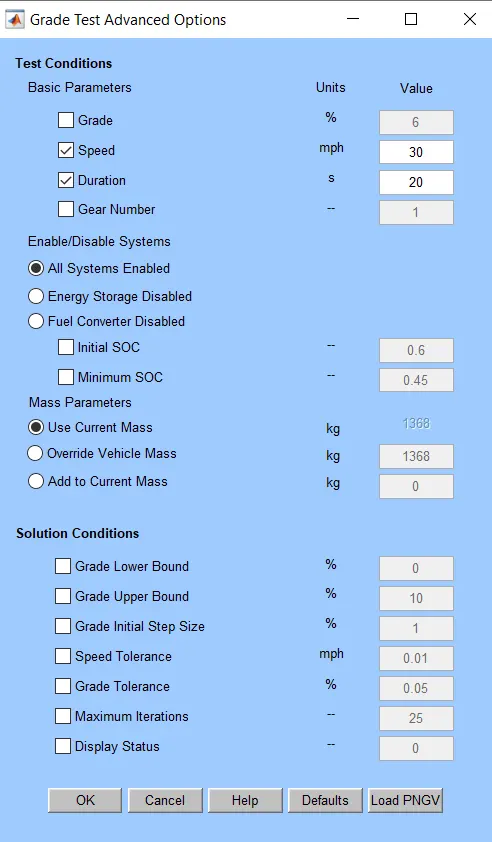
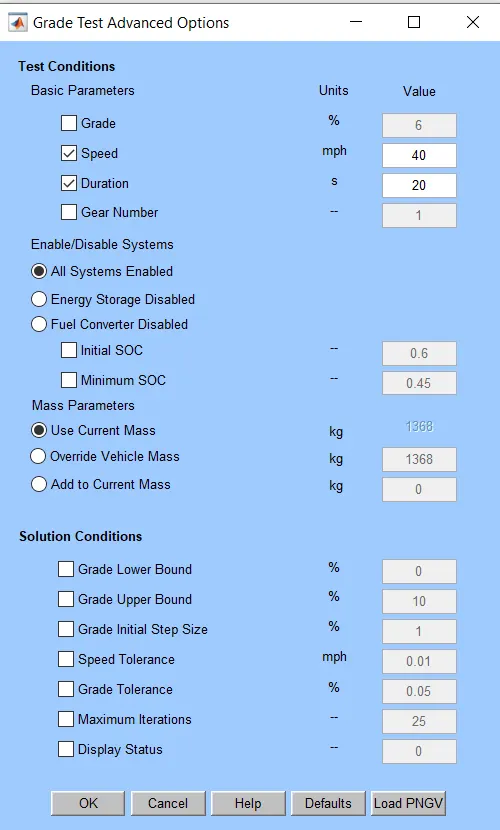
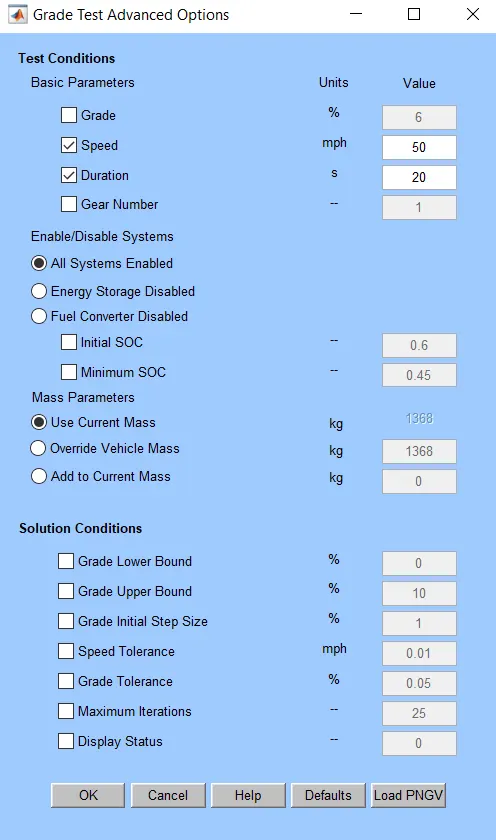
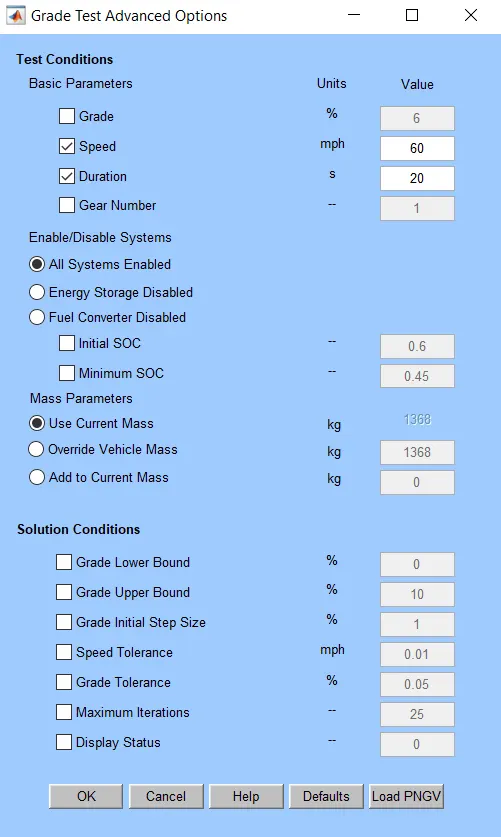
3. Click on Gradeability Test and open the Grade Options menu box. In the Grade Options box, we enter all the necessary paramerts for the gradeability test.
4. In grade test, Enter parameters such as Speed, Duration and activate All Systems Enabled. Leave all others parameters default and click on ok button.
5. Press the RUN button to run the simulation and see the results.
6. Repeat this simulation for different ranges of speed for 10 mph, 20 mph, 30 mph, 40 mph, 50 mph, and 60 mph. Take duartion= 20s.
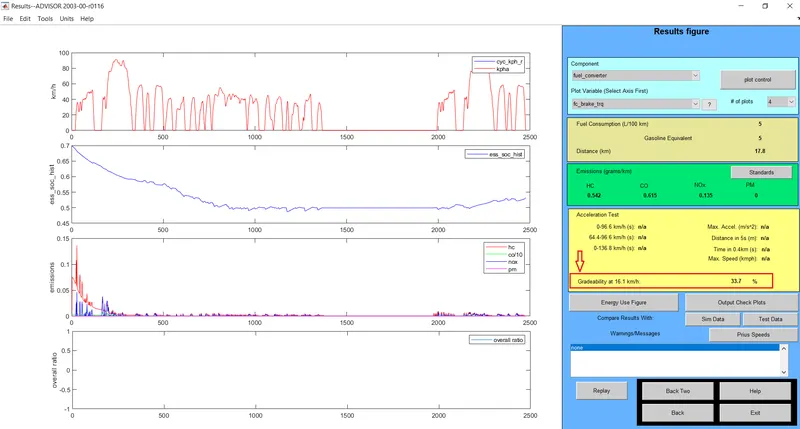
Results 1:
Input: For Speed =10 mph for 20s duration
Output: Gradeability= 33.7%
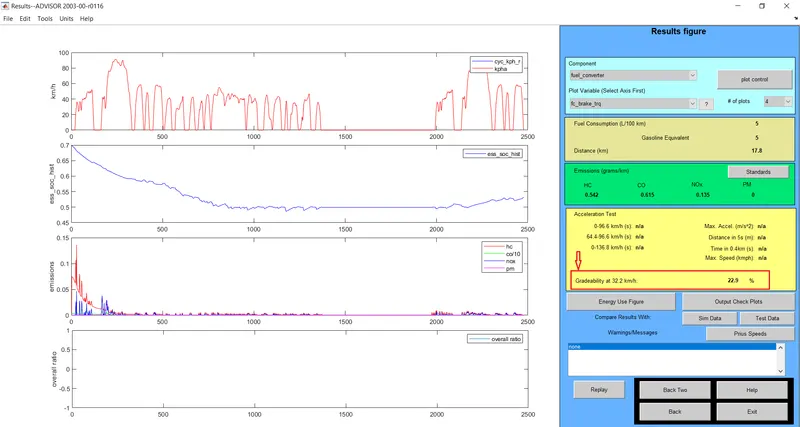
Results 2:
Input: For Speed =20 mph for 20s duration
Output: Gradeability= 22.9%
Results 3:
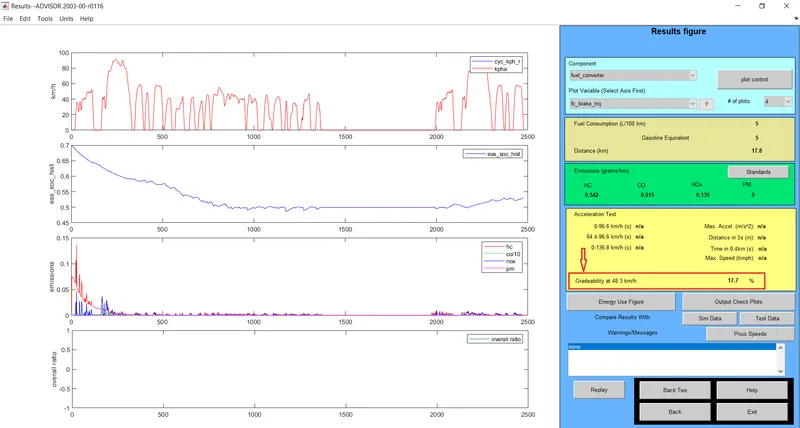
Input: For Speed =30 mph for 20s duration
Output: Gradeability= 17.7%
Results 4:
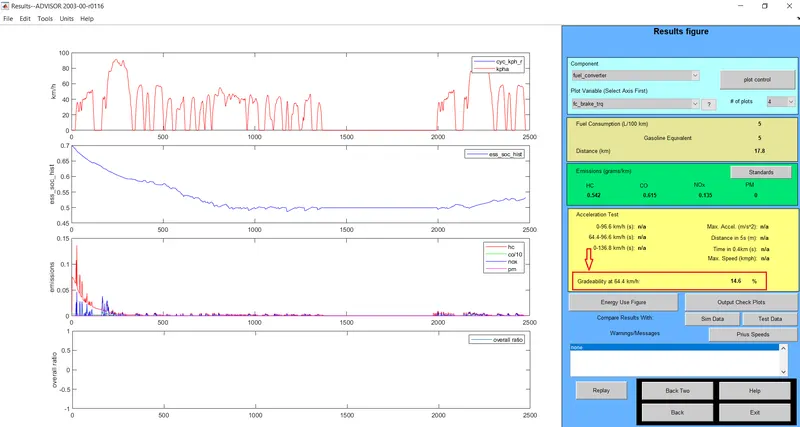
Input: For Speed =40 mph for 20s duration
Output: Gradeability= 14.6%
Results 5:
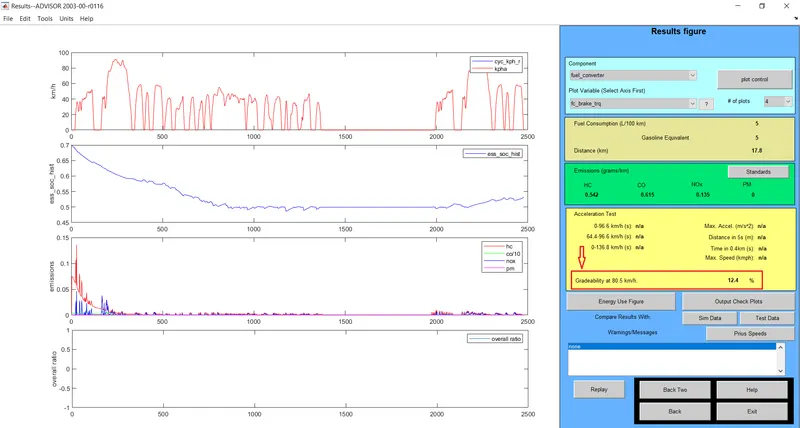
Input: For Speed =50 mph for 20s duration
Output: Gradeability= 12.4%
Results 6:
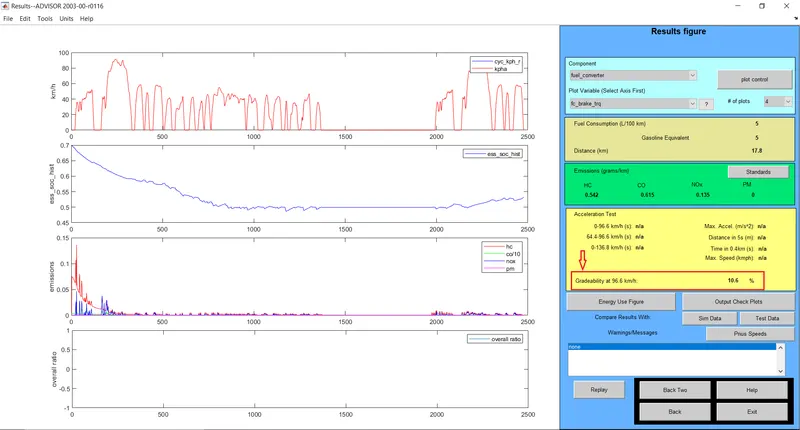
Input: For Speed =60 mph for 20s duration
Output: Gradeability= 10.6%
Observation Data:
|
Speed (mph) |
Speed (km) |
Duration (s) |
Gradeability (%) |
|
10 |
16.1 |
20 |
33.7 |
|
20 |
32.2 |
20 |
22.9 |
|
30 |
48.3 |
20 |
17.7 |
|
40 |
64.4 |
20 |
14.6 |
|
50 |
80.5 |
20 |
12.4 |
|
60 |
96.6 |
20 |
10.6 |
Therefore,
- From the results, it can be seen that increasing the speed of the vehicle results in decreasing the gradeability.
Conclusion:
1 . EV_defaults_in can't travel for 45 km, if cargo mass is 500 kg with all other default conditions, with FTP drive cycle.
2 . EV_defaults_in can travel for 45 km, if cargo mass is 500 kg, with FTP drive cycle where no. of cycle=3, #of mod=28 by
changing the battery capacity of the vehicle gives satisfactory results.
3 . From the results, it can be seen that increasing the speed of the vehicle results in decreasing the gradeability.