Week 3 Simulink
Aim:-
- To create a simulink model for the given force and distance on a cutting tool of a shaping machine varies over the length of cut.
- To create a two array data set from the command window and to create a simulink model to implement equation `z=3x^2-5y+18` store result values using to File block.
- Solve the given problems using the Mass-Spring-Damper in Simulink and Simscape model.
1. The force on a cutting tool of a shaping machine varies over the length of cut as follows:
Distance (mm) 0 20 40 60 80 100
Force (kN) 60 72 65 53 44 50
Finding work done by the cutting tool
- The action of the given force (F) is to move the cutting tool through a distance (d) in a straight line in the direction of the force. Now, work done (W) by the cutting too for this force is equal to the product of the magnitude of applied force and the distance through which the body moves.
- It can be calculated using the formula W=F⋅d
- We have different values of Force at different instances of distance.
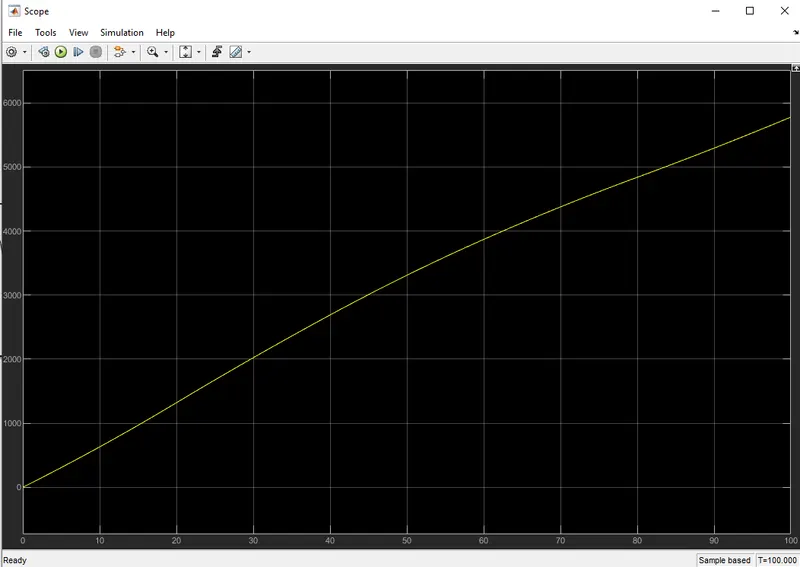
- So, we can calculate the work done for this by finding the area under the curve after plotting all the values.
- We can plot these values using the repeating sequence.
- The area under the curve can be calculated using the integration block.
- We can get the results in scope and display.
Simulink model:-
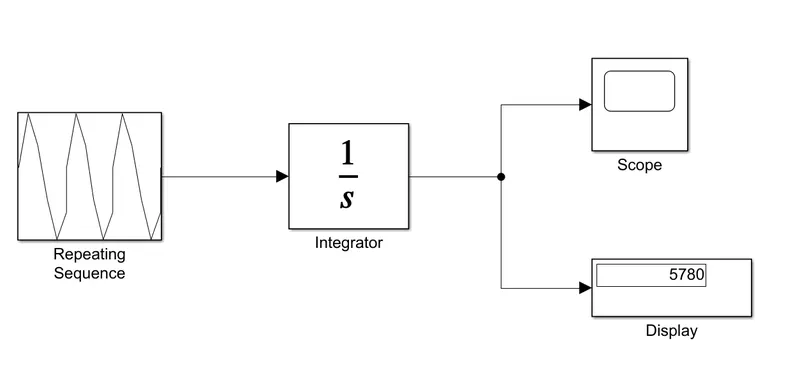
Scope:-
2 . Create two array data sets x = [22 3 55.6 9 12 10] and y = [5 31 95 56.3 77 61] from the command window. Create a Simulink model to implement equation z=3x2-5y+18 Store result values using To File block.
- We create a block diagram to find the solution for the above equation.
- The inputs given are x = [22 3 55.6 9 12 10] and y = [5 31 95 56.3 77 61].
- We use the basic constant blocks to add the above values, we add them from the workspace.
- The square block is used for squaring operation.
- Multiplication is done by using the Gain block.
- The Sum and Minus blocks are used for addition and subtraction respectively.
- We show the results in display and scope.
- We add a To File block so that we can store the results in a file.
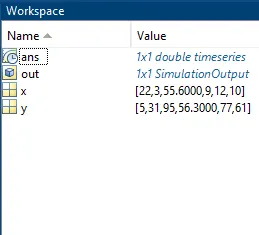
We first generate two arrays named X and Y in the command window.
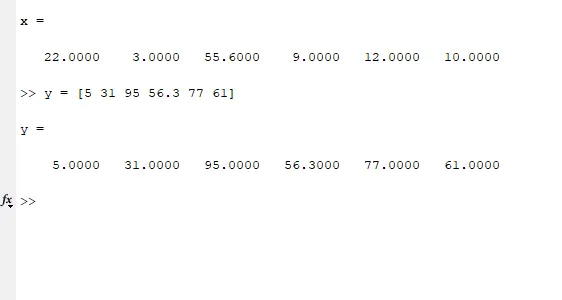
Now we have to make the simulink model for creating the equation
3x2-5y+18
Simulink model:-
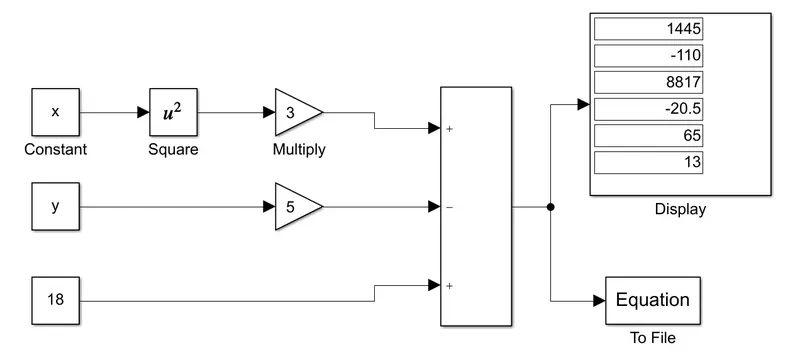
For making `3x^2`, we have first squared the x variable using a square block, therefore x becomes `x^2`.
The Gain block multiplies the input by a constant value (gain). The input and the gain can each be a scalar, vector, or matrix. We have inputted the constant 3 as gain value. Now what the Gain block does is that it multiplies the `x^2` with 3, thereby giving output as `3x^2`.
Similarly, another gain block is used for giving 5y.
The constant value in the equation "18" is given as it is inside a constant block.
Now all three of these are sent to an Add block for assigning + or - sign. Since 5y has a -ve sign, we give it to a - inside the add block.
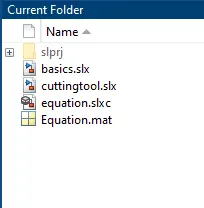
Finally, the results are given to a To File block. We have named it as "Output". We can see this "Output" file in our folder.
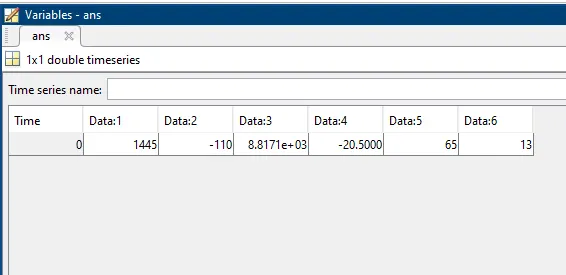
Inside the "Output" file, we can see the values of z.
workspace File block used to save the file in a respective folder
Results
3 . Solve the given problems using the Mass-Spring-Damper in Simulink and Simscape model.
- Derive the governing equation for the model
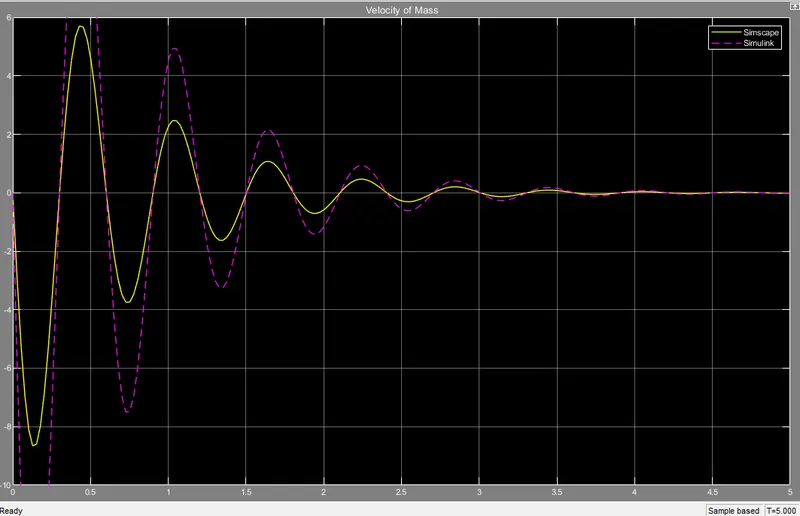
- Change the value of mass, damper, and spring for the Simscape model and plot the result. Change the value of Mass x0=2 in the Simulink model and plot the results.
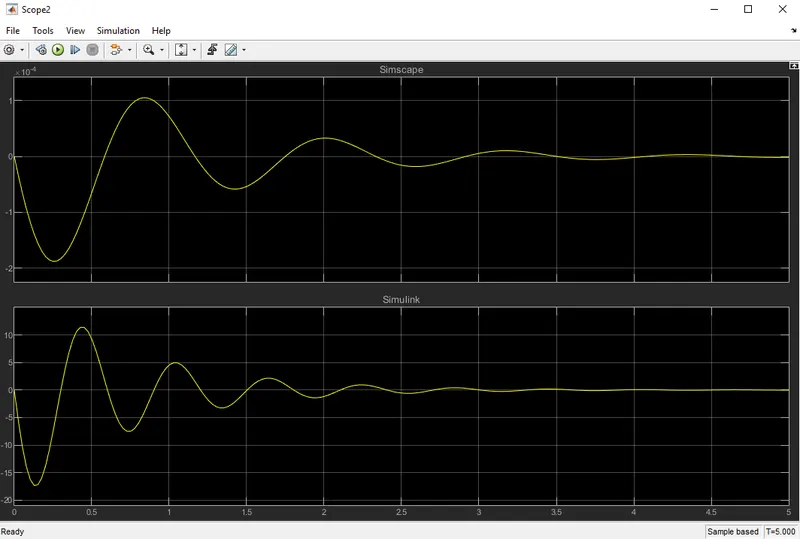
- Make the response from Simscape and Simulink as two separate displays.
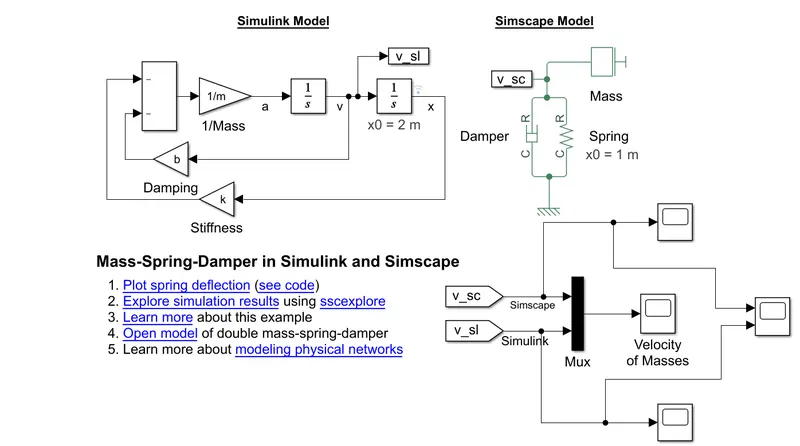
This example shows two models of a mass-spring-damper
1 .A model with Simulink input/output blocks
This model uses signal connections, which define how data flows from one block to another.
2 . Another using Simscape physical networks.
The Simscape model uses physical connections, which permit a bidirectional flow of energy between components.
Physical connections using the Simscape physical networks make it possible to add further stages to the mass-spring-damper simply by using copy and paste but, Input/output connections in the simulink model require rederiving and reimplementing the equations.
The initial deflection for the spring is 1 meter.
This is given as input in the block parameters for the Spring in the simscape model.
1 . Derive the governing equation for the model
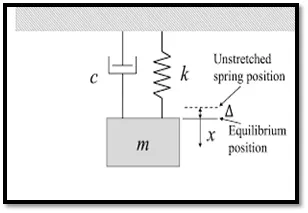
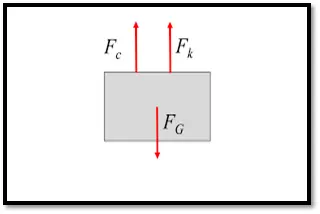
Where,
M = mass
K = Spring constant
C = Damper Coefficient
We know that:
∑F=m.a">∑F=m.a ………………… equation 1
Here,
Fc=c⋅v">Fc=c⋅v
Fk=k⋅x">Fk=k⋅x
Now, considering the sign conventions, (upward negative)
-Fc-Fk=m⋅a">−Fc−Fk=m⋅a ………………… from equation 1
-c.v-k.x=m⋅a">−c.v−k.x=m⋅a
Converting velocity & acceleration into displacement, we get:
`m(d^2x)/dt^2=-c(dx)/dt -k.x`
Multiply throughout by`1/m`
`(d^2x)/dt^2=-c/m.(dx)/dt -k/m.x`
This is the final governing equation for this model.
2 . Change the value of mass, damper, and spring for the Simscape model and plot the result. Change the value of Mass x0=2 in the Simulink model and plot the results.
3 . Make the response from Simscape and Simulink as two separate displays
Conclusion:-
1 . To find the wrokdone by the cutting tool the basic formula to be used is W=F.d. Its the product of the force and the distance but since the force is changing according to the distance travelled we calculate the workdone by find the area under the curve. This is done using the integration block.
2 . We can make a block diagram to solve any equation just by using the inbuilt blocks in Simulink and display the reults.
3 . The sample models are pre designed and we can use those to simulte the results. We can determine the governing equations and also answer some questions by changing the input parameters.
The simscape model gives us a wide range of parameters that we can change to simulate the model. Whereas when we use the simulink model we have a limited range of variables that we can change.