Week-3 Challenge: ADVISOR Tool
AIM :
To use advisor tool for simulation.
OBJECTIVE :
1) For EV_defaults_in file, if cargo mass is 500 kg with all other default conditions, can the vehicle travel for 45 km with FTP drive cycle ?
2) In the above case, try changing the battery capacity and repeat the simulation.
3) Perform gradeability test with PRIUS_Jpn_defaults_in file.Compare your results in table and conclude.
INTRODUCTION :
Adivisor tool developed in november 1994 by the national renewable energy laboratory (NREL). It is designed for rapid analysis of the performance and fuel economy of conventional, electric, and hybrid vehicles. ADVISOR also provides a backbone for the detailed simulation and analysis of user defined drivetrain components, a starting point of verified vehicle data and algorithms from which to take full advantage of the modeling flexibility of Simulink and analytic power of MATLAB.
ADVANTAGES :
- estimate the fuel economy of vehicles that have not yet been built
- learn about how conventional, hybrid, or electric vehicles use (and lose) energy throughout their drivetrains
- compare relative tailpipe emissions produced on a number of cycles
- evaluate an energy management strategy for your hybrid vehicle’s fuel converter
- optimize the gear ratios in your transmission to minimize fuel use or maximize performance, etc.
Starting the Advisior tool :
- Launch matlab and set the default location folder to the advisor.
- In the command window of matlab type 'ADVISIOR' and enter
- A new window will open and set 'metric' for unit and set advisor.
- Advisor tool will launch in a new window.
Advisior tools have 3 windows :
- Vehicle window input.
- Simulation parameter window.
- Results window.
Companies which use advisior tool :
- DaimlerChrysler
- Ford Motor Company
- General Motors Corp.
- Delphi Automotive Systems
- Visteon
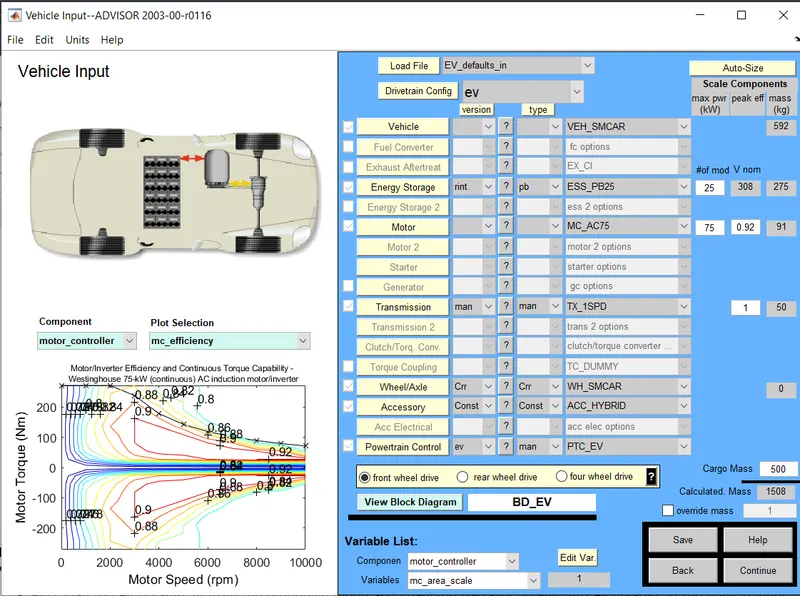
1. For EV_defaults_in file, if cargo mass is 500 kg with all other default conditions, can the vehicle travel for 45 km with FTP drive cycle? Conclude your observations.
- First load the Ev defaults in from the dropdown menu and changing parrallel default into Ev defaults in the vehicle input window.
- Changing the cargo mass to 500 kg.
- change in the total mass of the vehicle can been seen.
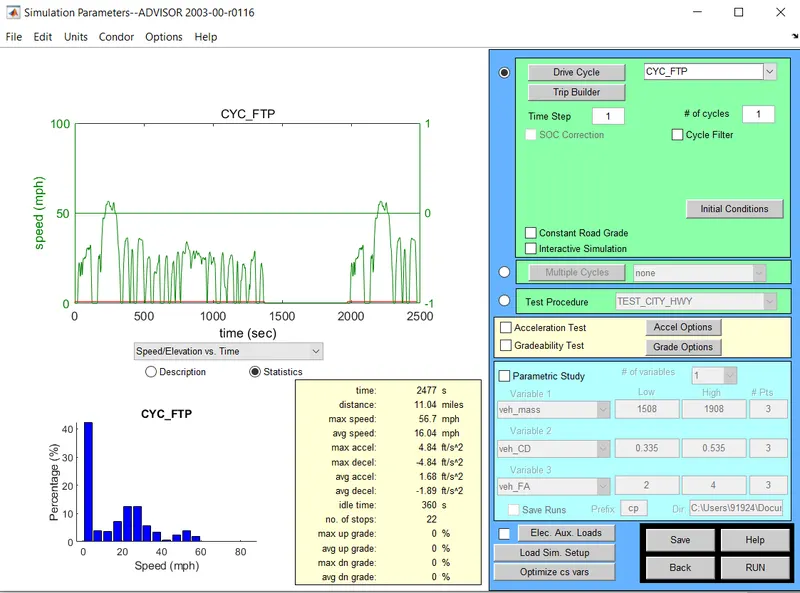
- Clicking the continue button after that a new window stimilation parameter will pop up.
- In stimulation parameter window change drive cycle to CYC_FTP by selecting the drop down menu.
- Below that we will see a list of cycles from this we can start the drive cycle.
- After running the simulation it will show the results in a new tab.
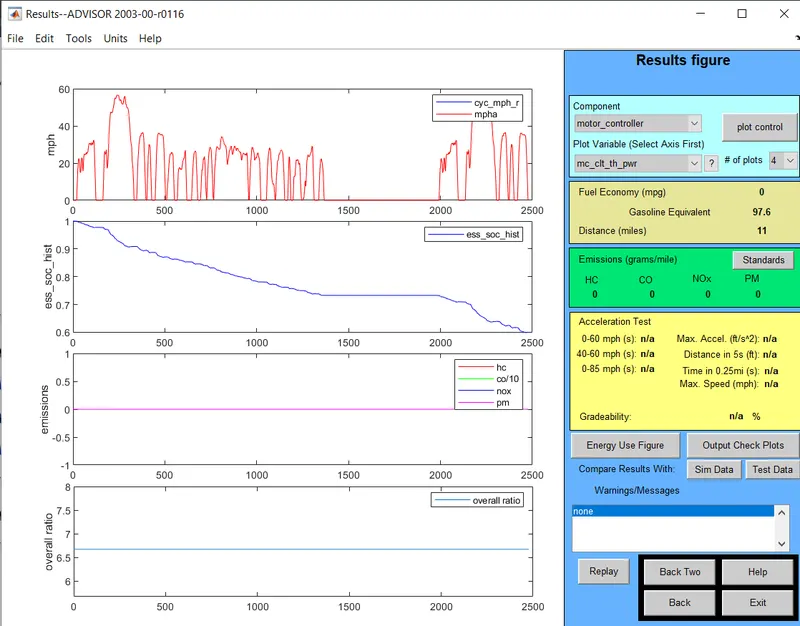
- The distance travelle by the vehicle in two drive cycles is 11miles.
Increasing the drive cycle to 2, we get...
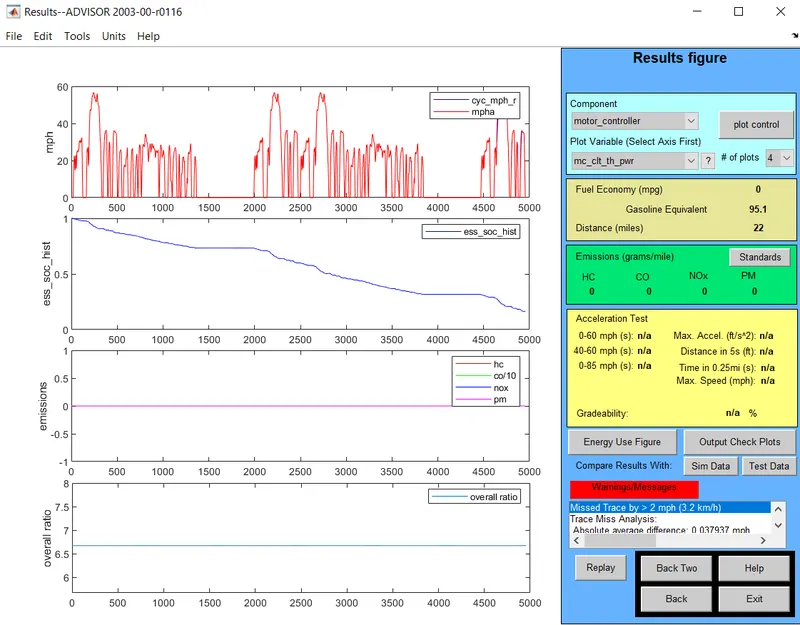
- The distance travelle by the vehicle in two drive cycles is 22miles.
Increasing the drive cycle to 3, we get...
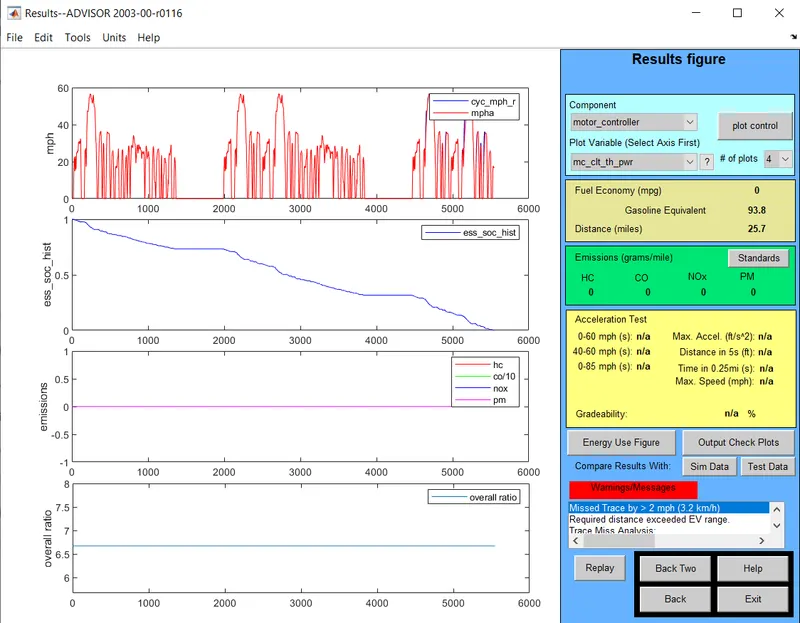
- The distance travelle by the vehicle in two drive cycles is 25.7miles.
CONCLUSION :
The maximum distance travelled by the vehicle is 25.7miles = 41.36km. This shows that the vehicle has failed to travel a distance of 45km under FTP cycle with a payload of 500kg.
2) In the above case, try changing the battery capacity and repeat the simulation.
- By repeating the simulation by changing the battery module and the drive cycle. The number of battery modules is increased from default 25 to 28 to check the range.
- Increase in the number of battery modules has increased the nominal voltage to 345V.
- This also resulted in increase in total weight of the vehicle.
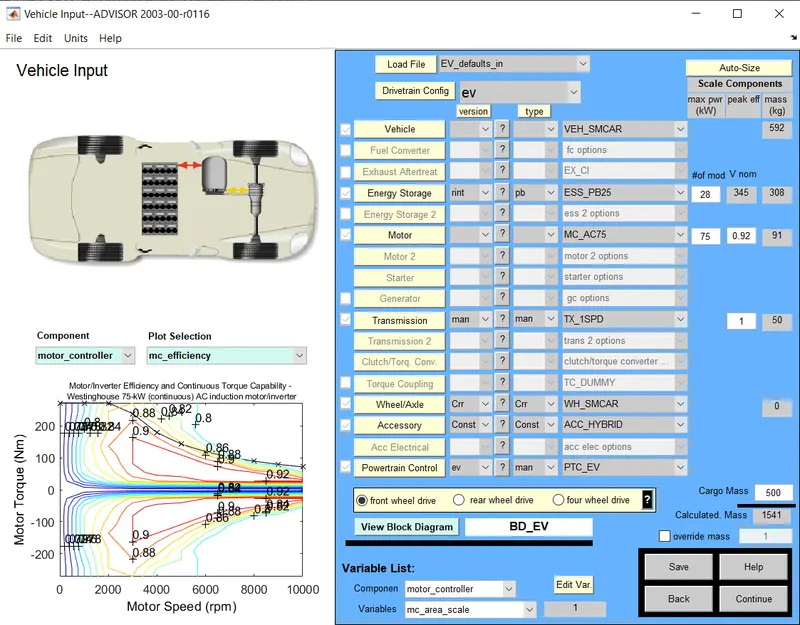
- While changing the battery module to 28 and the drive cycle to 3. The vehicle managed to travel 46.3Km with a payload of 500kg.
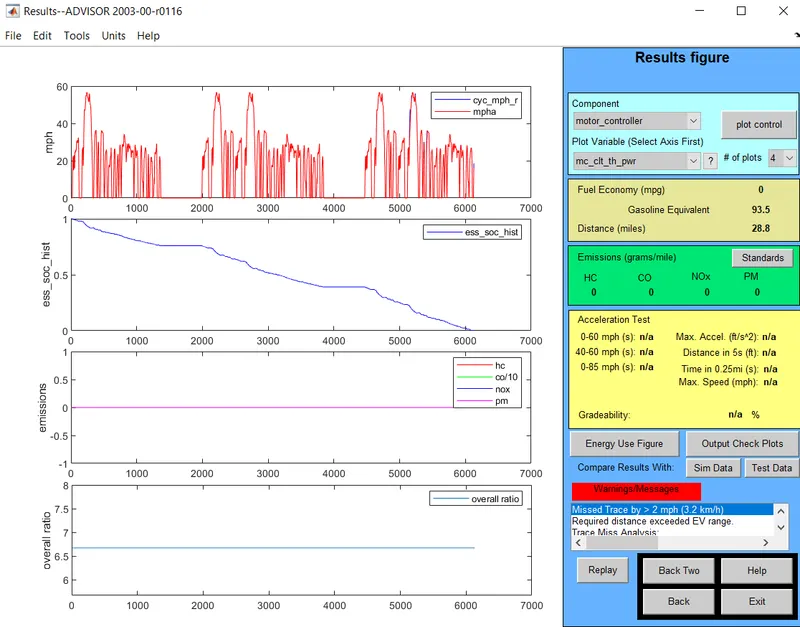
- To cover the 45km distance a 28 module 345volt battery is used.
- While changing the battery module in drive cycle to 2. we get constant distance travel.
- Changing the battery module in drive cycle to 3. We get the changes in the distance travelled by the vehicle.
3) Perform gradeability test with PRIUS_Jpn_defaults_in file. Compare your results in table and conclude.
- To Perform the gradability test Prius_jpn_default vehicle file is used.
- Gradability at some defined speed and test grade option is available for this.
- Gradability with constant grade at any of the drive cycle.
- Chaanging the grade parameters as required in grade option.
CASE 1 :
At 10 mph for 50 seconds.
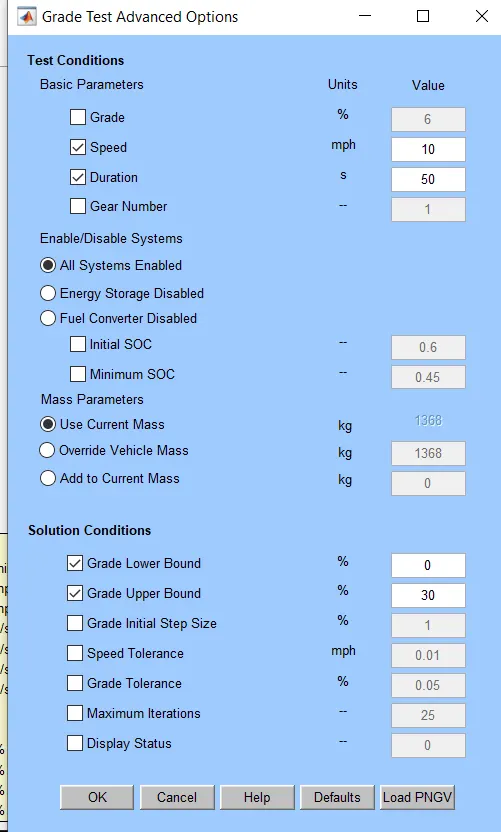
- In grade option box we can change speed and duration according to our simulation.
- Click on all system enabled.
- Click okay and then click on run a new window will display the output occording to our simulation.
OUTPUT :
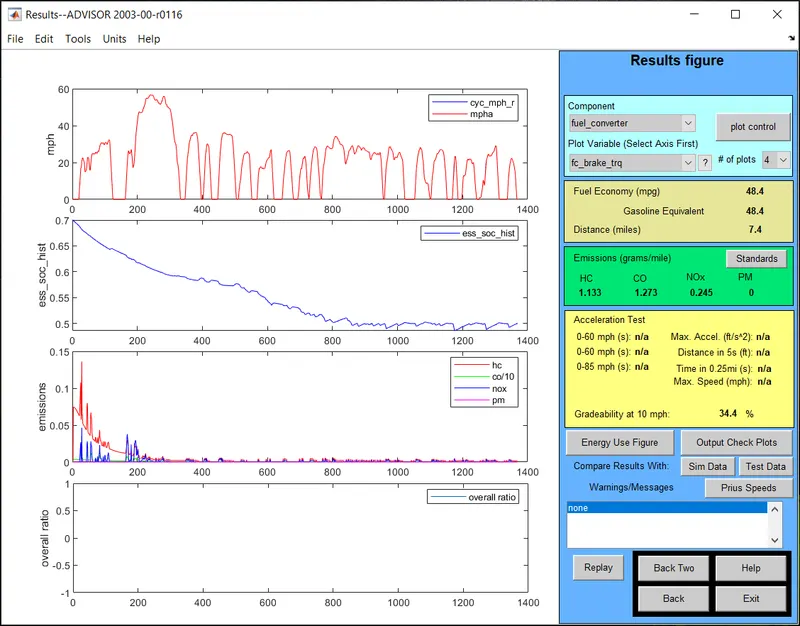
- The gradability is 34.4%.
CASE 2 :
At 20 mph for 50 seconds.
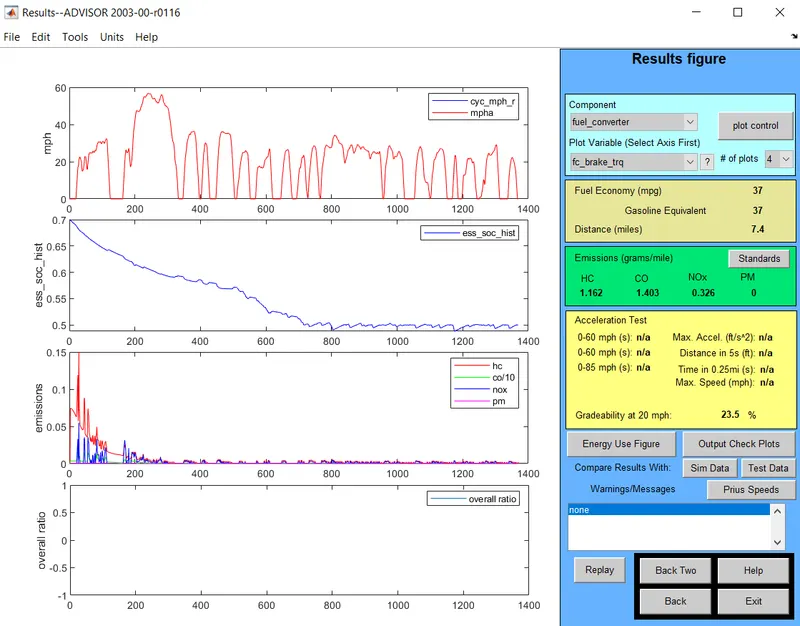
- The gradability is 23.5%.
CASE 3 :
At 30 mph for 50 seconds.
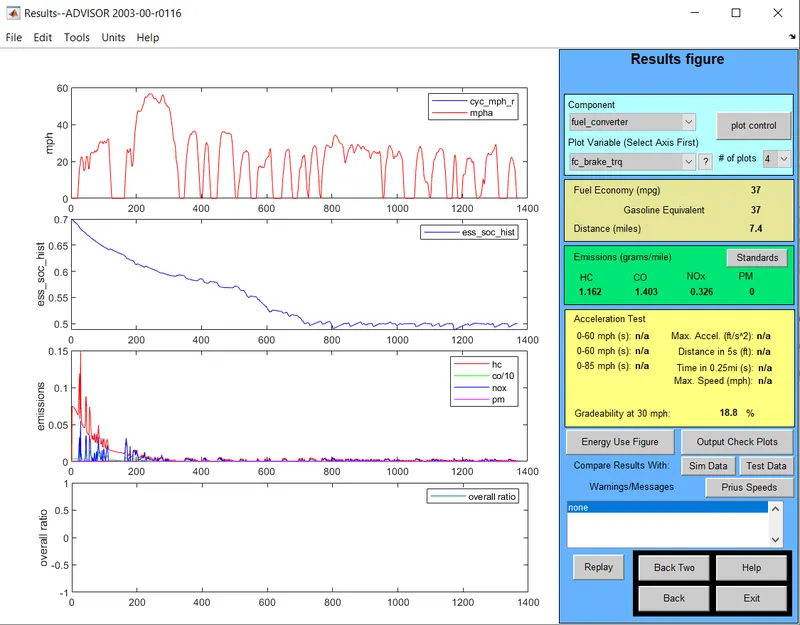
- The gradability is 18.8%.
CASE 4 :
At 40 mph for 50 seconds.
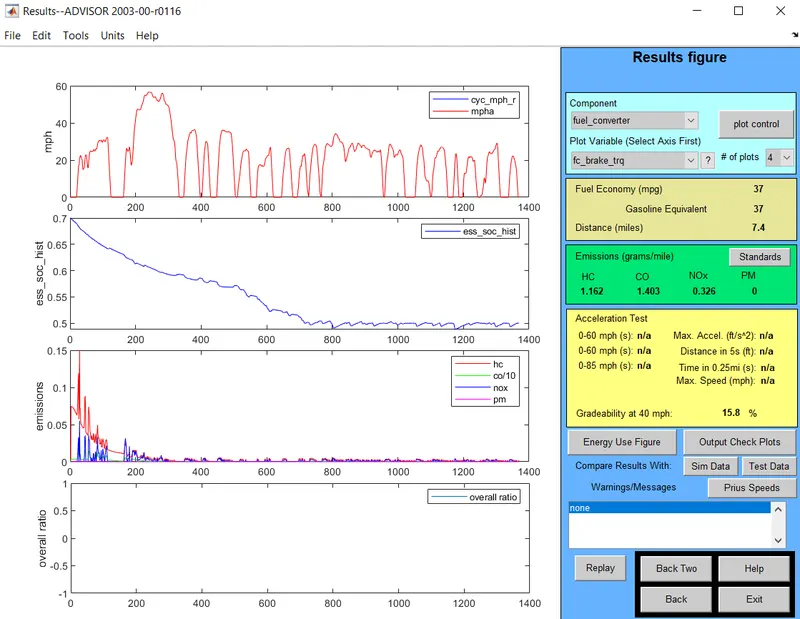
- The gradability is 15.8%.
CASE 5 :
At 50 mph for 50 seconds.
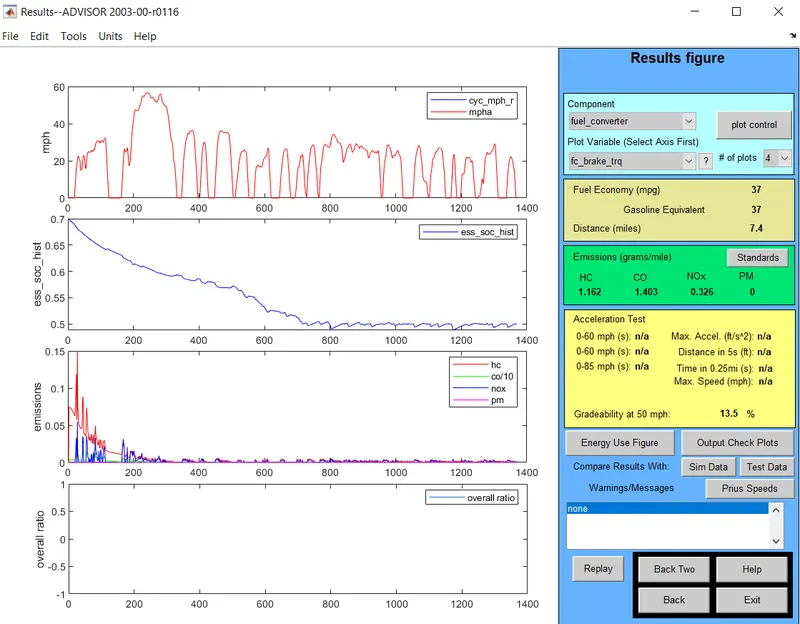
- The gradability is 13.5%.
CONCLUSION :
- The test grade fails when the Gradability is more than the max gradability at respective speed.
- The gradability decreases with increase in speed.