Week 3 - 2D meshing for sheet metal
AIM :
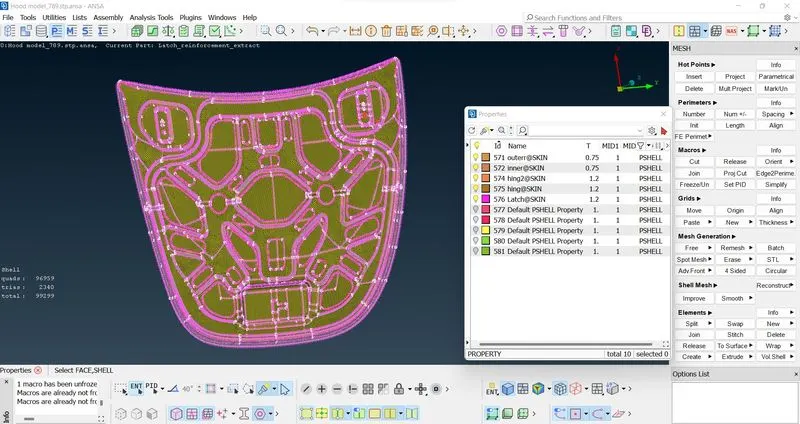
For the given Hood model, Take the mid surface for all the components after checking the geometrical errors and mesh the mid surface with the given element Quality criteria.
STEPS TO FOLLOW / PROCEDURES:
(Steps to follow in Short : Import Cad Geometry-->Geometry clean -up-->Skin/mid surface generation-->Shell meshing-->Element Quality checks)
In TOPO-
1] Geometry checking-
- After downloading the drawing Geometry, go for a geometry check. Normally if cons are generated select all then clear it by Right click and fix. If not clearing tough fix manually. In this case after selecting all, go for right click and fix. All errors are cleaned and geometry is perfect. If not go for individual checks and cleaning.
- Single Cons(represented by red colour lines) - Edges which are shared with only one surface should be single cons.Single cons denote there is no connectivity between the surfaces in the model.
- Double Cons(represented by yellow colour lines) -If any edge shared with two surfaces the that line is called Double Cons.
- Triple Cons(represented by cyan colour lines) – if any edge is shared with three or more than three surfaces then that line is called triple cons.
- Topology describes how elements are bounded and connected and Geometry describes the shape of each element.
2] Locking-
- The next part is locking the parent parts in order to take parent part alone.
3] Save-
- Save the settings from tools- settings and save the file
4] Orient-
- Apply orient on every mid surfaces, grey on top and yellow on bottom.
- Go to module buttons-Faces-Orient-Select
5] Offset / mid surface skin method-
- Go to- Topo-Faces-Offset- then on the feature area- and make offset, Then separate it from parent part by i-not function. Try not to delete parent part.
- In this case i have choose mid surface skin method to create offset.
- Mid=surface- Skin- select the entire phase by window and give a middle click.
6] Measurements-
- Apply measurements on every surface and store.[Cleanup the mid surface for the meshing. Edit the cons and faces using cut, project cut, release, paste, orient and topo options to clean up the geometry for meshing]
In Mesh- Classic Mesh-
7] Applying Perimeters-
- Go to- classic mesh- perimeters- select all-apply perimeters as 5.bPerimeters are the dots b/w two points on mesh.
(Defeaturing- Is used to remove unnecessary surfaces radius, pin holes, edges. In short To neglect one criteria and doing adjustments in another.)
8] Measurement checkup-
- Check the measurements whether the surfaces are coming under our quality criteria, if not arrange the by using cut in macros.
9] Counting the numbers-
- Go to perimeter- number to count the numbers and make it into even.
10] Slide-
- To rotate the circles to an extend, or aligning the side of circle parallel to the line of the perimeter.
11] Mark and unmarking Hotpoint-
- Points around circles are Marked after checking numbers else if after reconstruction shape or numbers may vary.
12] Quality Criteria-
Apply the quality criteria given by 'F11 tool'
Sr.No Quality Criteria Value
1 Target/Average length 5
2 Minimum Length 2
3 Maximum Length 7
4 Aspect 3
5 Warpage 15
6 Skewness 45
7 Jacobian 0.7
8 Minimum Quad Angle 45
9 Maximum Quad Angle 135
10 Minimum Tria Angle 30
11 Maximum Tria Angle 120
12 Tria Percentage 15
- Go to- presentation parameters- put tick in elements
- Enable range- apply - okay
- Then save the settings.
13] Mesh parameters-
- Go to-tools-utilities-mesh parameters
- Type of mesh- general
- Element Type- Mixed( Its a mix of quad and Tria)
- Order of element- First order
- Save the setting for future reference
14] Part ID-
- Create new properties and apply thickness
For using mesh we use 3 tabs mainly-1]Mesh Generation
-2]Shell Mesh
-3] Elements
15] Best mesh-
- Apply Best mesh to mesh the surfaces. Mesh the components individually. Instead of best mesh we can also use free mesh.
[In the hemming region(in the Outer panel’s bend region), Elements will fail for the Min length error due to the very small surface to capture the curved surface. In order to solve this Min length error, go for ‘defeaturing’ the midsurface. ]
16] Regeneration-
- Map-regeneration to get split and straight lines
17] Symmetry-
- If the part is symmetry then delete the half faces part and do meshing and clean up in rest of the part and go for tranform copy - select region- symmetry.
18] Deleting Hotpoint-
- By hot points- delete, for deleting unwanted nodes
19] Copy-
- Use transform copy – symmetry to copy the surfaces symmetry after meshing the half part
20] Split in elements-
- Used to delete unwanted Trias and to generate a straight line by splitting the lines.
21] Swap-
- Used to delete unwanted Trias and to generate a straight line or it is used to move the end line from one point to the other.
22] Reconstruct-
- If the mesh flow is not perfect go for reconstructing the mesh and rerunning them will make perfect.
23] Smooth-
- If the mesh flow is not perfect and after split usage and lines are not keeping uniform distance go for smooth function in the mesh to make perfect line mesh.
24] Improve-
- Uses both smooth and reconstruction at same time.
25] Property ID-
- Create property id to assign thickness to the elements.
26] Join-
- Macros - Join to keep lines in mesh what we have drawn
27] Draw shell as solid-
- To find the mesh into solids by assigning thickness. Founds in Quality criteria - Presentation parameters
28] Release-
- Elements- Release to release all the drawings from geometry.
29] Save the file
LEARNING OUTCOMES:
- The mesh should always look regular and proper.
- No two opposite Trias came back to back, if came go for smooth option.
- For long distance splitting, map- regenerate function can be used.
- By swap, tria's side can be moved or removed if unnecessary.
- The edges in ANSA are called cons and single cons are highlighted in red color, double in yellow color and triple in blue color. Double edge is shared by two surfaces and triple by three. Single cons are open edges.
- Aspect ratio is the ratio of maximum length to the minimum length
- What are Jacobian elements? Ans: In a FEW software Jacobian is a measure of deviation of a given element from an ideally shaped elements.
- Skewness is the Angular Measure of Element quality with respect to the Angles of Ideal Element Types.
- Maximum Angle out of the two possibilities is reported as "Warp Angle".
- If the part is symmetry then delete the half faces part and do meshing and clean up in rest of the part and go for transform copy - select region- symmetry.
CONCLUSION:
- The mesh was created on all the mid surfaces created from parent geometry.
- The quality criteria was satisfied for the given quality parameters.
- Thickness is assigned on the mesh as per the thickness of the given geometry..