Week 3.2 - 2R Robotic Arm Challenge
A program in Matlab to simulate the forward kinematics of a 2R Robotic Arm is given below:
%  Forward kinematics of a 2R Robotic Arm

clear all
close all
clc

% Inputs given
l1 = 1;      % Length of arm 1
l2 = 0.5;      % Length of arm 2
theta1 = linspace(0,90,10);   % Angles formed between arm 1 and surface
theta2 = linspace(0,90,10);   % Angles formed by arm 2
ct = 1;

% Create a for loop to potray the movements of the arms
for i = 1:length(theta1)
    THETA1 = theta1(i);
    for j = 1:length(theta2)
        THETA2 = theta2(j);

% Define the co-ordinates
        x0 = 0;
        y0 = 0;

        x1 = l1*cosd(THETA1);
        y1 = l1*sind(THETA1);

        x2 = x1 + l2*cosd(THETA2);
        y2 = y1 + l2*sind(THETA2);

% Create a plot to show the movement of arms
        plot([x0 x1], [y0 y1], [x1 x2], [y1 y2],'linewidth',2);
        axis([-0.1 1.5 0 1.5]);
        pause(0.09)
        M(ct) = getframe(gcf);
        ct = ct+1;
    end
end

% Create a movie file
movie(M)
videofile = VideoWriter('forward_kinematics.avi', 'uncompressed avi')
open(videofile)
writeVideo(videofile, M)
close(videofile)
The explanation of this code is given below:
1. The representation of the robotic arm is given below:
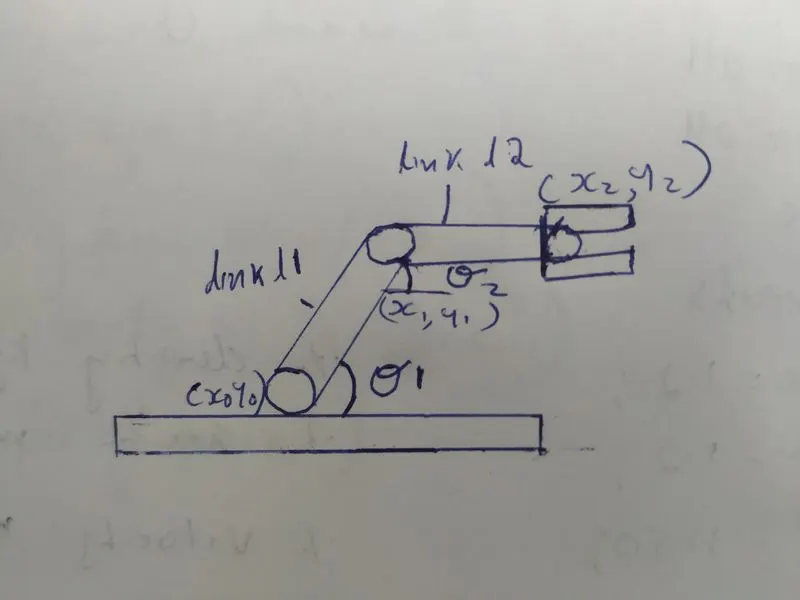
So at first we write the heading for the program using '&" syntax and then we write the usual commends such as clear all, close all and clc. Once we have written that we give the inputs required to make this code. The inputs given are as follows.
We take length of the link l1 = 1 and the length of the link l2 = 0.5. Then we take the angle formed by link 1 during its movements as theta1=linspace(0,90,10), that is the link l1 moves from an angle of 0 to 90 degrees. Similarly we take the angle created by l2 as linspace(0,90,10). We take ct=1.
2. After that we create a nested for loop to potray the movements of the arms. In the first for loop we take i=1:length(theta1). Then we assign the value of theta1(i) to THETA1. after that we take the secondfor loop for j=1:length(theta2). Then we assign the value of theta2(j) to THETA2.
3. After that we define the co-ordinates as:
x0 = 0; y0 = 0;
x1 = l1*cosd(THETA1); y1 = l1*sind(THETA1);
https://www.youtube.com/watch?v=pBiW4ME_z2M
Here you can see each of the movements of the arm l1 and and l2 from 0 to 90 degrees.
The mistakes made during writing this code are shown below:
1. The first mistake was on line 21 where instead of a semi-colon, a colon was written. So when the program tried to run this error popped up. Once the semi-colon replaced the colon the mistake was corrected.
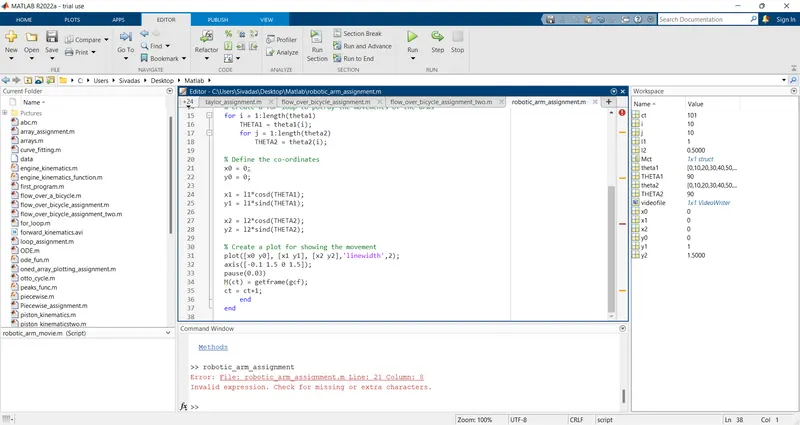
2. While plotting instead of defining the x and y axis like [x0 x1], [y0 y1], [x1 x2], [y1 y2], I first wrote [x0 y1], [x1 y1], [x2 y2]. So when i realised and corrected the mistake the program ran.