Week 3.2 - 2R Robotic Arm Challenge
Aim :
To Write a program in Matlab to simulate the forward kinematics of a 2R Robotic Arm.
Objective:
- Write a program to simulate forward kinematics of a 2R Robotic Arm
- To create a Movie/Animation from the plots obtained from the program
Theory Explaination:
A robotic arm is a type of mechanical arm, usually programmable , with similar functions to a human arm; the arm may be the sum total of the mechanism or may be part of a more complex robot. The links of such a manipulator are connected by joints allowing either rotational motion (such as in an articulated robot) or translational (linear) displacement. The links of the manipulator can be considered to form a kinematic chain. The terminus of the kinematic chain of the manipulator is called the end effector and it is analogous to the human hamd.
-In this project, we consider a 2R robotic arm. A 2R robotic arm represents a robotic arm with two rotations. i.e. it has two links which rotate or work over a two-dimensional plane with each of links having a single degree of freedom.
-Also, both the links are restricted to a 90° rotation with respect to the axes. Fig below shows the 2R robotic arm having many parts as described.
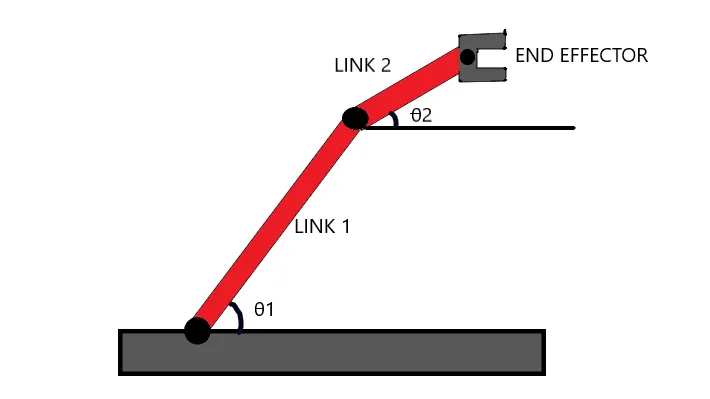
- Let , L1 & L2 be the lengths of the link-1 & link-2 Respectively.
- Let , θ1">θ1be the angle formed by link-1 with horizontal.
- Let , θ2">θ2 be the angle formed by link-2 with horizontal.
- Let , the starting and end co-ordinates of link-1 to be (x0, y0) and (x1, y1)
- Let , the starting and end co-ordinates of link-2 to be (x1, y1) and (x2, y2)
Coding logic and syntax explaination:
clear all,close all, andclc: These commands respectively clear all workspace variables, close all open figures/windows, and clear the command window to ensure a clean start.-
l1andl2: These variables represent the lengths of the two robotic arms. -
theta1andtheta2: These variables store arrays of angles in degrees. They are created using thelinspacefunction to generate 10 equally spaced angles ranging from 0 to 90 degrees. -
ct: This variable is an index that keeps track of the frame number for creating the animation. -
The first
forloop iterates through each angle in thetheta1array. -
Inside the first loop, the second
forloop iterates through each angle in thetheta2array. -
Inside both loops, the current values of
THETA1andTHETA2are set to the corresponding angles from the arrays. -
The coordinates for the start point of the arms (
x0andy0) are set to (0, 0). -
The coordinates for the end point of the first arm (
x1andy1) are calculated using trigonometric functions (cosdandsind) based onl1andTHETA1. -
The coordinates for the end point of the second arm (
x2andy2) are calculated by adding the coordinates of the end point of the first arm to the position determined byl2andTHETA2. -
The
plotfunction is used to draw the robotic arms. The plot consists of two segments: one representing the first arm and the other representing the second arm. Thelinewidthparameter sets the thickness of the lines. -
The
axisfunction is used to set the limits of the plot area to ensure that the animation stays within a specific range. -
pause(0.03): This command introduces a short pause between frames, creating the appearance of animation. -
The
getframefunction captures the current figure as a frame and stores it in theMarray. Thectindex is used to keep track of which frame is being captured. -
The outer loop increments
ctto prepare for the next frame. -
After both loops are completed, the
moviefunction is used to play the animation using the frames stored in theMarray. -
The animation frames are then written to a video file named
'robotic_arms.avi'using theVideoWriterobject. The video format chosen is an uncompressed AVI. -
The video file is opened, the frames are written to the file using the
writeVideofunction, and then the file is closed.
Main code:
% kinematics of 2R Robotics Arm Manipulator
clear all
close all
clc

% Define the lengths of the two robotic arms
l1 = 1;
l2 = 0.5;

% Define an array of angles for the first and second arms
theta1 = linspace(0, 90, 10);
theta2 = linspace(0, 90, 10);

% Initialize a counter for the animation frames
ct = 1;

% Loop through each angle in the theta1 array
for i = 1:length(theta1)
    % Get the current angle for the first arm
    THETA1 = theta1(i);

    % Loop through each angle in the theta2 array
    for j = 1:length(theta2)
        % Get the current angle for the second arm
        THETA2 = theta2(j);

        % Set the starting coordinates of the arms
        x0 = 0;
        y0 = 0;

        % Calculate the coordinates of the end point of the first arm
        x1 = l1 * cosd(THETA1);
        y1 = l1 * sind(THETA1);

        % Calculate the coordinates of the end point of the second arm
        x2 = x1 + l2 * cosd(THETA2);
        y2 = y1 + l2 * sind(THETA2);

        % Plot the robotic arms with the calculated coordinates
        plot([x0 x1], [y0 y1], [x1 x2], [y1 y2], 'linewidth', 3);

        % Set the plot limits to create a consistent view
        axis([-1 1.5 0 1.5])

        % Pause to create an animation effect
        pause(0.03)

        % Capture the current frame and store it in the M array
        M(ct) = getframe(gcf);

        % Increment the frame counter
        ct = ct + 1;
    end
end

% Play the animation using the captured frames
movie(M)

% Create a VideoWriter object for saving the animation to a video file
videofile = VideoWriter('robotic_arms.avi', 'Uncompressed AVI');
open(videofile)

% Write the captured frames to the video file
writeVideo(videofile, M)

% Close the video file
close(videofile)
Video link:
Errors faced:
- Misplaced the code in the line of ct = ct + 1 above the line M(ct) = getframe(gcf)
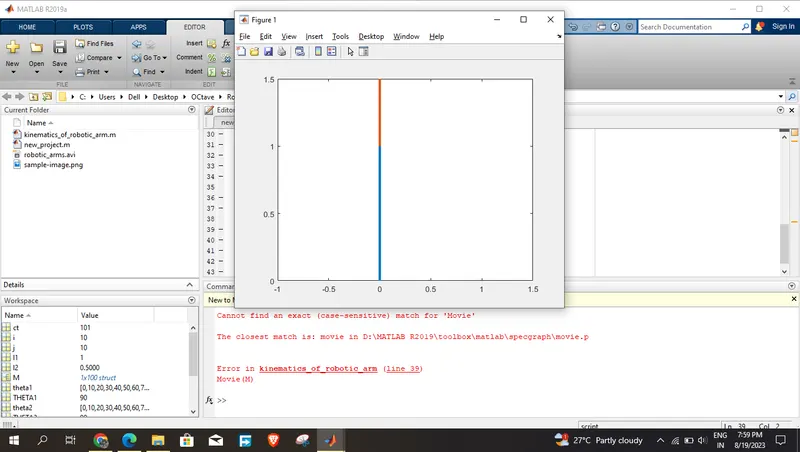
- Matlab is not recognised the word of Movies(M) that can be replaced with movies(M).
Screenshot of the errors occured:
Figure - 1:
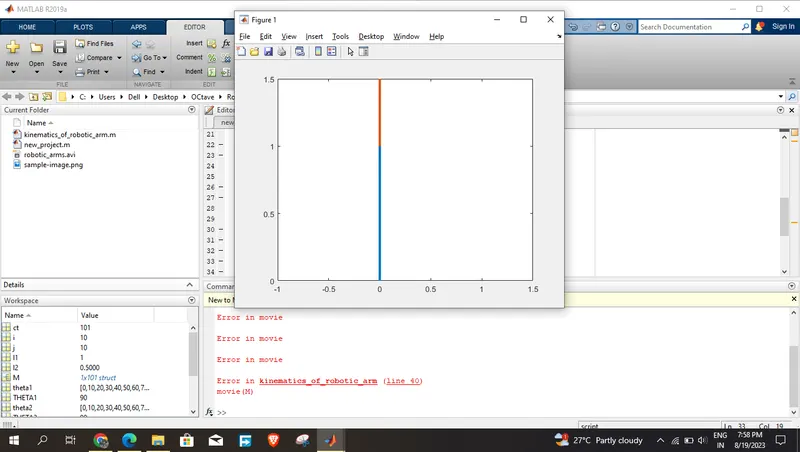
Figure - 2:
Conclusion:
We have simulated 2R robotic arm by using the matlab programming and also created a Movie/Animation from the plots obtained from the program.