Week 3.2 - 2R Robotic Arm Challenge
PROBLEM STATEMENT;
Write a program in Matlab to simulate the forward kinematics of a 2R Robotic Arm, as shown in the video.
- Create an animation file of the plot.
- Upload an animation on You tube and provide the You tube link for an animation in your report.
- You can also provide the google drive link.Note: Make sure that you provide the access to the video, while pasting the google drive link.
- The presentation of your code will be taken into consideration while grading.
- paste the code using the "INSERT SAMPLE CODE" option and attach screenshots of the output.
Content expected in the report:
- Step-wise explanation of your code.
- Mention the errors faced while programming.
- Steps taken to overcome those errors.
- Screenshots showing errors thrown in command window.
> INTRODUCTION THEORY;
FORWARD KINEMATICS;
In robot kinematics, forward kinematics refers to the use of the kinematic equations of a robot to compute the position of the end-effector from specified values for the joint parameters.[1]
The kinematics equations of the robot are used in robotics, computer games, and animation. The reverse process, that computes the joint parameters that achieve a specified position of the end-effector, is known as inverse kinematics.
Computer animation.
|
|
The forward kinematic equations can be used as a method in 3D computer graphics for animating models.
The essential concept of forward kinematic animation is that the positions of particular parts of the model at a specified time are calculated from the position and orientation of the object, together with any information on the joints of an articulated model. So for example if the object to be animated is an arm with the shoulder remaining at a fixed location, the location of the tip of the thumb would be calculated from the angles of the shoulder, elbow, wrist, thumb and knuckle joints. Three of these joints (the shoulder, wrist and the base of the thumb) have more than one degree of freedom, all of which must be taken into account. If the model were an entire human figure, then the location of the shoulder would also have to be calculated from other properties of the model.
Forward kinematic animation can be distinguished from inverse kinematic animation by this means of calculation - in inverse kinematics the orientation of articulated parts is calculated from the desired position of certain points on the model. It is also distinguished from other animation systems by the fact that the motion of the model is defined directly by the animator - no account is taken of any physical laws that might be in effect on the model, such as gravity or collision with other models.
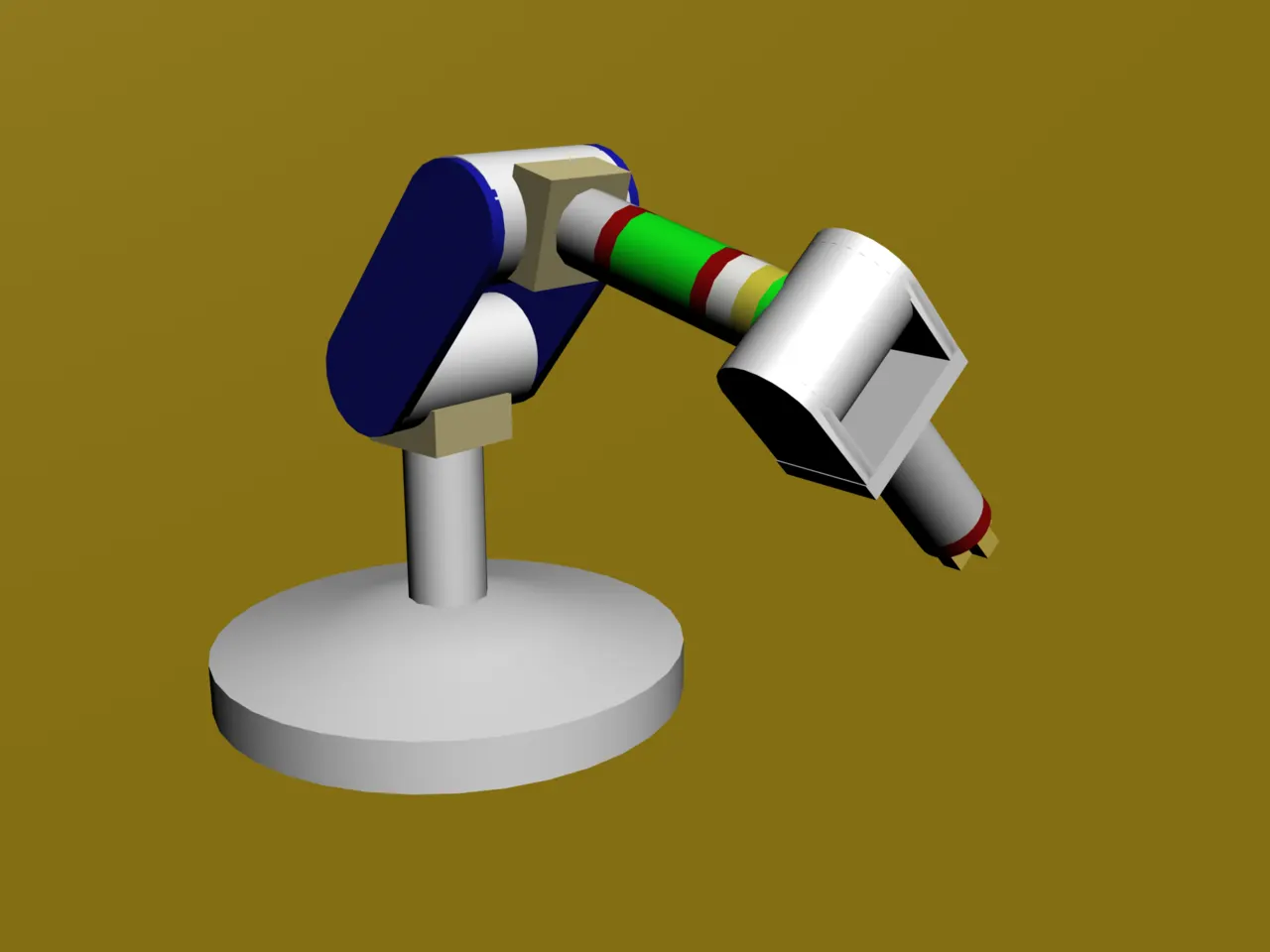
>An articulated six DOF robotic arm uses forward kinematics to position the gripper.
> Commands used in the program.
1) figure() ; this command is used Fix the figure window so that we can see all the plots those are of diffrent positions at a single figure window.
2) axis(); this command is used to set te minimum and maximum limits for the x and y axis, for setting the domain for the figure window.
3) videowriting in MATLAB;
for creating the animation in the MATLAB we have to execute the statement "" M(ct) = getframe(gcf) "".
> counter_variable(ct); It helps in proper indexing in which the captured frames will be indexed sequentially.
> getframe(); it captures the figure as frames.
> To create the movie animation in the MATLAB;
movie(M); this command is used to plays the movie frames those are sequentially arranged in the array M.
VideoWriter(); This command will create a videofile of specified name and format,initially this is empty video file.
writeVideo(); THis command is used to write the frames those are sequentially arranged in the array 'M' in the videofile that is created by the command 'videowiter()'.
> PROGRAM CODE:
% %  simulate the forward kinematics of a 2R Robotic Arm

clear all
close all
clc

% Define the lengths for the link 1 and link 2.

l1 = 1;
l2 = 0.5;

% Define the positions for the link1 and link2,theta1 is for link 1 and
% theta 2 for the link 2. There are 10 diffrent positions for both link1
% and link 2.

theta1 = linspace(0,90,40);
theta2 = linspace(0,90,40);

% define the value for the counter variable as 1 for indexing.

% counter_variable(ct) helps in proper indexing in which the captured
% frames will be indexed sequentially.

ct = 1;

% for every single position of the link 1 there are 40 multiple positions
% for the link 2 so for single value of theta1 for link1 link 2 will change
% its position 40 times so there is the repetition in the control structure
% so use for loop.


% in this case as position of both the link will change up to certain range
% use nested for loop.

for i = 1:length(theta1)

    % for accessing the value from the theta1 array use indexing.
    % assign the value in variable THETA1.

    THETA1 = theta1(i);
    for j = 1:length(theta2)
            THETA2 = theta2(j);

            % define the three joint points of the robotic arm.
            %
            x0 = 0;
            y0 = 0;
            x1 = l1*cosd(THETA1);
            y1 = l1*sind(THETA1);
            x2 = x1 + l2*cosd(THETA2);
            y2 = y1 + l2*sind(THETA2);


             % Fix the figure window so that we can see all the plots
             % those are of diffrent positions at a single figure window.

            figure(1)

            % plot the diffrent figures.
            plot( [x0 x1],[y0 y1],[x1 x2],[y1 y2],'linewidth',3 )

            % fixing the domain so that our maximum and minimum value of
            % the x and y-axis will fixed.
            axis([-0.1 1.5 0 1.5])
            pause(0.0001)

            % % get the individual frames and save them in the matrix
            % called M.


            % Create a matrix M which will store all the frames.
            % gcf is used for grtting the current frame and getframe is
            % used for arranging the diffrent frames in a certain order.

            M(ct) = getframe(gcf)
            % ct helps in proper indexing in which the captured frames will be indexed sequentially.
            % update the value of ct so the new frame will captured at the updated position.

            % first save the frame and then increment the value of ct.

            ct = ct + 1;
            % "ct" is the position which tells us where the frame has to be seated.
            % "M" is the array which will keep all the frames.
    end
end

% create the movie using the command "movie which contains all the frames.
movie(M)

% crete a movie file where we can put all the generated frames initially it
% is empty video file.This command will create a videofile of specified
% name and format.

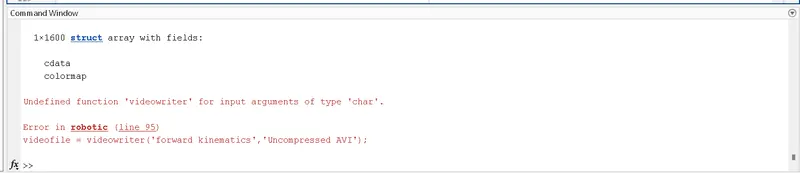
videofile = VideoWriter('forward kinematics','Uncompressed AVI');

% open that video file.

open(videofile)

% write the frames that we have captured in the M array in this videofile.
writeVideo(videofile,M)

% close the specified file.
close(videofile)
> WORKSPACE;
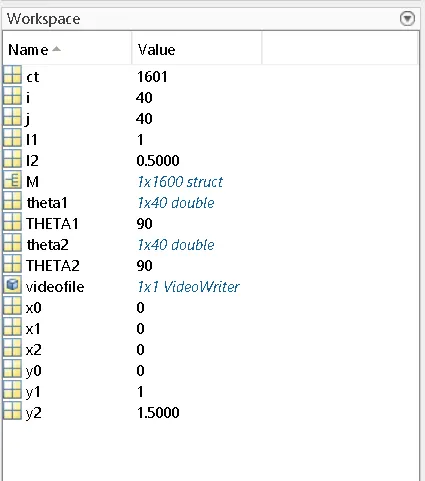
> ERRORS THAT ARE COMING DURING SIMULATIONS ARE.
> Error in getframe.
> increment in the value of ct should be after the previous value of ct assigned in the array 'M'.
M(ct) = getframe(gcf)
ct = ct +1

> undefined writevoideo;
it should be writeVideo,

> undefined function "videowriter"
it should be VideoWriter.
Animation video of 2R robotic arm for forward kinematics where link 2 will have 40 diffrent position at single position of link 1, so link 2 will have total 1600 position for the 40 position of link1;
https://www.youtube.com/watch?v=DLlBLJlBNnA&ab_channel=ansys