Week -2
AIM :
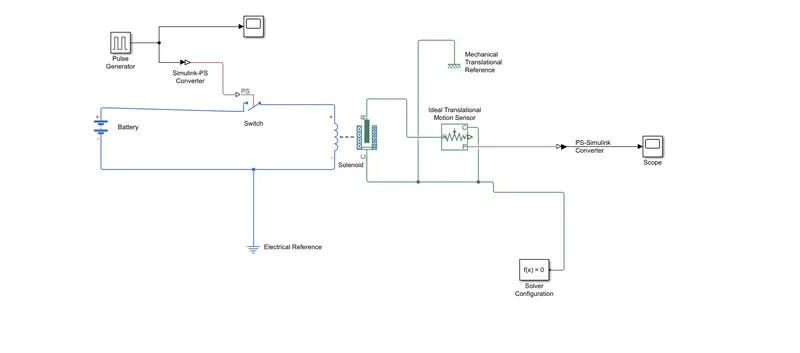
To make a simulink model of doorbell using solenoid block .
EXPLANATION :
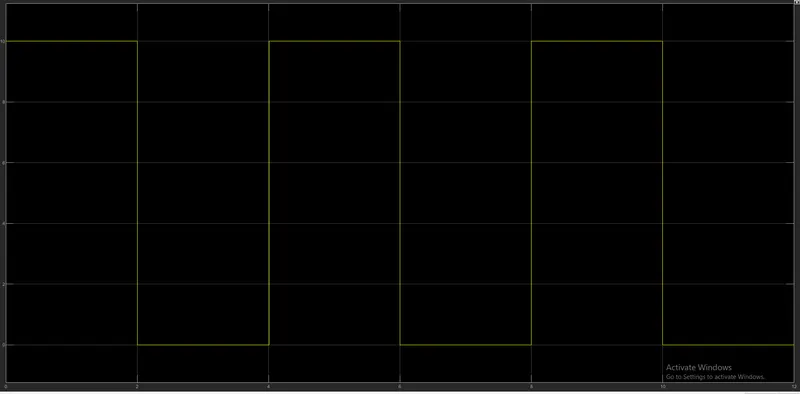
- PULSE GENERATOR BLOCK : Pulse generator is used to create an phase delay of 2 seconds when the switch is off in a solenoid .
- SWITCH BLOCK : Here switch is used control the flow of input power to the solenoid used .
- SCOPE : Scope is connected to input . Shows the graphical form of input .
- SIMULINK TO PS CONVERTER BLOCK : This converter is used because the switch belongs in simscape toolbox and pulse generator belongs to simulink toolbox and so the input from pulse generator can't be given to switch . So to convert input signal from pulse generator , simlink to ps converter is used.
- BATTERY BLOCK: Battery is used to provide current to the solenoid .
- ELECTRICAL REFERENCE BLOCK : The Electrical Reference block represents an electrical ground. Electrical conserving ports of all the blocks that are directly connected to ground must be connected to an Electrical Reference block. A model with electrical elements must contain at least one Electrical Reference block.Electrical reference is connected to the electrical side of the solenoid .
- SOLENOID BLOCK : The Solenoid block represents the electrical characteristics and mechanical characteristics . when the electrical side is connected ( both positive side and negative side ) . there will be an movement in the plunger inside the mechanical side of solenoid .
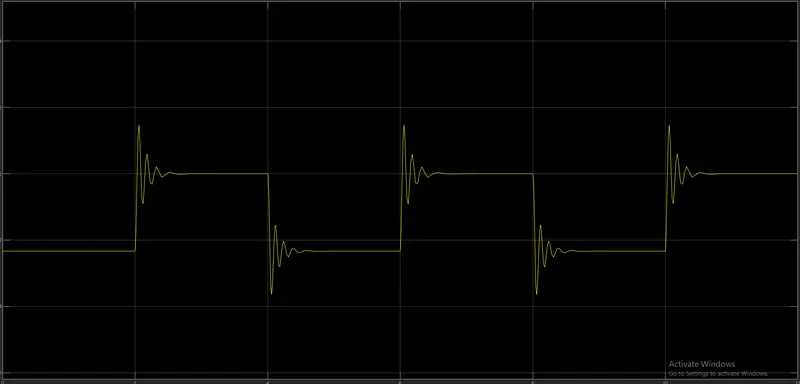
- IDEAL TRANSLATIONAL MOTION SENSOR : The movement in the plunger will be measured using ideal translational motion sensor .
- MECHANICAL TRANSLATIONAL REFERENCE : The Mechanical Translational Reference block represents a reference point, or frame, for all mechanical translational ports. All translational ports that are rigidly clamped to the frame (ground) must be connected to a Mechanical Translational Reference block.
- SOLVER CONFIGURATION : Each physical network represented by a connected Simscape block diagram requires solver settings information for simulation. The Solver Configuration block specifies the solver parameters that your model needs before you can begin simulation.
- PS TO SIMULINK CONVERTER : Here we covert simscape toolbox signal to simulink toolbox signal . here the output signal from ideal translational motion sensor converted to signal that is requried to display output in scope
- SCOPE : The final output is shown in graphical form .
RESULTS:
The switch is closed for 2 seconds and then released . the physical movement is noted and plotted in the form of graph .
2.
AIM :
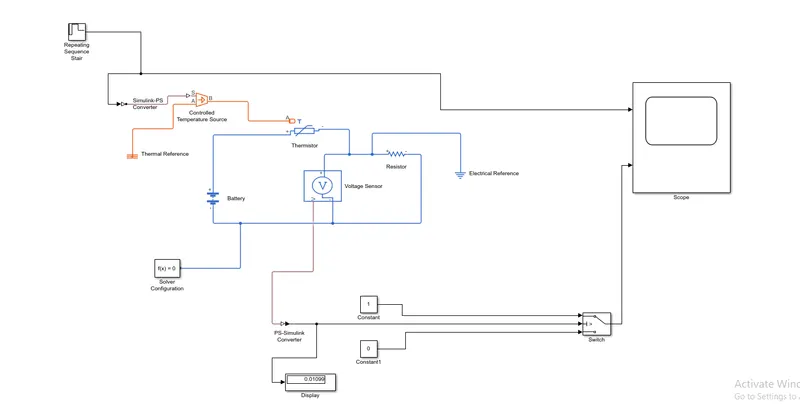
Use a thermistor to sense the temperature of a heater & turn on and turn off the fan .
EXPLANATION :
- REPEATING SEQUENCE STAIR : The Repeating Sequence Stair block outputs and repeats a stair sequence that you specify with the Vector of output values parameter.you can specify the vector as
[293 300 300 296 296 ]. A value in Vector of output values is output at each time interval, and then the sequence repeats and it is provided as inputs to controlled temperature source . - CONTROLLED TEMPERATURE SOURCE : The Controlled Temperature Source block represents an ideal source of thermal energy that is powerful enough to maintain specified temperature difference across the source regardless of the heat flow consumed by the system.
- SIMULINK-PS CONVERTER : Here we need to provide input signal from repeating sequence stair to controlled temperature source , to do that we use simulink to ps converter , because the repeating sequence stair belongs to simulink toolbox and controlled temperature source belongs to simscape toolbox .
- THERMISTOR : A thermistor is a semiconductor that has a resistance capacity more than a conducting material and less than insulating material. Its electrical resistance varies with the change in the temperature or thermally sensitive resistor. There are mainly two types of thermistors, namely the Negative Temperature Coefficient (NTC) and the Positive Temperature Coefficient (PTC).Thermistor’s relation with temperature also depends on the material in which it is made. A negative temperature coefficient (NTC) thermistor will decrease its resistance value when temperature increases whereas a Positive temperature coefficient will increase its resistance when temperature increases .
- BATTERY : Battery is used provide current to the thermistor
- VOLTAGE SENSOR : The Voltage Sensor block represents an ideal voltage sensor, that is, a device that converts voltage measured between two points of an electrical circuit into a physical signal proportional to the voltage . the volatge sensor measures voltage across the model.
- RESISTOR : A resistor is an electrical component that limits or regulates the flow of electrical current in an electronic circuit.
- SOLVER CONFIGURATION : Each physical network represented by a connected Simscape block diagram requires solver settings information for simulation. The Solver Configuration block specifies the solver parameters that your model needs before you can begin simulation.
- PS-SIMULINK CONVERTER : Here we use this converter , the signal from the voltage sensor need to be converted because it belongs to simscape toolbox and the we need should be the one simulink toolbox accepts .So we this converter to convert the signal
- DISPLAY : It is used display the output result in numerical form
- CONSTANT : We use two consents here to mark on time and off time . we use 0 and 1 for on and off .
- SWITCH : Switch block performs on and off functions .
- SCOPE : scope displays the final output in graphical form.
RESULTS :
The final output for temperature source : 20 degree celsius from 0 to 10 seconds , 27 degree celsius from 10 to 30 seconds , 23 degree celsius from 30 to 50 seconds
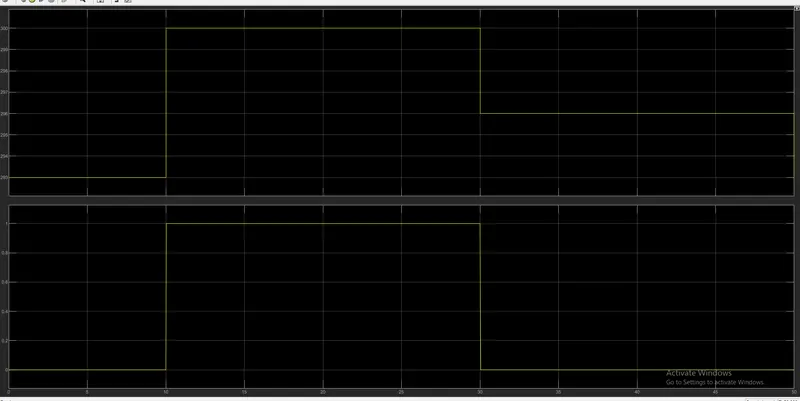
fan conditions given : ON if the temperature is above 25 degree celsius , OFF other wise . the graph is plotted for both input and output .