Week 2- 2R Robotic Arm Challenge
Aim: To simulate forward kinematic of a 2R-Robotic Arm using MATLAB.
Objective:
- To create a MATLAB program for the movement of 2R-Robotic arm having an end manipulator.
- Animating and creating a movie from the obtained program in MATLAB.
Theory:
A robotic arm is type of mechanical arm, usually programmable, with similar functions to a human arm. The arm may be the sum total of the mechanism or may be part of a more complex robot.
The links of such a manipulator are connected by joints allowing either rotational motion (such as in an articulated robot) or translational (linear) displacement.
The links of the manipulator can be considered to form a kinematic chain.
The terminus of the kinematic chain of the manipulator is called the end effector and it is analogous to the human hand.
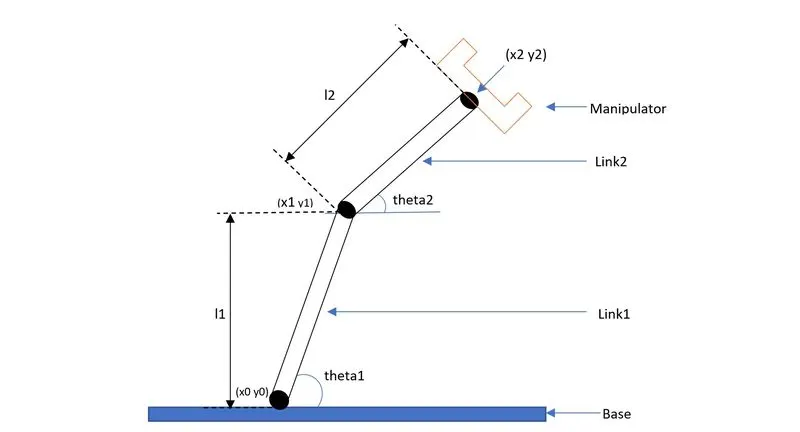
Figure of 2R robotic arm
Inputs:
1. The above figure represents the fig of 2R- Robotic arm.
2. There are two links,
- Link1 (l1) = length of link attached to base.
- Link2 (l2) = length of link between the first link and the manipulator
3. The coordinates of link1 (l1) are,
- (x0 y0) = starting point of l1.
- (x1 y1) = end point of l1/ starting point of l2.
4. The coordinates of link2 (l2) are,
- (x1 y1) = starting point of l2.
- (x2 y2) = end point of l2.
5. Two angles are made which are,
- theta1 = angle made by l1 with x-axis.
- theta2 = angle made by l2 with x-axis.
Code:
  % Forward Kinematic of a 2r Robotic Arm Manipulator
    clear all
    close all
    clc

    % Inputs
    l1 = 2;
    l2 = 1;

    theta1 = linspace(0,90,10);
    theta2 = linspace(0,90,10);
    ct=1;
    for i = 1: length(theta1)
         THETA1 = theta1(i);
         for j = 1: length(theta2)
              THETA2 = theta2(j);
              x0 = 0;
              y0 = 0;

              x1 = l1*cosd(THETA1);
              y1 = l1*sind(THETA1);

              x2 = x1 + l2*cosd(THETA2);
              y2 = y1 + l2*sind(THETA2);

              %Plotting

              plot([x0 x1], [y0 y1], [x1 x2], [y1 y2], 'linewidth',3)
              axis([-0.1 3.5 0 3.5])
              pause(0.03)
              M(ct) = getframe(gcf);
              ct = ct+1;

         end
    end

    movie(M)
    videofile = VideoWriter('Forward_kinematic.avi','Uncompressed AVI');
    open(videofile)
    writeVideo(videofile,M)
    close(videofile)
Explanation of the above code and output:
- Clear & Close command
- Clear all - used to clear all the workspace variable.
- Close all - used to close all the plot output window.
- Clc - used to clear the command window.
- Length of link’s
- l1 = 2; - the length of link one with 2meter.
- l2 = 1; - the length of link tow with 1meter.
- Angle of the link’s
- theta1 = linspace(0,90,10); - the value of angle of l1.
- theta2 = linspace(0,90,10); - the value of angle of l2.
- Linspace command
- linspace command is used for equal interval array.
- For loop
- For loop is used to repeat a specific number of times.
- For loop for link length
- i = 1: length(theta1); for loop between length of theta range.
- THETA1 = theta(i); initialized value of different value in THETA1.
- for j = 1: length(theta2); - for loop between length of theta range.
- THETA2 = theta2(j); initialized value of different value in THEAT2.
- Coordinates
- x0 = 0
- y0 = 0
- x1 = l1*cosd(THETA1); - cosd gives the value of THETA1 in degree.
- y1 = l1*sind (THETA1); - sind gives the value of THETA1 in degree.
- x2 = x1+l2*cosd(THETA2); - x2 coordinates value.
- y2 = x1+l2*sind(THETA2); - y2 coordinates value.
- Plot
- plot([x0 x1],[y0 y1],[x1 x2],[y1 y2],’linewidth’,3); -plot command is used to generate x-axis & y-axis plot. Linewidth command was used to give width to the line in the plot.
- Axis
- axis([-0.1 3.5 0 3.5]) – used to set the range, (-0.1to3)for x-axis and (0to3.5)for y-axis.
- Pause
- pause(0.03) – used to pause video for smoother animations.
- M(ct) = getframe(gcf) – get a frame from plot.
- End
- end – used to close the loop command.
- Movie
- movie(m) – plays the movie in matrix ones.
- Videofile
- Videofile = videoWrit(‘forward_kinematics.avi’,‘Uncompressed AVI’) – is used for uncompressed avi properties to this video data on avi file.
- Open(videofile) – is used to open videofile from writing video data.
- writeVideo(videifile,M) – toweite video data to file.
- Close
- Close(videofile) – is used to close file for writing video data.
The errors faced while programming:
- Error 1
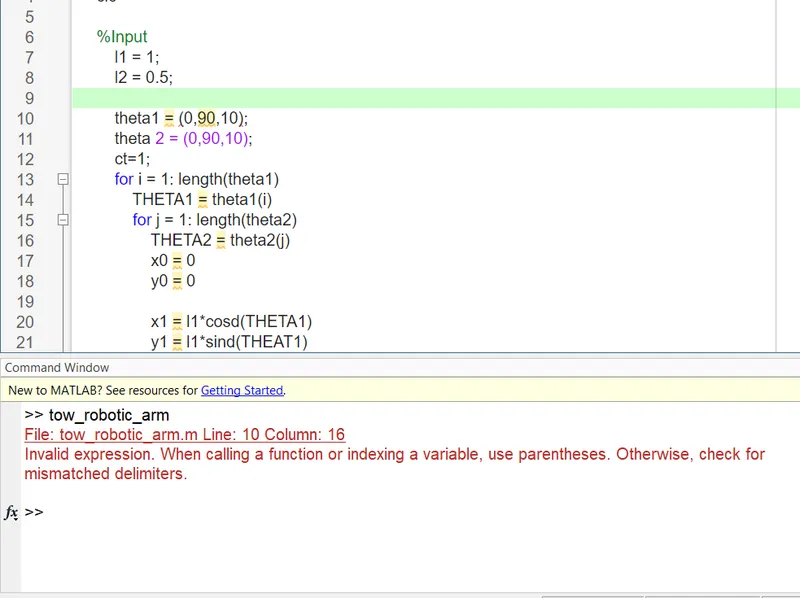
- The error I faced was 'invalid expression' {theta1 = (0,90,10)} I had not mentioned the linspace command. The correct command is {theta1 = linspace(0,90,10)}.
- Error 2
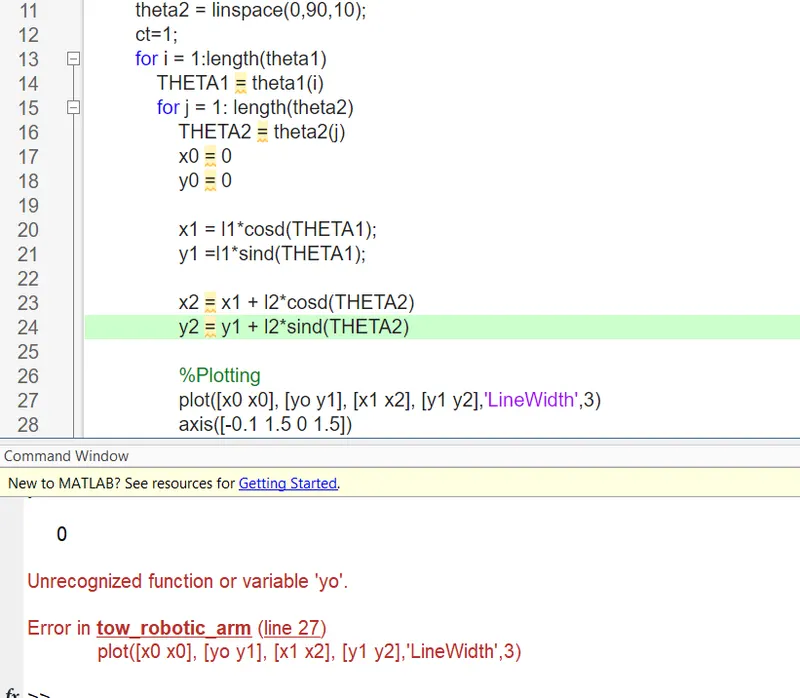
- The error I faced was 'error of line 27' {plot([x0 x0]' [y0 y1], [x1 x2], [y1 y2], 'LineWidth',3)}. I had misspelt the y coordinate to yo (leter O) instead of zero.
Result:
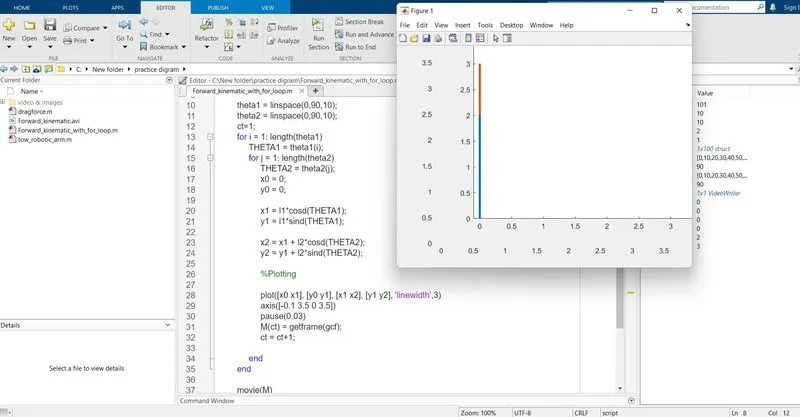
Click on the link below to view the Simulation of the 2R Robotic Arm
Youtube link for an animation: https://youtu.be/DJiJPiPesH4
Conclusion:
The results show the maximum reach of the robotic arm used to perform the different applications. The workspace has been experienced by simulating the forward kinematics with a program in MATLAB.