Week 2- 2R Robotic Arm Challenge
Aim: To write a program to stimulate the forward kinematics of a 2R Robotic Arm in Matlab.
Matlab Code:
% Program for 2R Robotic Arm Challenge
clear all
close all
clc

%Inputs
 l1 = 1;
 l2 = 0.5;
 theta1 = linspace(0,90,12);
 theta2 = linspace(0,90,12);
 ct = 1;

for i = 1:length(theta1)
THETA1 = theta1(i);

    for j = 1:length(theta2)
    THETA2 = theta2(j);

    x0=0;
    y0=0;

    x1 = l1*cosd(THETA1);
    y1 = l1*sind(THETA1);

    x2 = x1+l2*cosd(THETA2);
    y2 = y1+l2*sind(THETA2);

    %Plotting Line
    plot([x0,x1],[y0,y1] , [x1,x2],[y1,y2],'Linewidth',2)
    axis([-0.1 2 0 1.5])
    pause(0.05)

    M(ct)=getframe(gcf);
    ct=ct+1;
    end

end

movie(M)
Videofile=VideoWriter('2R_Robotic_arm.avi','Uncompressed AVI');
open(Videofile)
writeVideo(Videofile,M)
close(Videofile)
Code Explanation:
- Let, L1 & L2 be the lengths of link-1 & link-2 Respectively. We have assumed the length of link 1 and link 2 to be 1 m and 0.5 m.
- Let, θ1 be the angle formed by link-1 with horizontal and θ2 be the angle formed by link-2 with horizontal
- Providing the values for theta-1 & theta-2 using the linspace command for theta=0 to 90 degrees for 12 values.
- Let, the starting and end co-ordinates of link-1 are (x0, y0) and (x1, y1)
- Let, the starting and end co-ordinates of link-2 are (x1, y1) and (x2, y2)
- The coordinates of the base, i.e., are assumed to be at origin (0,0).
- The coordinates of endpoints of link 1 (L1) can be found by using trigonometry as,
X1 = L1 . cos(theta1) and Y1 = L1 . sin(theta1)
- The coordinates of the endpoints of link 2 can be found by using trigonometry as,
X2 = X1 + L2 . cos(theta2) and Y2 = Y1 + L2 . sin(theta2)
- Now using 'for' command we iterating the valued of desired variables.
- Plotting the all coordinate values.
- Using 'pause' command to make the plot realistic.
- Using 'movie' command to combine the figures saved in the m file to make an animation.
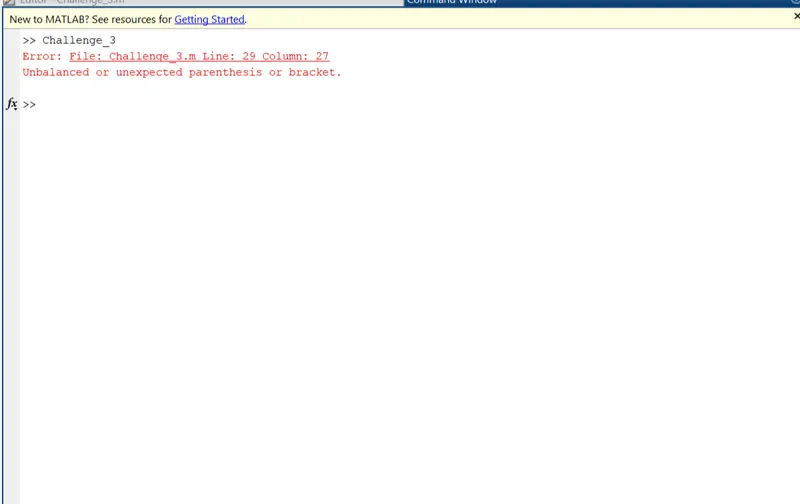
Errors:
1) This error was observed due to extra parenthesis provided in the code.
And this get rectified by clearing the extra parenthesis.
Movie Link.....
https://drive.google.com/file/d/1Z8si7HgYvOgTXOjPgGClXO3XfzR6l5LQ/view?usp=sharing