Week 2- 2R Robotic Arm Challenge
AIM : A program in Matlab to simulate the forward kinematics of a 2R Robotic Arm.
OBJECTIVES:
- program in Matlab to simulate the forward kinematics of a 2R Robotic Arm.
- Creating an animation from the plots obtained in the program.
THEORY:
- A robotic arm is a type of mechanical arm, usually programmable, with similar functions to a human arm. The arm are connected by joints allowing either rotational motion or translational displacement. The links of the manipulator can be considered to form a kinematic chain.
- Forward kinematics refers to the use of the kinematic equations of a robot to compute the position of the end-effector from specified values for the joint parameters.
- Here, we have two arms in which 1st arm is connected to the base and the link between the 1st arm and the base be theta1 and the 2nd arm is connected to the end of 1st arm and the link between the 1st arm and 2nd arm be theta2.
CODES
clear all
close all
clc

%inputs
l1 = 1;
l2 = 0.5;
theta1 = linspace (0,90,20)
theta2 = linspace (0,90,20)

ct = 1;

for i = 1:length(theta1);

x0 = 0;
y0 = 0;


    THETA1 = theta1(i);
    for j = 1:length(theta2)
    THETA2 = theta2(j);


x1 = l1*cosd(THETA1);
y1 = l1*sind(THETA1);

x2 = x1 + l2*cosd(THETA2);
y2 = y1 + l2*sind(THETA2);
%plotting


plot([x0,x1],[y0,y1],[x1,x2],[y1,y2],'linewidth',3)
axis ([-0.1 1.5 0 1.5])
pause(0.03)
M(ct) = getframe(gcf);
ct=ct+1;
    end
end

movie(M);
videofile = VideoWriter('forward_kinematics_2R_Robotic arm.avi','Uncompressed AVI');
open(videofile);
writeVideo(videofile,M);
close(videofile);
DETAILED EXPLANATION
clear all
close all
clc
step 1-
%inputs
l1 = 1;
l2 = 0.5;
explanation- Lengths of both the links are taken as input. Length of link-1 (l1) is taken as 1m and length of link-2 (l2) is taken as 0.5m.
theta1 = linspace (0,90,20)
theta2 = linspace (0,90,20)
explanation - Angles traced by both the links, for link-1 and for link-2 is taken as input. The angles traced are varied over a range to simulate the movement of the robotic arm.
ct = 1;
step 2-
for i = 1:length(theta1);
x0 = 0;
y0 = 0;
explanation- Base position of link-1 (x0,y0)is considered as origin (0,0).
THETA1 = theta1(i); {explanation - taking particular values of angle traced by link-1}
for j = 1:length(theta2)
THETA2 = theta2(j); {explanation - taking particular values of angle traced by link-2}
explanation- Then two for loops are used to iterate over the range of angles traced by both the links. For each particular angle of link-1 , link-2 is moved over its entire range , to obtain different positions of end effector at that angle of link-1.
step-3
x1 = l1*cosd(THETA1);
y1 = l1*sind(THETA1);
explanation - For a particular value of THETA1 , the end position of link-1 is calculated by these equations.
x2 = x1 + l2*cosd(THETA2);
y2 = y1 + l2*sind(THETA2);
explanation - For a particular value of THETA2 ,the end position of link-1 is also the start position of link-2, the end position of link-2 is calculated by these equations.
Step-4
%plotting
plot([x0,x1],[y0,y1],[x1,x2],[y1,y2],'linewidth',3)
axis ([-0.1 1.5 0 1.5])
pause(0.03)
M(ct) = getframe(gcf);
ct=ct+1;
end
end
movie(M);
explanation- For each particular position of link-1 and link-2 , a plot is made which is then captured frame by frame to make a movie.
step-5
videofile = VideoWriter('forward_kinematics_2R_Robotic arm.avi','Uncompressed AVI');
open(videofile);
writeVideo(videofile,M);
close(videofile);
explanation- A video file of '.avi' format is made to save the movie. The movie is then written into the videofile and the final animation is thus created.
YOUTUBE LINK FOR OUTPUT VIDEO:
ERRORS:
I have used hold on that's why my animation frame was staying there and new animation was coming.
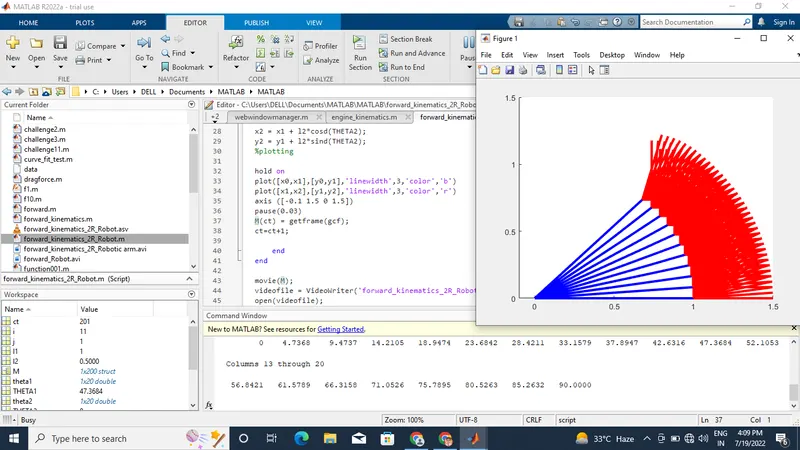
correction- remove hold on and put both the plotting in a single command.
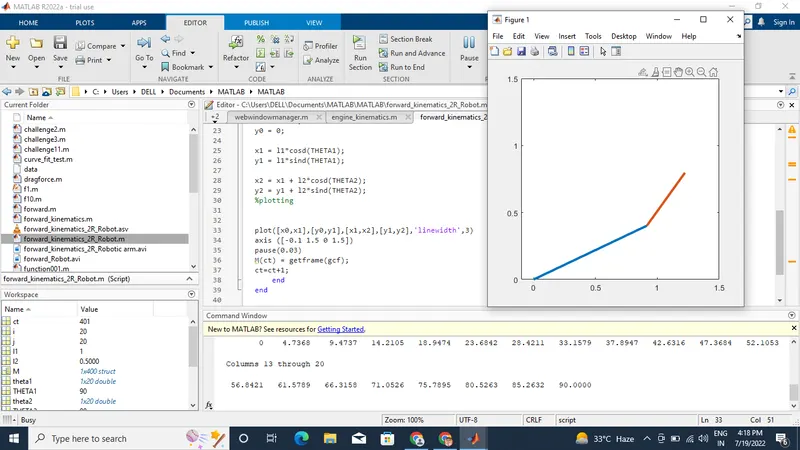
CONCLUSION- After generating animation by examine closely we can understand the workspace of the Robotic arm which is our main purpose. By changing length & angles of the links different combinations are possible, plotting graphs for all those different combinations Robot design can be done.